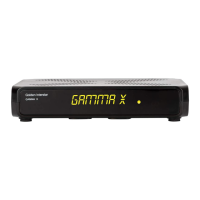
The XPEED LX2 is a High Definition Personal Video Recorder (PVR) Digital Satellite Receiver, fully compliant with the international Digital Video Broadcasting (DVB) standard. This device is designed to receive digital satellite broadcasts and offers a comprehensive set of features for an enhanced viewing experience.
Function Description:
The XPEED LX2 serves as a digital satellite receiver and PVR, allowing users to watch and record digital satellite television. It supports High Definition (HD) content and is equipped with a Linux Operating System, enabling advanced functionalities and plug-in support. The device includes two DVB-S2 tuners, allowing for flexible satellite cable connections and the ability to receive multiple satellite signals. It also features a media player for playback of various media files. Conditional access is supported through two smartcard readers and one Common Interface (CI) slot, enabling access to subscription-based encrypted channels when used with appropriate smartcards and Conditional Access Modules (CAMs). The XPEED LX2 is designed for ease of use, with an intuitive interface and a comprehensive remote control.
Important Technical Specifications:
Processor & Memory:
- Processor: 3300 MIPS Processor
- Operating System: Linux Operating System
- Flash Memory: 512MB NAND Flash
- RAM: 512MB DDR SDRAM
Connectivity:
- USB: 2 x USB 2.0 ports (one on front, one on rear) for connecting USB storage devices.
- Serial Port: RS-232 for data transfer.
- Video Output: HDMI (for HD audio/video), 1 x SCART (for analogue TV), S/PDIF (optical) for digital bit stream audio.
- Ethernet: 10/100MB Ethernet Interface for network connectivity.
- Satellite Input: 2 x DVB-S2 Tuners (TUNER A and TUNER B) with F-type sockets for satellite cable connection.
- Power Input: DC IN plug (12Vdc).
Video Specifications:
- Video Resolution: CCIR601 (720 x 576 lines), 576p, 720p, 1080i, 1080p@30.
- Video Decoding: MPEG-2, MPEG-4 compatible (H.264 Hardware Decoding).
- Input Data Rate: 2~45 MSymb/s.
- Signal-to-Noise Ratio (S/N): > 53 dB.
Audio Specifications:
- Audio Decoding: MPEG-4(AAC-HE), MPEG-1 Layer1, 2 and 3.
- Sampling Rate: 32 / 4.1 / 48 KHz.
- Signal-to-Noise Ratio (S/N): > 65 dB.
LNB Specifications:
- LNB Supply (Horizontal/Vertical): 14/18V; Max. 400mA.
- Control Signal: 22 KHz; Tone Burst; DiSEqC™ 1.0 / 1.1 / 1.2.
Power:
- Mains Voltage: 90V~250V, 50/60Hz.
- Max Power Consumption: 40W.
- Deep Stand-by Power Consumption: 0.5W.
RF:
- RF Range: 950~2,150 MHz.
- Modulation, FEC, de-multiplexer: DVB-S/DVB-S2 standard.
General:
- Dimensions (W x H x D): 260 x 55 x 180 mm.
- Weight (without HDD): Approx. 1 KG.
- Display: 8-character segment VFD display showing channel names, icons, and program information.
- Smartcard Reader Slots: 2.
- Common Interface Slots: 1.
- Buttons (Front Panel): 3 (Power, Volume Up/Down).
Usage Features:
Installation:
The XPEED LX2 features an installation wizard that guides users through the initial setup process, including:
- Video Input Selection: Automatic probing of video input ports (HDMI, SCART, YPbPr) with manual selection option.
- Video Mode Selection: Choice of various video modes (e.g., 720p, 1080i, 1080p, 576p, 480p).
- User Interface and DHCP: Configuration of network settings.
- Language Selection: Choice of multiple languages for the user interface.
- Tuner Configuration: Detailed setup for TUNER A and TUNER B, supporting various modes:
- Simple: For single LNB connection.
- Not Configured: Default state.
- Loop-through to: Connects TUNER A internally to TUNER B.
- Equal to: Uses the same configuration as TUNER B.
- Advanced: For complex user configurations.
- Single: For receiving a single satellite with a single LNB.
- ToneBurst A/B: For receiving two satellites using a ToneBurst switch.
- DiSEqC A/B: For configuring two satellites.
- DiSEqC A/B/C/D: For configuring up to four satellites.
- Positioner: For motorized satellite antennas.
Remote Control Functions:
The remote control provides extensive control over the device:
- TV/STB: Switches between TV and STB modes.
- Power (Standby): Puts the device into standby or accesses standby options.
- Numeric Keys (0-9): For entering channel numbers and text.
- PREV/NEXT: Navigates through channel history.
- EPG: Displays the Electronic Program Guide.
- FAV: Shows favorite channel lists.
- MENU: Accesses the main menu or current function menu.
- EXIT: Exits current menu or window.
- OK: Confirms selections.
- INFO: Displays more information.
- MEDIA: Shows recordings; long press goes to Media Player.
- BACK: Shows channel history.
- VOL+/-: Adjusts volume.
- CH+/-: Changes channels.
- Mute: Mutes audio.
- Color Buttons: For various operations.
- Playback Controls: Fast Forward, Rewind, Play/Pause, Stop (for Timeshift or Media playback).
- Record: Starts recording or shows recording options.
- TIMER: Accesses timers/timer overview.
- WEB: Opens the web browser.
- PLUGIN: Accesses the Plugins menu.
- AUDIO: Shows available audio tracks.
- PiP: Picture in Picture.
- SUBTITLE: Shows subtitles.
- SLEEP: Accesses power timers.
- TEXT: Shows Teletext.
- TV/RADIO: Switches between TV and Radio modes.
- HELP: Displays the HELP menu.
Power Management:
- Complete Power Shutdown: Via the power switch on the rear panel.
- Standby Mode: Instant on/off via the POWER key on the remote, maintaining some system activity for quicker boot-up.
- Deep Standby Mode: Reduces power consumption to under 1W, designed for energy efficiency during long periods of inactivity.
Conditional Access:
- Smartcard Insertion: Two smartcard reader slots are available on the front panel (behind a door) for subscription-based services.
- CAM Insertion: One CI module slot is available for Conditional Access Modules (CAMs) to decrypt channels using various CAS systems (e.g., Nagravision, NDS, Irdeto, Viaccess).
Maintenance Features:
General Care:
- Cleaning: Use a damp cloth (without solvents) to clean the exterior of the product.
- Unplugging: Always unplug the product before cleaning or connecting/disconnecting cables (satellite, TV).
Safety Precautions:
- Power Supply: Use the specified AC 90V~250V, 50/60Hz power supply. Avoid overloading outlets, altering the power cord, or exposing it to damage. Unplug if the cord is damaged or if the product is unused for long periods.
- Exposure and Placement: Operate indoors in moderate temperatures. Avoid liquids, open flames, heat-emitting appliances, and unstable surfaces. Ensure ample ventilation (at least 10 cm clearance from other appliances). Do not use unrecommended attachments.
- Warnings: Do not use near flammable gases, if liquids or foreign objects are present, or with wet hands. Unplug during thunderstorms to prevent damage from lightning and power surges. Do not use if defective. Do not block ventilation openings.
- Warranty: Any unauthorized adjustments or opening of the casing will void the warranty. Contact trained professionals for repairs.

 Need help?
 General

 To Next Page