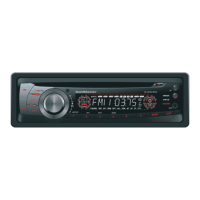
EN - 5
GENERAL OPERATION
Power On/Off Button
Press the POWER button to turn the unit on
when the vehicle ignition switch is on. Press
and hold the button to turn the unit off.
Adjust Volume level
Rotate the VOL/MENU control to adjust
volume level. Rotate it clockwise to increase
and anticlockwise to decrease the volume.
Audio Mute
Press the MUTE button to mute the volume
from the system. “MUTE” will appear on the
display panel and the volume will be muted.
Press the MUTE button again, or rotate or
press the VOL/MENU control to return the
volume level to the setting in use before the
Mute function was activated.
Audio Controls
To adjust the bass, treble, balance and
fader, press the VOL/MENU control until the
appropriate audio control appears on the
displaypanel.Withinfveseconds,rotatethe
VOL/MENU control to adjust the audio settings
Mode Button (SRC)
Press the SRC button to change between
for the selected function.
Radio, DISC (when disc is in), USB (when
USB is connected), Card(when SD/MMC card
is in) or AUX play.
Auxiliary Input
To access an auxiliary device:
1. C onnect the portable audio player to the
AUX interface on the front panel.
2. P ress the SRC button to select Aux-In
mode.
Press SRC again to cancel Aux-In mode and
go to the next mode.
Display Selector (DISP)
This unit can display either the clock time
or radio frequency/CD player functions.
Ord inarily, the radio freq uency or CD
player track indication is displayed, but the
unit will display the time when the DISP
button is pressed. The time will display for
approximately 5 seconds then return to the
Setting the Clock
The correct time of day can be set by pressing
radio or CD player function display.
and holding the DISP button.
To set the clock, perform the following steps:
1. Turn the vehicle ignition and radio on.
2. P ress the DISP button to view the clock.
3. W ith the clock visible on the display, press
and hold the DISP button until the time
displayfashes.
4. W ithin 5 seconds, rotate the VOL/MENU
control counter clockwise to adjust the
minutes to the desired setting. To change
the hour, rotate the VOL/MENU control
clockwise to adjust the hour to the desired
time.


 To Next Page