EN - 13
INSTALLATION GUIDE
Installation Opening
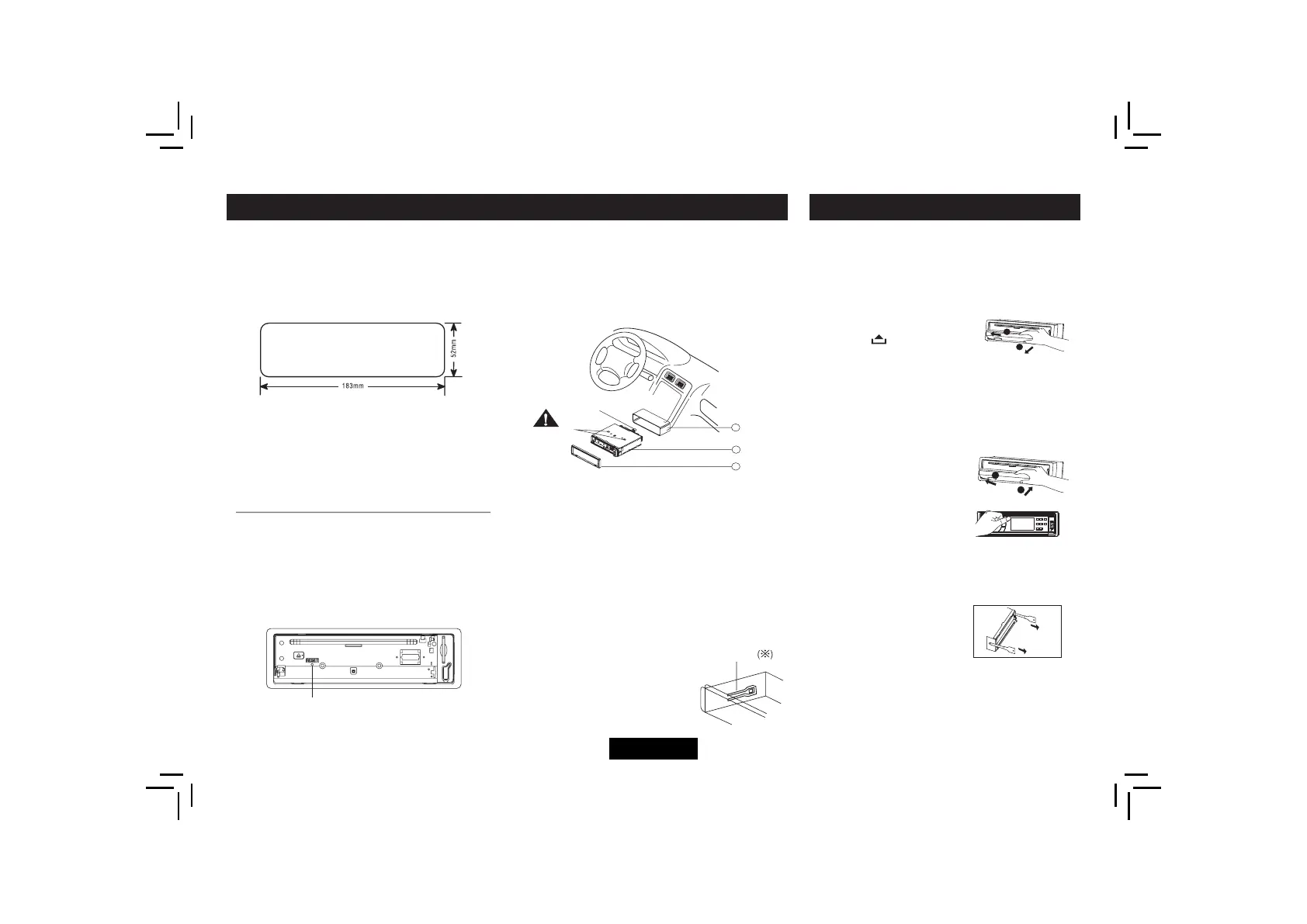
This unit can be installed in any dashboard
having an opening as shown below. The
dashboard should be 4.75mm - 5.56mm thick
in order to be able to support the unit.
Iftheopeningistoosmall,carefullycutorfle
as necessary until the sleeve easily slides into
the opening. Do not force the sleeve into the
opening or cause it to bend or bow. Check for
suffcientspacebehindthedashboardforthe
unit chassis.
Reset
Press the RESET button with a pointed object
to reset the unit to the original status.
Note: Press the RESET button will erase the
Install the unit
Important:
clock setting.
Remove the two screws on the top of the unit
before installation.
Otherwise, the player will not work.
Mounting bolt
rubber cushion.
1
2
3
Remov e th e
tw o s crews.
lock lever
1. Inset mounting collar into the
dashboard, and bend the mounting tabs
out with a screwdriver.
Make sure that lock lever is
fushwiththe mountingcollar
(not projecting outward).
2. Secure the rear of the unit.
Afterfxingmountingboltandpower
connector,fxtherearoftheunittothecar
body by rubber cushion.
3. Insert trim plate.
Reset
ANTI-THEFT SYSTEM
This unit is equipped with a detachable panel.
Removing this panel makes the radio totally
inoperable.
Remove the detachable panel
1.
Switch off the power of
the unit.
2. Press buttontofip
down the panel.
3. Hold the right part of the panel. Press to
the left side, then take off the panel.
4. Place the panel into the case and take it
with you when you leave the car.
Install the panel
1.
Hold the panel and
ensure the panel faces
downward, and set left
side of the panel in the
panel bracket, then set
the right part.
2. Press the top of panel until it locks.
Remove the unit
1.
Remove the panel and
the trim plate.
2. Insert both T-Keys
into hole on the front of
the set until they lock.
3. Pull out the unit.
1
2
Pull
Insert
1
2
Mo unting bolt
ru bber cushion.
1
2
3
Re mov e th e
tw o s crews.
lock lever


 To Next Page