EN - 8
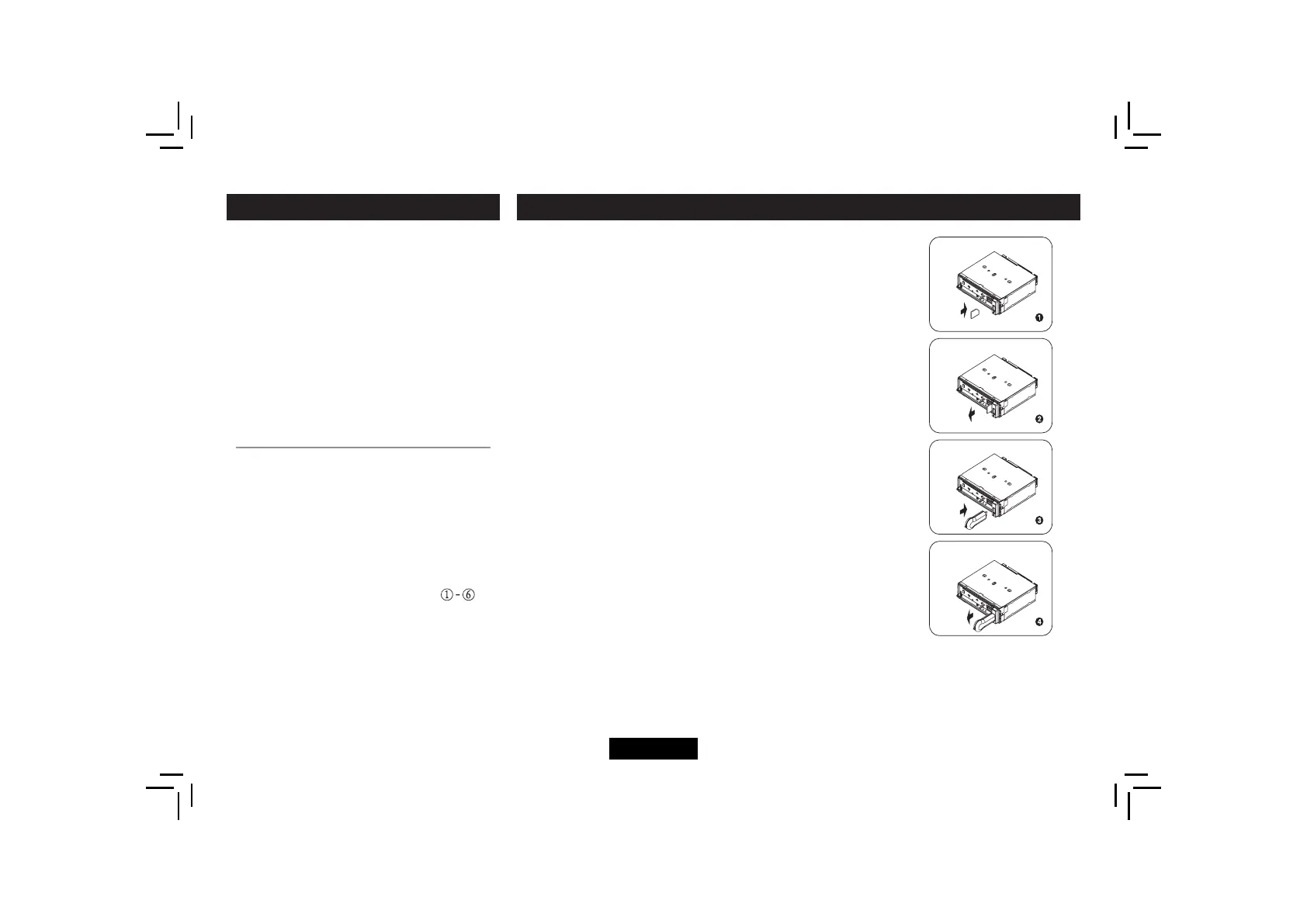
1. Loading SD/MMC Card
Open the panel, insert the SD/MMC card into the slot, with the
front side at left.
The unit will play the music automatically.
2. Take out SD/MMC Card
Press SRC button and switch to non CARD mode, open the
panel, slight press SD/MMC card, take out the card when it
was popped out.
3. Loading USB equipment
Open the cap, insert the USB into the connector and the unit play
the music in the USB storer automatically.
4. Take out USB equipment
Press the SRC button and switch to non USB- DRIV mode, then
take off the USB storer, close the cap.
USB/SD/MMC Notes
USBfunctions(fashmemorytype)MP3musicplay
1. SD/ MMC card support.
2. USBfashmemory2in1(SD/MMC)support.
3. Fat 12/fat 16/fat 32 is possible.
4. F ile name : 32 byte/dir name : 32 byte/tag name : 32 byte
5. Tag (ID3 tag ver 2.0)
- title/artist/album : 32 byte support.
6. Multi card reader not support.
7. U SB 1.1 support, USB 2.0 support (It can not support USB 2.0
speed. Just, get the same speed with USB 1.1).
Not all kinds of USB devices are compatible with the unit.
USB/SD/MMC MP3 PLAYBACK
TA: Traffc informationcanbereceivedfrom
the current station or stations in other network.
AF: The frequency list of preset RDS
stations is updated by EON data. EON
enables the radio to make fuller use of RDS
information. It constantly updates the AF
list of preset stations, including the one that
currently tuned into. If you preset a station
around the area at your home, you will later
be able to receive the same station at an
alternative frequency, or any other station
serving the same program, EON also keeps
track of locally available TP stations for quick
reception.
PTY Reception ( Program Type )
RDS FM stations provide a program type
identifcationsignal.
Example: news, rock, info, sport, etc.
PTY Type Preset
Press PTY button once to enter the MUSIC
type or press “ PTY ” twice to enter the
SPEECH type. Then use function
to
select the desired program type. The selected
PTY type is shown and searching starts if
no other function is selected for 2 seconds.
If there is no corresponding program type,
NO PTY is shown and the unit will return to
normal mode.
RDS (RADIO DATA SYSTEM)


 To Next Page