Need help?
Do you have a question about the GOLUK T3 and is the answer not in the manual?
Insert a Micro SD (TF) storage card of Speed Class 10 or above.
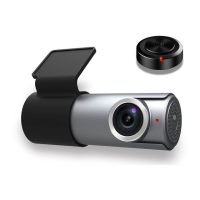
Insert the Camera into the docking station and use the LOCK button to secure it.
Mount the camera on the windshield using 3M adhesive tape, ensuring it faces forward.
Connect the camera to the vehicle charger with the power cable and secure the cable.
Attach the wireless remote to the steering wheel or other convenient location.
Use the Goluk APP on Android/iOS to preview, replay, manage videos, and share.
Overview of functions like recording, emergency videos, instant capture, live broadcast, and parking security.
Recommends Micro SD Class 10, max 128GB, for optimal performance.
Videos enter cyclic storage; clear via Goluk mobile client.
Ensure proper Wi-Fi connection for video playback.
Activate via APP; may require a voltage regulator cable for continuous power.
Troubleshooting connection issues for Android users, including Wi-Fi hotspot configuration.
Visit the official Goluk website to download the mobile client application.
Scan the QR code to obtain the download link for the mobile client.
 General
| Brand | GOLUK |
|---|---|
| Model | T3 |
| Category | Dash Cameras |
| Language | English |

 To Next Page