Q: What kind of Micro SD should I choose? What is the maximum
storage?
A: A Micro SD (TF) of Class 10 purchased through regular sources.
Maximum storage is 128 GB. Around 1000 minutes of high quality
videos can be recorded and saved with such storage. Substandard
cards or counterfeit may lead to damage of device, storage fail and
loss of videos.
Q: What to do if storage is full? How to clear videos in the card?
A: Please do not worry too much about storage, since all videos apart
from emergency ones will enter cyclic storage once the set limit is
reached.You may clear all videos or delete a particular record via
Goluk mobile client application.
Q: It says ‘fail to play’ when I try to look at real-time videos or replay
videos.
A: Please ensure proper Wi-Fi connection between your phone and
device. Video playing requires a higher bandwidth. Please operate
near the device.
Q: How to activate Goluk parking security function? Does it require
power supply from car battery?
A: Please activate parking security function on Goluk APP. The
device will automatically switch between Security/Normal Mode
upon activation. Since cigar lighters of most cars cut power supply
after the car is turned off, you will need to install a voltage regulator
cable with low-voltage protective function to supply power to your
device continuously. Under security mode, the device will prioritize
to low power status, and meanwhile the battery voltage regulator will
monitor battery voltage. If the power falls below safety level, power
supply will be automatically cut off to protect the battery and ensure
normal initiation and functioning of the car. Please visit Goluk ofcial
website or ofcial WeChat account for enquiries if you would like to
purchase a Goluk voltage regulator.
Q: I’m an Android user. What should I do if I can’t connect to the
Camera?
Attention
A: First, make sure you have not connected the Camera hotspot in
the Wi-Fi list in the Android system settings. If otherwise, long press
the ‘forget’ button. There are 2 main steps for rst binding of Goluk
Android APP: 1. Connect your phone with the Camera wireless
hotspot. Configure information of the Camera and create a phone
hotspot. 2. Wait for the Camera to connect to phone hotspot and
complete linking. If it shows that connection to Wi-Fi fails in the
first step, it is very likely the system version of your phone is not
compatible with Goluk APP. Please use another phone of a different
model to test if the Camera functions normally. If you wait for a long
time and the Camera still fails to connect, please return to the last
page, and restart the Camera. Wait for the blue flash of the Wi-Fi
indicator and reconnect. A signicant number of versions have been
introduced due to certain specic features of the Android platform.
Besides, some mainland manufacturer will normally modify the base
system of the phone which complicate application configurations.
Goluk has already configured to major Android platforms and
endeavored to congure to more types of phones.
Further Enquiry
Customer Service Number: +86 400 969 1800
E-mail: service@goluk.com
Ofcial website: www.goluk.com
This manual is for reference only. Amendments will not be notied.
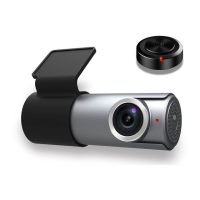
Security Indicator
Red: Flash indicates security function activated.
Wi-Fi Indicator
Blue: Flash indicates inability to connect with phone.
Constant light indicates successful connection.
Power/Record Indicator
Green: Constant light indicates normal power supply.
Red: Steady indicates normal recording.
Reset
Press for 6 seconds to restore default factory settings.
Power port
Micro USB 5V-1A.
7 8


 To Next Page
 Loading...