2.4.3 Connection with Mixer or Amplifier
The audio output interface of the server is used to connect to a mixer or an amplifier for loud speaking. Use an
audio cable to connect the “LINE OUT” RCA interface of the server with corresponding interface of a mixer or an
amplifier. The following figure shows the wiring diagram:
1009
2.4 Connection
2.4.1 Connection with Congress Terminal
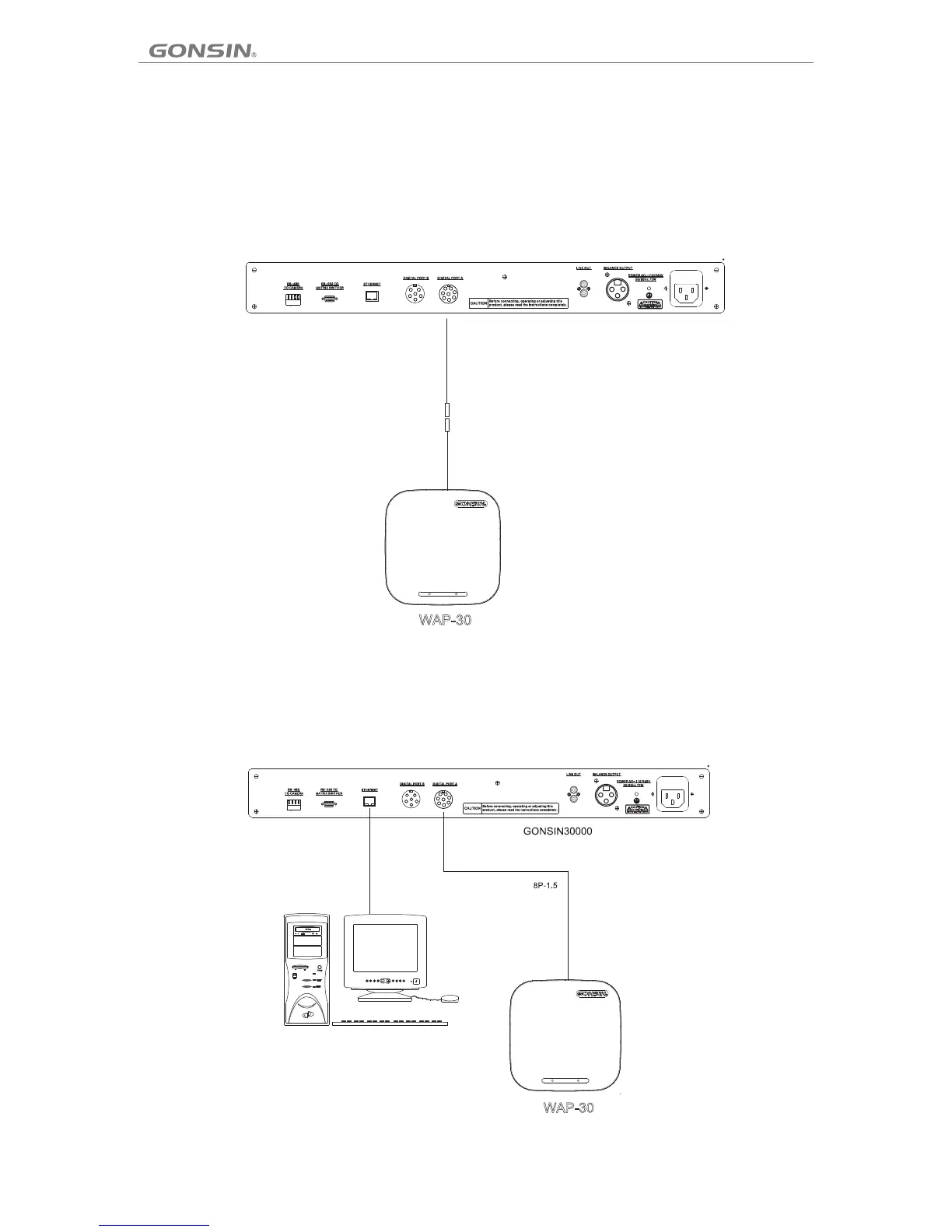
To connect the congress server with a wireless terminal, use an 8PS-03/05/10/20/40 extension cable to connect the 8P
interface (female connector) of the congress server to a WAP-30 AP, with one male connector of the cable connected to
congress server ,and the other female connector connects the male connector of 8P2-01 male-male connector cable, the
other male connector of 8P2-01 connects to the female connector of WAP-30 AP, as shown in the following figure:
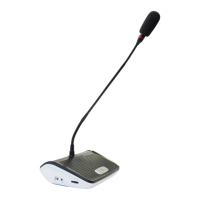
2.4.2 Connection with Wireless AP and Control PC
The successful communication between the congress server and a wireless terminal must be supported by a
wireless AP WAP-30 to perform signal conversion. The congress server is connected to a PC over the RJ-45
connector. The following figure shows the wiring diagram:
2.4.4 Connection with Camera
Among the three groups of wiring from the camera (for details on camera operation, refer to the camera operation
guide), two groups of wiring are used for connecting to the congress server (power of the camera is supplied
directly from the control room). One group is the HD video wiring, which is implemented by connecting the video
output of the dome camera to the SDIINPUT of the HD matrix over an RGB connector; where, number 1–input 1;
number 2–input 2. The panoramic preset position and the video tracking of the chairman terminal are completed by
number 1 camera. The other group is the RS-485 wiring. Generally, use network cables for communication and
select a pair of wires as the “A” and “B” of the RS-485 cable. Refer to the following figure:
-
+
-
+
GONSIN30000
8PS-15
-
+
-
+
GONSIN30000
RS-485
VIDEO
VIDEO
VIDEO
VIDEO
RS-485
RS-485
RS-485
RS-485
GX-HD3300
GX-HD3300
DCS-3021 Congress System
PC
Power Amplifier/Console
8
P2-01



 To Next Page