OWNER'S MANUAL
0
FILTER
0
FILTER
SET
Page 18
About Advanced
Features & Operation
CYCLES PER HOUR - The Cycles Per Hour setting (page 17)
monitors the number of times per hour your HVAC unit may
energize. For example, at a setting of 6 cycles per hour the
HVAC unit will only be allowed to energize once every 10
minutes. The Cycles Per Hour limit may be temporarily
overridden by pressing the WARMER or COOLER button.
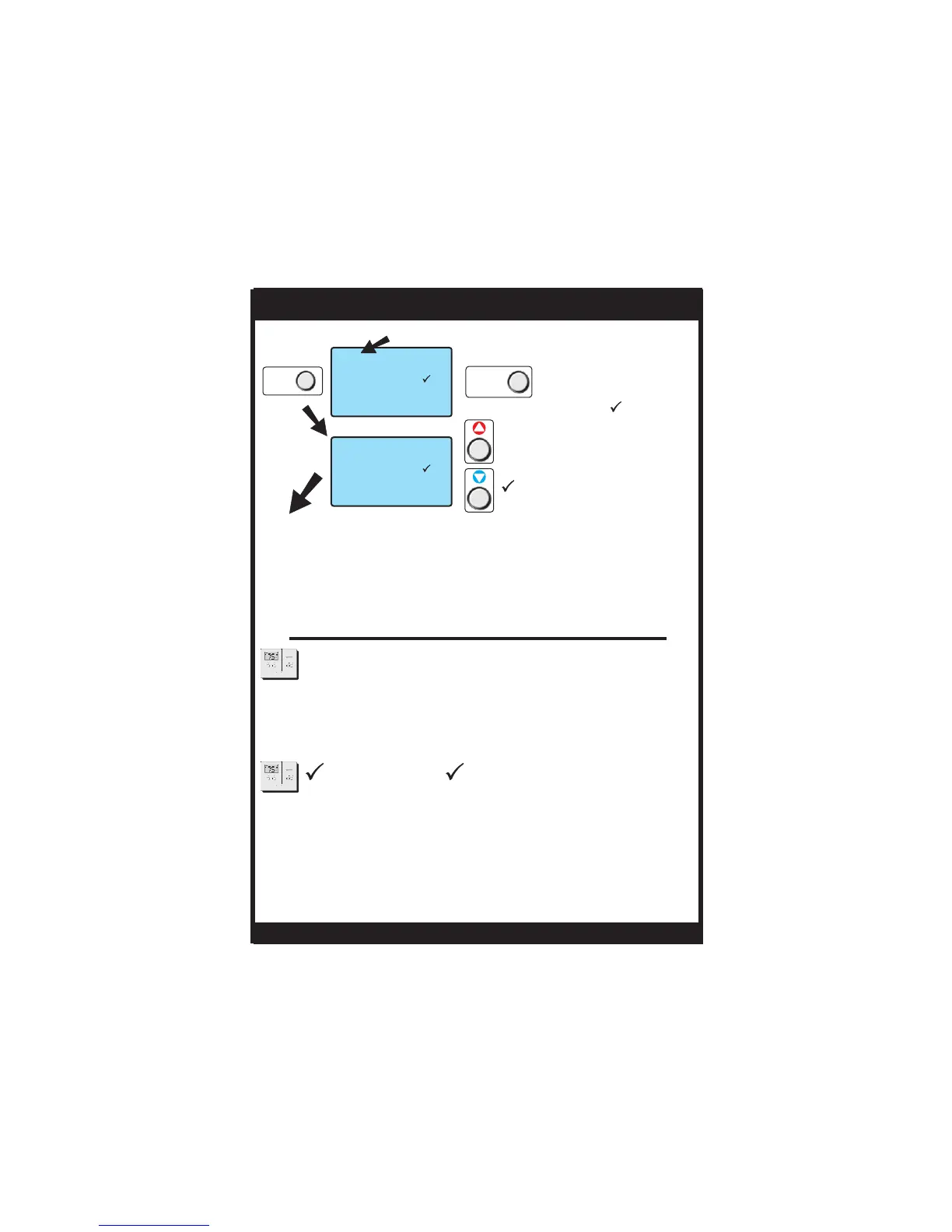
ICON - The icon will appear after a set
number of hours for fan run time (see above) has been
achieved. This counter keeps track of the number of hours
of fan run time whether the fan is energized in the heating
or cooling modes, or in stand alone operation.
FILTER FILTER
Press NEXT
to advance
Adjust the number of hours
the blower will run before the
icon appears on the
display. 0 = off.
Press RESET
FILTER
FILTER
Press and hold the RESET
FILTER button to reset
the filter counter to 0 and
remove the icon
from the display.
FILTER
Slide the Program Switch to OFF or RUN to exit
Advanced Setup.
Actual hours of
fan operation
NEXT
TSTATG1152-2
NEXT
RESET
FILTER


 To Next Page