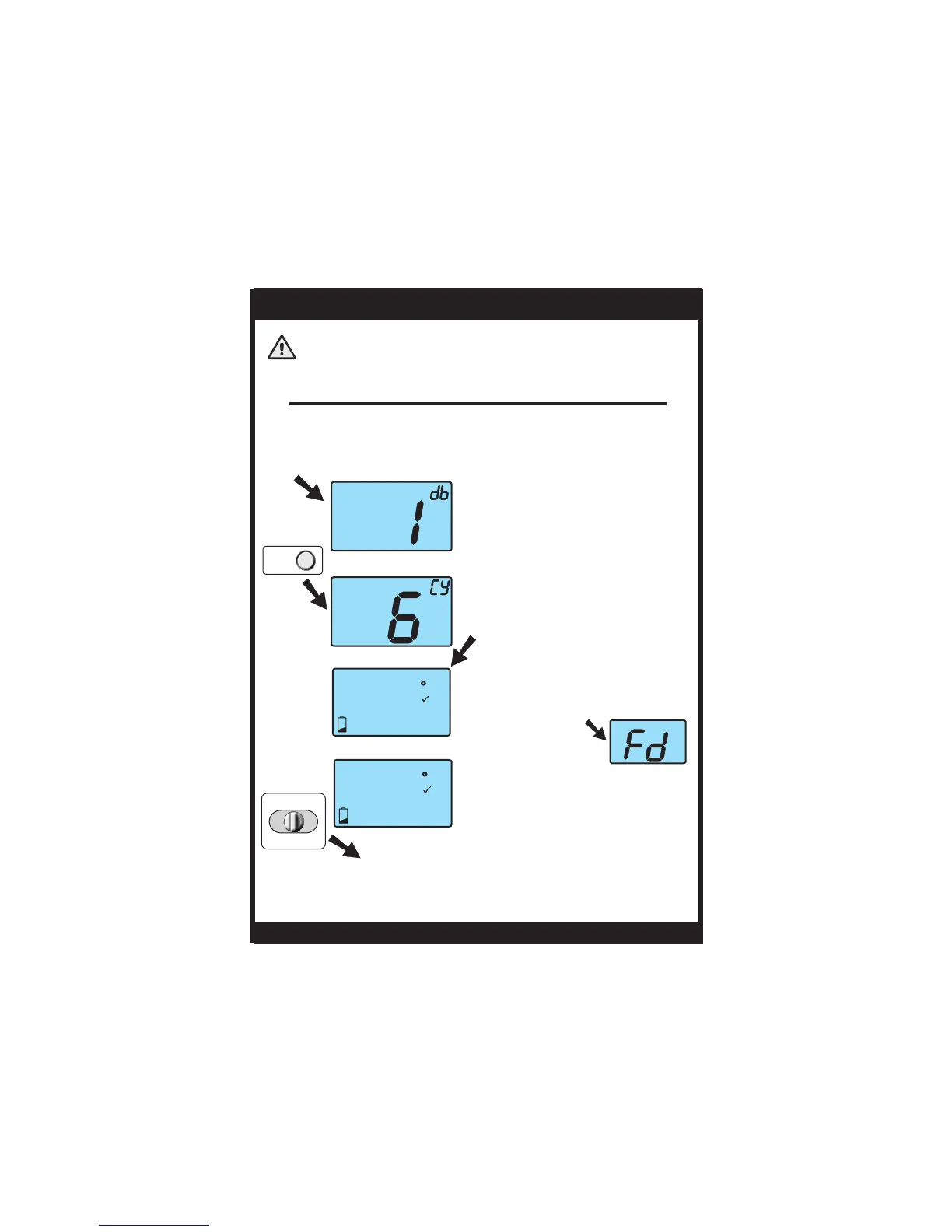
Factory Defaults
Press NEXT
to advance
Page 19
Slide the Program Switch to OFF or RUN to
return to normal operation.
88
88
SET
MTuWThF
SaSu
AM
PM
Morning
Evening
Day
Night
HEAT
COOL
I2:00
:
FILTER
88
88
SET
MTuWThF
SaSu
AM
PM
Morning
Evening
Day
Night
HEAT
COOL
I2:00
:
FILTER
CAUTION
After restoring factory
defaults, the thermo-
stat screen will display
all icons.
OWNER'S MANUAL
If, for any reason, you desire to return all the stored settings
back to the factory default settings, follow the instructions below.
WARNING: This will reset all Time Period and Advanced Programming to
the default settings. Any information entered prior to this reset may be
permanently lost.
When the Cycles Per Hour is
flashing, press and hold the NEXT
button until this screen appears.
Enter advanced setup by sliding the Program Switch to
SET. When the clock is flashing, press the NEXT button for
5 seconds. Do not release the button until this screen
appears.
Press and hold the
NEXT button again
until this screen appears.
TSTATG1152-2
NEXT
PROGRAM
RUN OFF SET


 To Next Page