P. 13
CONTROLS
VOLUME
SELECT
BASS
SELECT
TREBLE
SELECT
BALANCE
SELECT
FADER
SELECT
Goodmans Product Information Helpline (0870) 873 0080
2324
542214139
15
8
1211
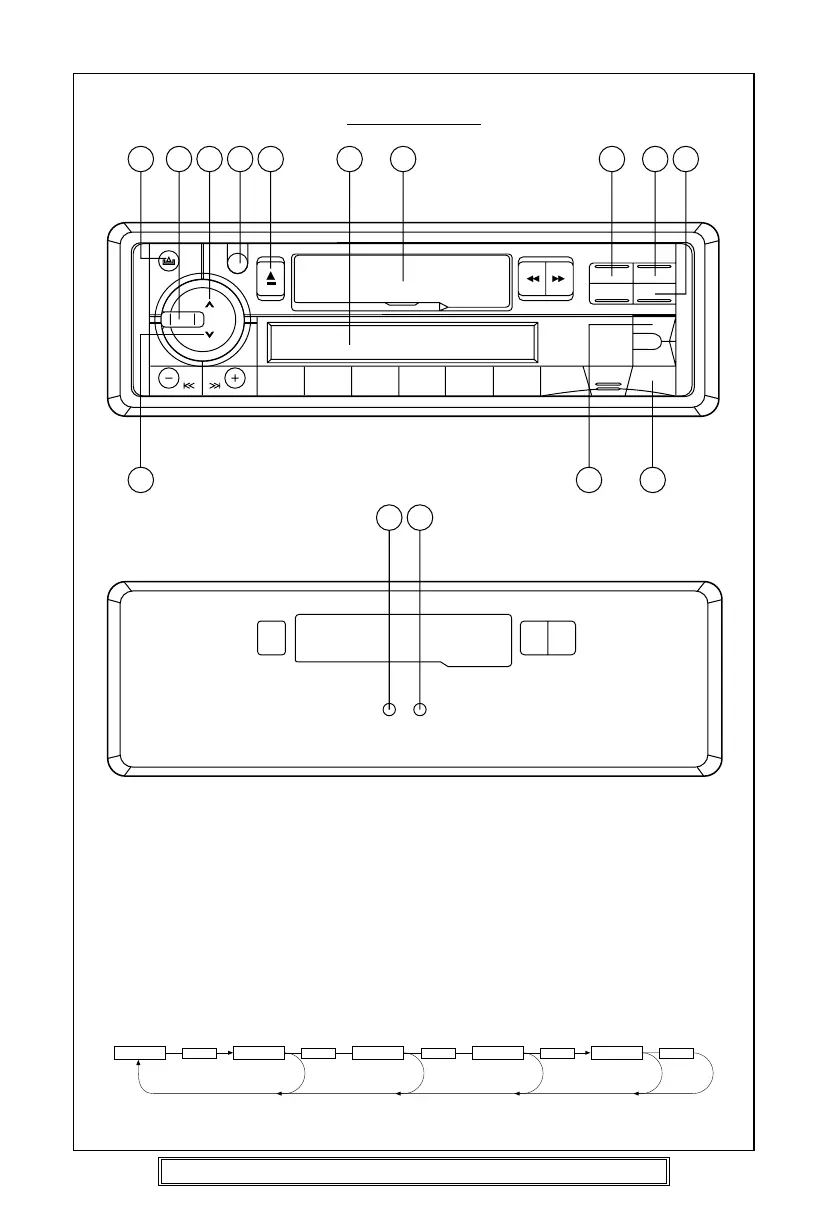
1. Power button (PWR) (12)
Press to turn power to the player ON or OFF.
2. Select button (SEL) (13) / VOL UP (14) / DOWN (15)
The Volume, Bass, Treble, Balance and Fader functions are electronic and are selected
for adjustment by this button. The function defaults to the volume setting which can
be increased/decreased by pressing the VOL Up (14)/Down button (15).
To adjust the Bass, Treble, Balance or Fader functions press the SEL button (13)
repeatedly unit the desired function shows in the display. Press the VOL Up (15)/Down
button (14) to adjust the desired function. The display will show the amount by which
the function has been altered.
If no adjustments have been made within 4 seconds of pressing the SEL button (13),
the player will assume the correct setting has been made and will automatically return
to normal/Volume setting.
31 2



 To Next Page