Remote Control2.5
TAKE CARE WITH
LIVE ELEMENTS
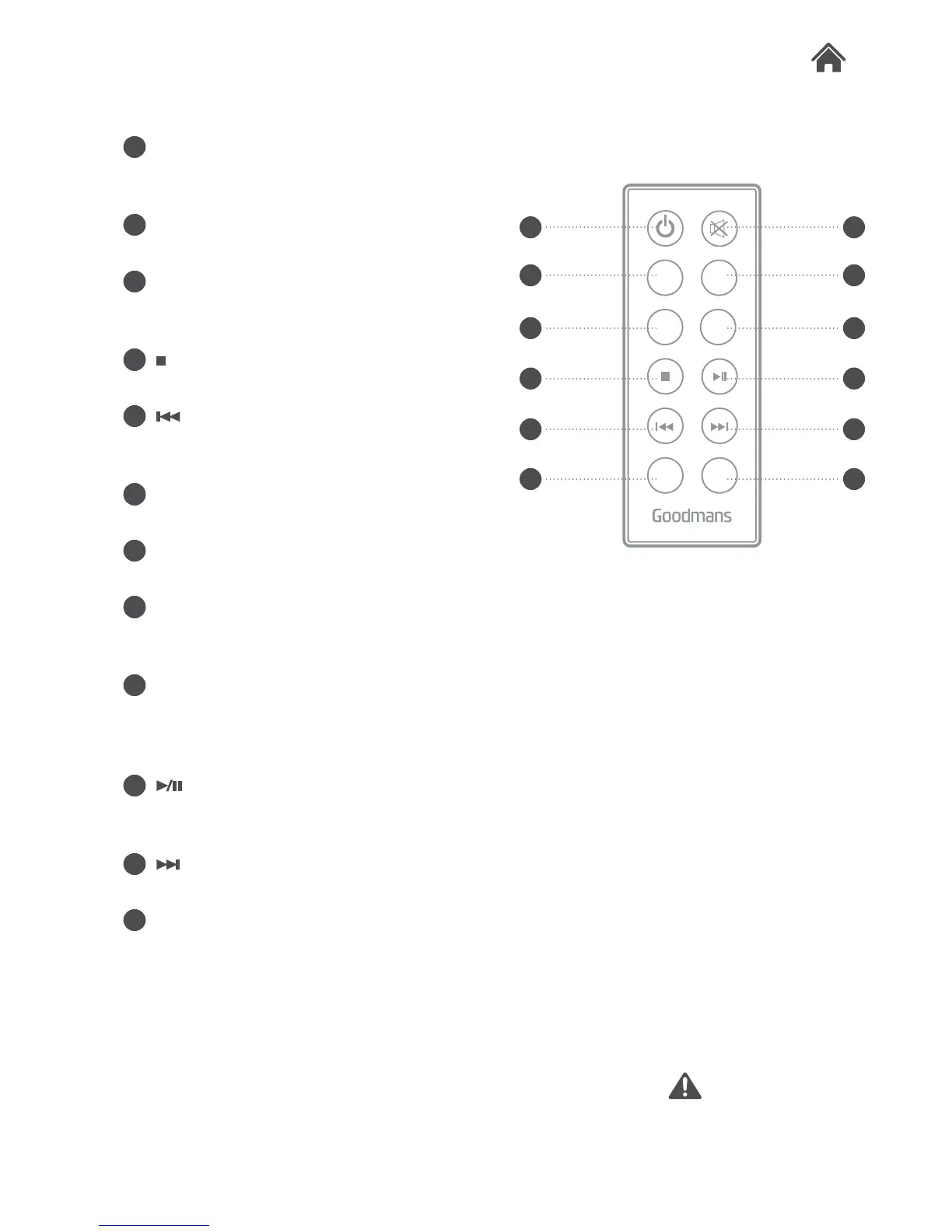
K STANDBY button. Press to wake or
press & hold to enter STANDBY
mode.
L PAIR button. Press to begin the
pairing operation in Bluetooth mode.
M FLAT. Press this button to restore
any sound EQ preset to the default
flat mode.
N
button. Press to stop playback of a
paired Bluetooth device.
O
button. Press to skip to the
previous track of a paired Bluetooth
device.
P VOLUME- button. Press to
decrease the volume output.
Q MUTE. Press to silence playback of
a paired Bluetooth device.
R MODE button. Press to cycle
between the different input modes:
Line in, Bluetooth & Aux in.
S EQ. Press repeatedly to cycle
between the following sound modes:
Rock, Pop, Jazz, Live, Classic &
News
T
button. Press to Play or Pause
playback of a paired Bluetooth
device.
U
button. Press to skip to the next
track of a paired Bluetooth device.
V VOLUME+ button. Press to
increase the volume output.
Q
R
S
T
U
V
K
L
M
N
O
P
MODE
FLAT
VOL+
EQ
VOL -
PAIR


 To Next Page