Operating a connected device
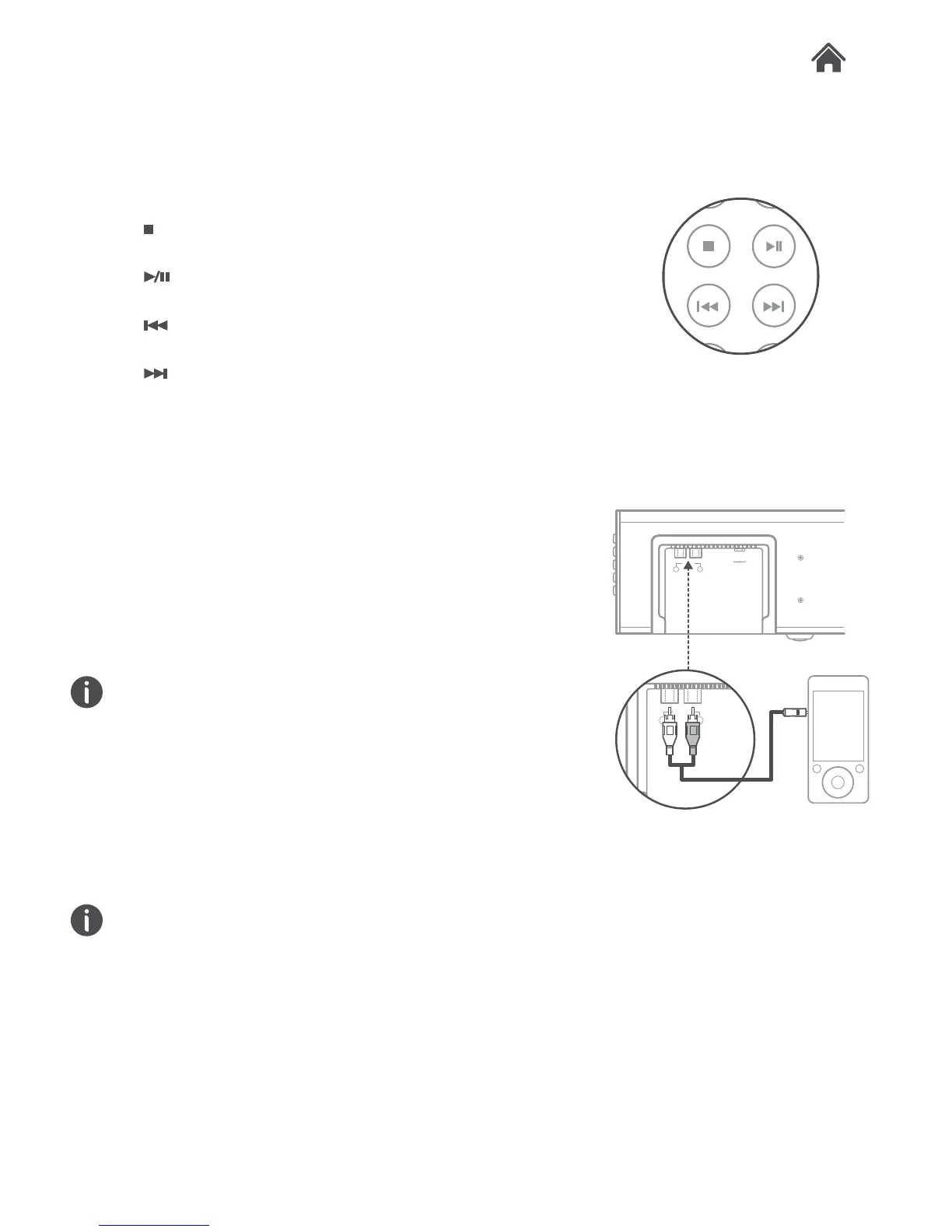
Once paired you can control some playback functions from
the remote control.
•
button. Press to stop playback of a paired Bluetooth
device.
•
button. Press to Play or Pause playback of a paired
Bluetooth device.
•
button. Press to skip to the previous track of a paired
Bluetooth device.
•
button. Press to skip to the next track of a paired
Bluetooth device.
Aux in mode
Follow the below steps to connect an external audio device
using the supplied 3.5mm to RCA audio cable.
1. Connect the 3.5mm jack end of the cable to the external
audio devices headphone output and the red & white RCA
jacks to the RCA AUX input (I) on the rear of the Soundbar.
Take care to match the red jack to the red plug and the white
jack to the white plug.
2. Press the MODE button on the side (D) or on the remote
control (R) repeatedly until the LED mode indicator turns
white.
3. Press play on the external device to begin playback through
the Soundbar speakers.
The volume output is effected by the volume level on the audio
source EG: Phone or laptop, so make sure that is set to about
70-80% (not too loud to avoid distortion).
4. Adjust the VOLUME on the unit to the required listening
level.
Bluetooth Operation
Aux Operation
4.2
4.3
AUX IN
L R
DC IN 1 8V
-
+


 To Next Page