
 Need help?
Do you have a question about the Goodmans GMC01 and is the answer not in the manual?
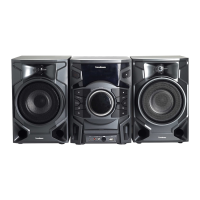
Details the front panel components of the CD Micro System, including speakers, display window, and remote control sensor.
Describes the rear panel of the CD Micro System, identifying the DC-in socket and stand attachment points.
Explains the function of each physical button on the CD Micro System's control panel for operation.
Details the buttons and functions of the remote control for operating the CD Micro System, including range and usage.
Step-by-step guide to unboxing, connecting power, and preparing the CD Micro System for initial use.
Instructions on how to effectively use the remote control with the CD Micro System, covering range and angle.
Guide to setting the 12/24 hour clock display and adjusting the time on the CD Micro System.
Instructions for inserting, playing, and managing CDs on the CD Micro System, including automatic playback.
How to pause and resume music playback from a CD or other audio sources on the CD Micro System.
Method to stop CD playback and restart the current track from the beginning on the CD Micro System.
Navigating between tracks on a CD during playback on the CD Micro System, including first/last track behavior.
Options for repeating tracks, all tracks, or playing in random order from a CD on the CD Micro System.
Steps to operate the FM radio function, including selecting FM mode and tuning into stations.
How to automatically scan for, select, and store FM radio stations on the CD Micro System.
Guide to connecting and playing audio from Bluetooth-enabled devices via the CD Micro System.
Instructions for playing music from USB pen drives or MP3 players connected to the CD Micro System.
How to connect and play audio from external devices using the AUX input on the CD Micro System.
How to set the sleep timer to automatically switch the CD Micro System to standby after a set period.
Instructions for setting and managing the alarm clock function on the CD Micro System, including source and volume.
This document describes the Goodmans Bluetooth CD Micro System, model GMC01, a versatile audio system designed for home use.
The Goodmans Bluetooth CD Micro System is an all-in-one audio solution that combines a CD player, FM radio, Bluetooth connectivity, and external device support (USB and AUX). It allows users to play music from various sources, including audio CDs, MP3 files from USB drives, and wirelessly stream music from Bluetooth-enabled devices like smartphones. The integrated FM radio offers access to local radio stations, with the ability to scan and store favorite frequencies. The system also includes practical features such as a sleep function, which allows users to fall asleep to music, and an alarm clock function to wake up to their preferred audio source.
General Setup: To set up the system, users need to unbox all components, attach the base, extend the aerial for FM radio, remove protective films and the white card tab from the CD compartment, and connect the mains power adaptor. The remote control requires removing any protective strip from its battery compartment.
Controls: The system features both on-unit controls and a remote control. On-unit controls include POWER (on/off), FUNC (mode change), TUNE-/SKIP- (scan backward/previous track), TUNE+/SKIP+ (scan forward/next track), PLAY/PAUSE, STOP, M+/PMODE (memory slot/repeat/random), USB Socket, and AUX Socket. The remote control offers similar functions, plus dedicated buttons for SLEEP, MONO (mono/stereo switch), MEM (store station in memory), M- (previous memory slot), M+ (next memory slot), MUTE, VOL- (reduce volume), and VOL+ (increase volume). The remote control operates up to 6 meters away and at an angle of up to 30 degrees, though bright light can reduce its sensitivity.
Clock Setting: The clock can be set in standby mode by holding the FUNC button. Users can switch between 24H and 12H display, then set hours and minutes using the TUNE-/SKIP- or TUNE+/SKIP+ buttons, confirming each step with the FUNC button.
CD Player Operation: To play a CD, open the disc cover, insert the CD label side up, and close the cover. If in CD mode, playback starts automatically. Otherwise, press FUNC to select CD mode. Playback can be paused/resumed with PLAY/PAUSE, stopped with STOP, and tracks skipped with TUNE+/SKIP+ (next) or TUNE-/SKIP- (previous). The PMODE button cycles through repeat current track, repeat all tracks, and random playback.
FM Radio Operation: Extend the aerial for optimal reception. Press FUNC to enter FM mode. Use M+ and M- to select stored stations, or TUNE-/SKIP- and TUNE+/SKIP+ to manually locate stations. To scan and store stations, press and hold TUNE+/SKIP+ to scan. Press MEM to store a found station, using M+ and M- to select a memory slot if desired (up to 20 slots).
Bluetooth Operation: To connect a Bluetooth device, turn on Bluetooth on the device, place it in search mode, and select "GMC01" from the list. Confirm pairing. Playback is controlled by the Bluetooth device or the system's controls. The system connects to one Bluetooth device at a time; to connect a different device, unpair or turn off Bluetooth on the currently connected device. Music playback will pause for incoming calls on a connected phone.
USB Operation: Connect a USB pen drive or MP3 player (using a USB cable, not supplied) to the USB socket. Press FUNC to enter external mode. Playback from USB pen drives is controlled by the system, while playback from MP3 players is controlled by the MP3 player itself. Note that some MP3 formats may not be compatible via USB; in such cases, use the AUX port.
AUX Operation: Connect an MP3 player or other device to the AUX port using a phono cable (not supplied). Press FUNC to enter external mode. Playback is controlled by the connected device.
Sleep Function: (Remote control only) With the system on, press and hold SLEEP until "90" appears. Repeatedly press SLEEP to cycle through sleep times (90, 80, 70, 60, 50, 40, 30, 20, 10, OFF). The system will switch to standby after the selected time.
Alarm Clock: (Unit or remote control) In standby, press and hold STOP. The alarm clock display will show flashing hours. Set hours, then minutes, using TUNE-/SKIP- or TUNE+/SKIP+ and confirming with STOP. Select the alarm mode (radio, CD, USB, or buzzer) and volume using the same buttons. The alarm is set after a few seconds. Press POWER to silence the alarm, or STOP to cancel it.
Troubleshooting: The manual provides a comprehensive troubleshooting guide for common issues:
Warning: Users are advised not to dismantle or attempt to repair the CD Micro System themselves, as this poses a risk of electric shock and will invalidate the warranty. For unresolved issues, contact the dealer or service center.
Customer Support: Goodmans offers customer service for technical or guarantee support. Users can visit www.goodmans.co.uk/support for assistance.
 General
| Brand | Goodmans |
|---|---|
| Model | GMC01 |
| Category | Stereo System |
| Language | English |











 To Next Page

