6
02
Your Mini Stereo System
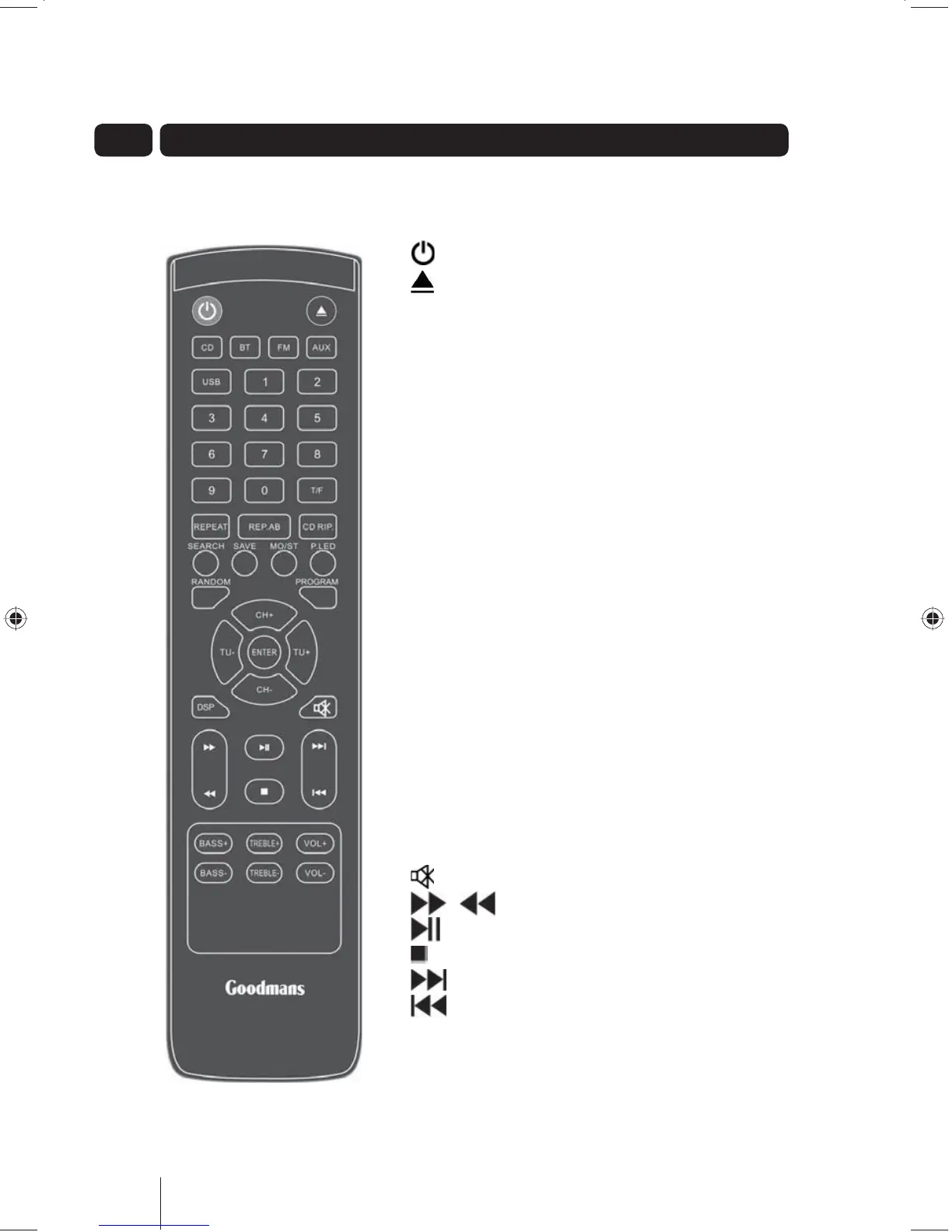
Remote Control
Buttons on the Remote Control:
- Switches the Mini Stereo System on or to standby.
- Opens and closes the CD drawer.
CD - Switches the Mini Stereo System to CD mode.
BT - Switches the Mini Stereo System to Bluetooth mode.
FM - Switches the Mini Stereo System to FM radio mode.
AUX - If you have connected an external device via the AUX
IN ports, this switches to the external device.
USB - Switches the Mini Stereo System to USB mode.
0-9 - Number keys for selecting tracks or preset radio
stations.
T/F - Frequency. Used to enter a specific FM frequency.
REPEAT - Repeat current track or all tracks.
REP.AB - Repeat segment between two points.
CD RIP - Store tracks from the current CD on a USB device.
SEARCH - Search for radio stations.
SAVE - Store current radio station in memory.
MO/ST - Switches the stereo on or off in FM mode.
P.LED - Switch the LED around the volume dial on or off.
RANDOM - Switch the random CD track selection on or off.
PROGRAM - Set the Mini Stereo System to only play
preselected tracks on a CD.
CH+ and CH- - Channel up and down.
ENTER - Select channel, track or option.
TU+ and TU- - FM Tuning up and down.
DSP - Switch between different sound types (e.g. pop, jazz).
- Mute the volume.
/ - Fast forward/Rewind.
- Play/Pause.
- Stop.
- Skip to beginning of next track.
- Skip to beginning of previous track.
BASS+/BASS- - Adjust the bass up or down.
TREBLE+/TREBLE- - Adjust the treble up or down.
VOL+/VOL- - Adjust the volume up or down.













 To Next Page