
 Need help?
Do you have a question about the GOOROO CONTROLLERS LIO BOX and is the answer not in the manual?
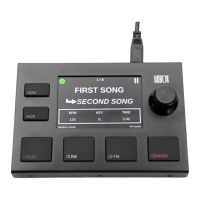
Describes the device's 3.5-inch display screen.
Provides access to menus and the home screen.
Allows navigation back to the previous menu.
Launches the next selected track in the list.
Handles Rewind, restarts track, or selects next track.
Manages Fast Forward and track selection.
Controls playback pausing and resuming.
Enables menu navigation and track selection/launch.
Port for connecting the device via USB.
3.5 mm jack for MIDI output.
Indicates Ableton's current playback state (Play/Pause).
Displays the name of the currently playing track.
Shows the name of the track queued next.
Displays BPM for current and next tracks.
Displays musical key for current and next tracks.
Displays duration for current and next tracks.
Shows the current Ableton mode (Arrangement/Session).
Shows the current LIOBOX mode (All Track/Setlist).
Indicates connection status and errors.
Shows the track's position within the set or setlist.
Instructions for connecting the LIO BOX to Ableton software.
Details on connecting external MIDI instruments.
Guidelines for selecting appropriate cables for optimal performance.
Explanation of the 6 backlit, silicone PADS and their functions.
Description of the encoder for menu navigation and track selection.
Access all tracks in the Ableton session, sorted by order.
Select and rearrange tracks for custom setlists without modifying Ableton.
Automatic detection and resynchronization of Ableton modes.
Step-by-step guide to creating new setlists.
Instructions for adding, moving, or deleting tracks in a setlist.
Option to switch between DARK and DAY display themes.
Accessing settings via MENU and using the click wheel for navigation.
Methods for launching tracks using PLAY button or encoder click.
Manual refresh of the LIO BOX using the REFRESH menu option.
Display of the current track's position within the set or setlist.
Details on BPM values, accepting only integer values.
Guidelines for entering musical key or other 4-character information.
Format for entering track duration as 'minute:seconds' or seconds.
Loading specific scripts for Ableton 9-10 and 11 versions.
How the LIO BOX communicates with the main computer.
Using spare scripts and LIO BOX comparison with spare computer.
Checks for power issues, including wiring and cable length.
Troubleshooting steps for a red cross error at startup.
Checks for correct naming, procedure, and prefix usage.
Checks for track name consistency and mode synchronization between computers.
Reasons for track names appearing in red within setlists.
 General
| Brand | GOOROO CONTROLLERS |
|---|---|
| Model | LIO BOX |
| Category | Recording Equipment |
| Language | English |

 To Next Page