POWERING ON AND OFF
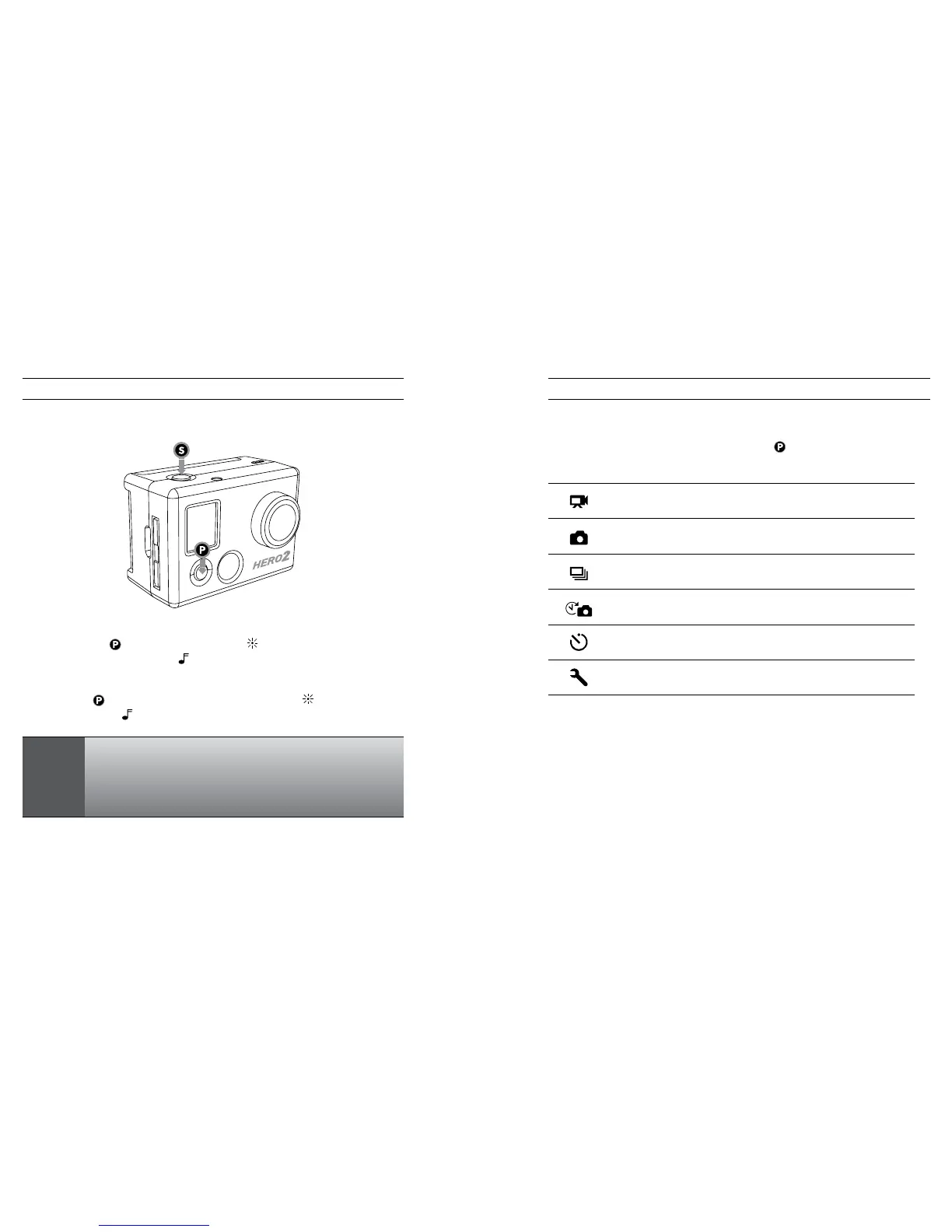
To power ON the HD HERO2:
Press and release
. The LED Recording Light on the front of the camera will
flash three times and the Buzzer
will emit three short beeps.
To power OFF the HD HERO2:
Press and hold
for two seconds. The LED Recording Light will flash seven
times and the Buzzer
will emit seven quick beeps.
PRO
TIP:
You can change the
HD HERO2
default settings to start in
One Button Mode, which sets the camera to immediately
begin recording once it is powered on.
See ONE BUTTON MODE for more information.
OVERVIEW
Once the
HD HERO2
is powered on, each press of
will cycle through the camera’s
recording modes and settings menu in the following order:
VIDEO
Record video
PHOTO
Take single photos
BURST
Take 10 photos in 1 second
TIME LAPSE
Take a photo every 0.5, 1, 2, 5, 10, 30, and 60 seconds
SELF TIMER
Take a single photo aer a 10-second countdown
SETTINGS
Change the camera’s configuration
Each camera mode can be changed in the Settings menu.
See ENTERING THE SETTINGS MENU for more information.
USING YOUR HD HERO2: CAMERA MODESUSING YOUR HD HERO2: BASICS
10 11



 To Next Page