Page 6 For technical questions, please call 1-888-866-5797. Item 58892
SAFETY OPERATION MAINTENANCESETUP
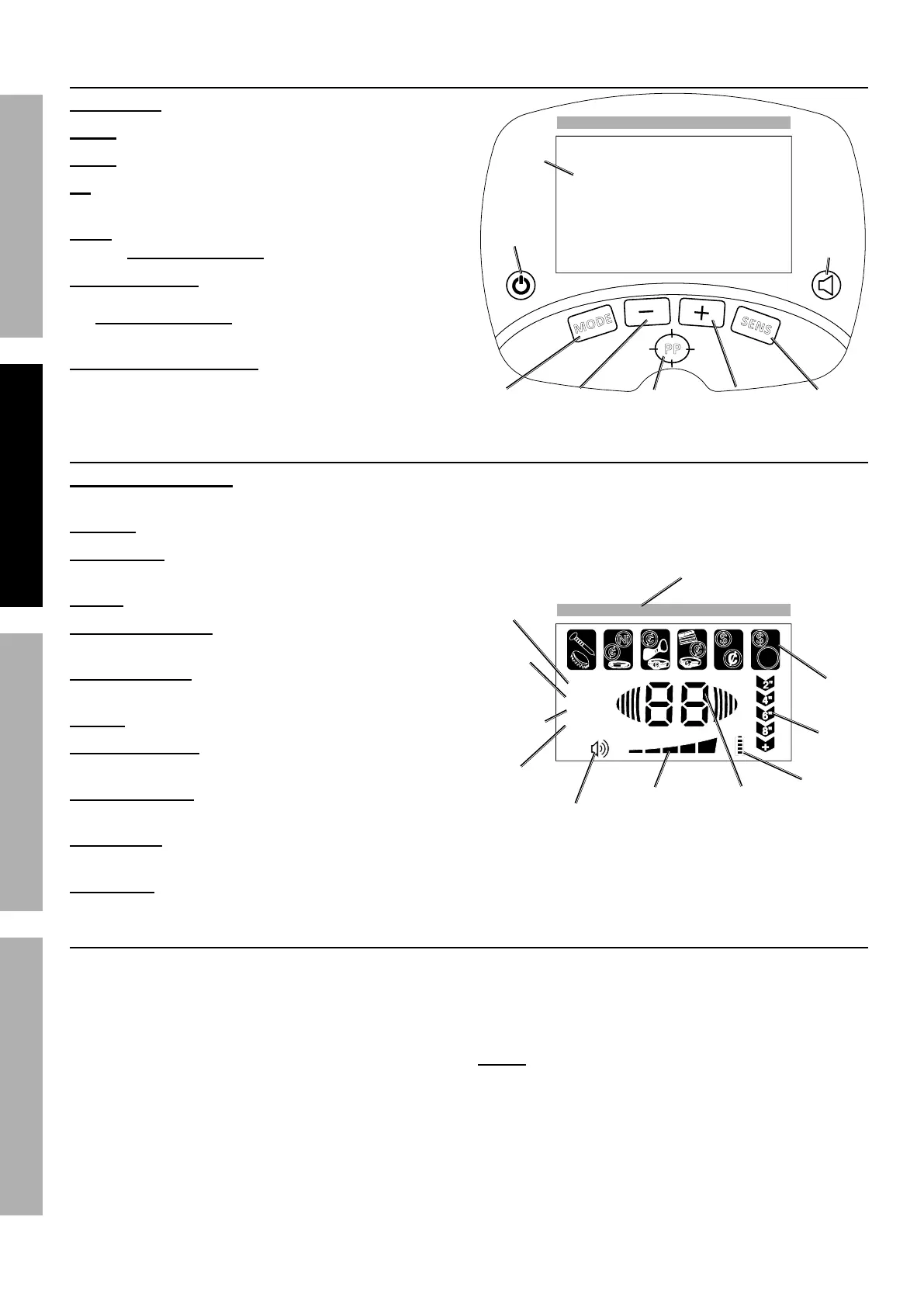
Control Panel Buttons
LCD Display - Displays operating information/data.
Power - Switches Control Box power ON or OFF.
MODE - Selects detection Mode.
PP - Used to accurately pinpoint / locate
an object underground.
SENS - Adjust sensitivity level; used in conjunction
with the Decrease/Increase buttons.
Volume/Backlight - Quick press allows volume
level to be adjusted; used in conjunction with
the Decrease/Increase buttons. Two second
press will turn backlight ON or OFF.
Decrease (-) / Increase (+) - Increases
(+) or decreases (-) range for volume,
sensitivity, and DISC Mode.
< 40
50
60
70
80
90 +
MODE
COIN
DEPTH
S
E
N
S
PP
M
O
D
E
A-M
MEMORY
JEWEL RY
DISC
Si l ver
Pinpoint
Increase
Decrease
Mode
Sensitivity
Volume/
Backlight
Power
LCD
Display
LCD Display Icons
Target ID Digital Scale - Visual reference scale for
Target ID and Target Digital Value Range.
Target ID - Displays target types.
Target Depth - Displays approximate
depth of underground objects.
Battery - Displays battery level.
Target Digital Value - Displays digital
value of the detected target.
Sensitivity Level - Displays current
detection sensitivity level setting.
Volume - Displays volume level.
JEWELRY (Mode) - Mode is for detecting
non-ferrous (non-iron) metals.
MEMORY (Mode) - Mode is for detecting metal with the
same Target ID as the metal example in its memory.
DISC (Mode)- Mode allows the operator to selectively
eliminate certain catagories (Target ID) from detection.
A-M (Mode) - Mode is for detection of all metal types.
Modes and Testing
1. Press Power and after a few seconds the Display
will show the four Modes, Sensitivity Level, and
Battery Level.
After 15 minutes if no button is pressed or object
is detected, the unit will power off automatically.
2. Before beginning a search outside, test the unit
with samples of metal. Use the following:
• an iron nail
• a Nickel
• a Penny (zinc coin, after 1982)
• a silver Quarter
3. Place the Metal Detector on a non-metal surface
with the Search Coil face up. Make sure the
unit is away from TVs, computers, or any device
that can cause electromagnetic interference.
NOTE: Remove any watches, rings, or other
metal objects on your fingers and hands.
4. Power on the Metal Detector and:
a. Press Volume/Backlight and then
Decrease (-) to set volume to low.
b. Press MODE and select the desired Mode.
< 40
50
60
70
80
90 +
MODE
COIN
DEPTH
S
E
N
S
PP
M
O
D
E
A-M
MEMORY
JEWEL RY
DISC
Si l ver
Target ID
Target
Depth
A-M
(Mode)
DISC
(Mode)
MEMORY
(Mode)
JEWELRY
(Mode)
Volume
Battery
Level
Sensitivity
Level
Target
Digital Value
Target ID
Digital Scale


 To Next Page