Page 9For technical questions, please call 1-888-866-5797.Item 58892
SAFETYOPERATIONMAINTENANCE SETUP
Tips for Searching in Different Environments
1. There are many factors which influence the
sensitivity and accuracy of detecting and
discriminating between metal objects, including
the angle, depth, size and oxidation of the target
object. Various soil or seawater conditions, and
also electromagnetic and electrical interference
surrounding the target can also affect readings.
Other metal detectors in the area will also cause
interference, so when there is more than one unit
in use, be sure they are at least 10 yards apart.
2. Some ways to help increase success are:
a. If there is interference from similar metal
detectors in your searching area, lower the
Sensitivity Level setting to stop the interference.
b. If there is interference from electrical cables, TV,
radio, or other electrical devices in your searching
area, lower the Sensitivity Level setting.
c. When searching in highly mineralized areas, the
unit may sound even if there is no metal. Lower
the Sensitivity Level setting, eliminate some
Target ID icons (eliminates detection of certain
metal types) and increase the distance of the
Search Coil from the ground until the false signal
disappears. To set detection, place a test metal
object in highly mineralized earth or wet sand
and eliminate Target ID icons as needed to focus
the detection range for the desired metal object.
d. When searching in a trash area, set the unit
into the JEWELRY mode so that the unit can
ignore most invaluable metals such as nails,
bottle caps, cans, and small pieces of iron.
e. Generally, the higher the Sensitivity Level,
the worse the detection of the selected metal
object will be, as undesired, similar metals will
be detected. If needed, lower the Sensitivity
Level to have better discrimination and detection
of the selected metal object without interference
from other metals and mineralized earth.
f. Remove all metal digging tools when searching.
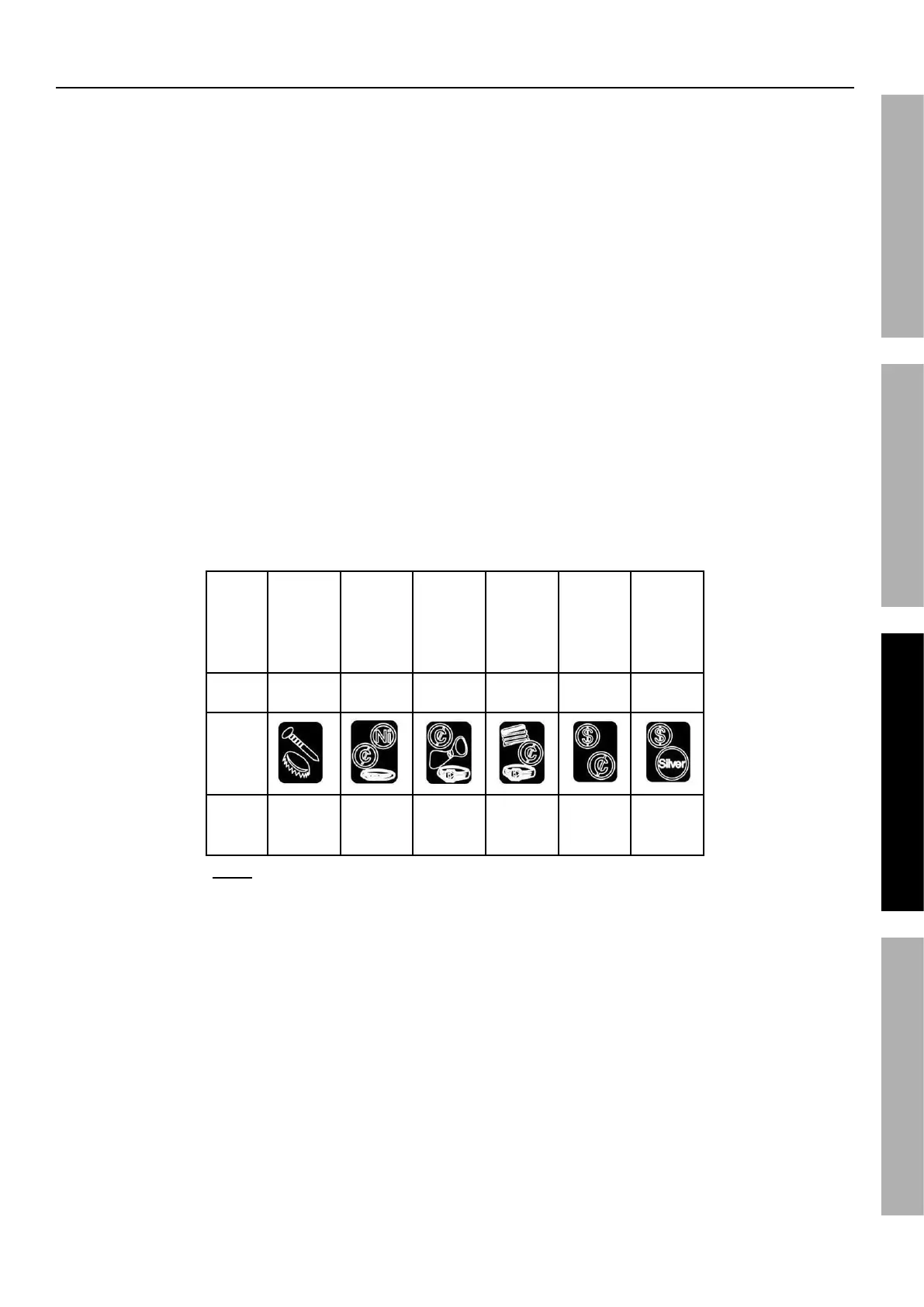
g. Reference the chart below for common examples
of metal objects, their tone pitch, Target ID
icons, and Target Digital Value ranges.
Target
Iron,
Bottle
Cap
Nickel,
Jewelry
Pull-
Tab,
Jewelry
Zinc
Penny,
Bottle
Cap,
Jewelry
Quarter,
Copper
Half
Dollar,
Silver
Tone
Pitch
Low Low Medium Medium High High
Target
Icon
Digital
Value
Range
0-40 41-55 56-65 66-75 76-85 86-99
Note: Table for general reference only. There are a wide variety of
metals and no metal object can be identified for certain until unearthed.


 To Next Page