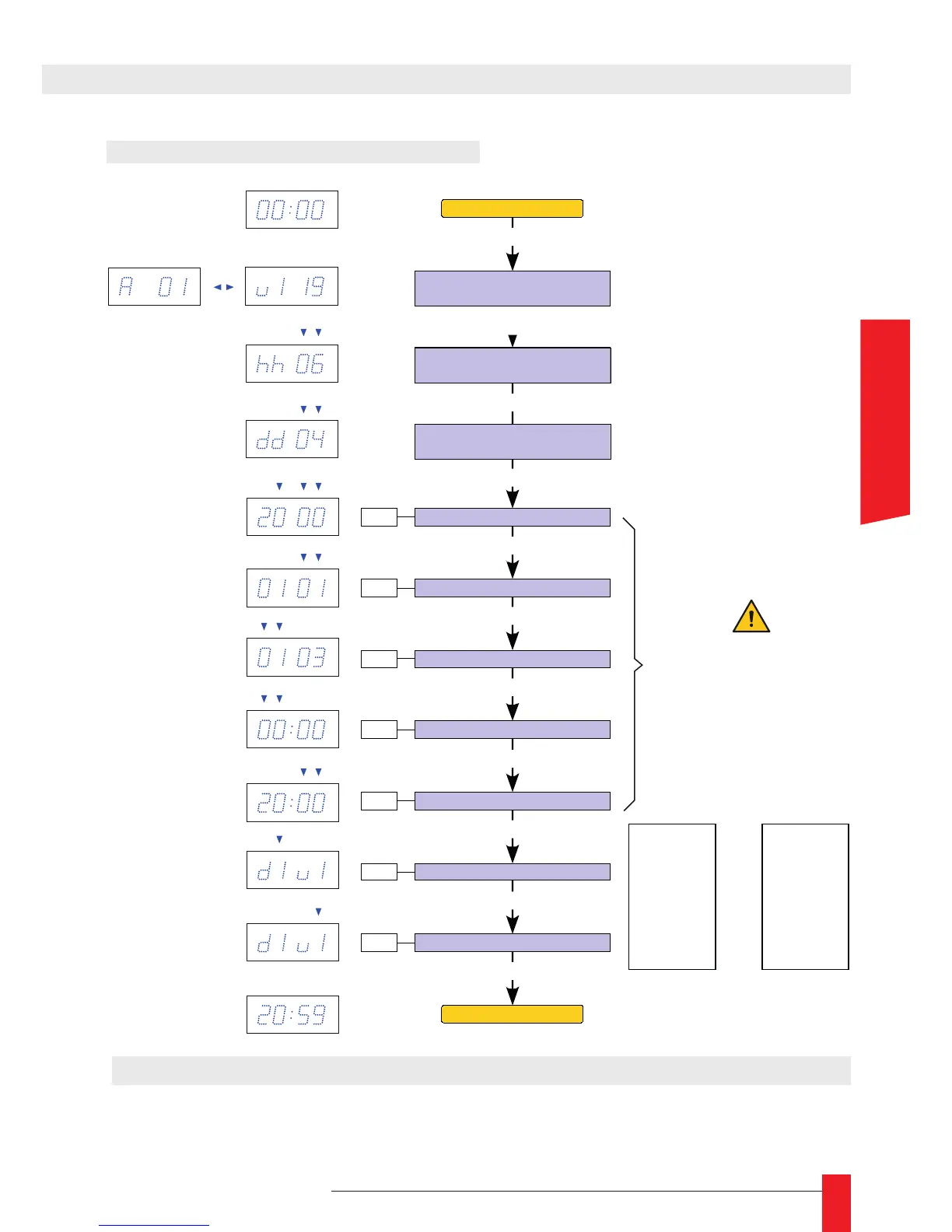
5.2. SETTING THE DATE AND TIME
► Reset : Press the "RESET" button on the rear panel of the product. This operation will
reset the clock in its factory conguration. All parameters are reinitialized.
Configuration matériel :
Adresse - Version logiciel
Set year
Set month
PROG
PROG
PROG
PROG
Set day
PROG
Set month
PROG
Set minutes
PROG
Set digit color
PROG
Set wave color
PROG
+ / -
+ / -
+ / -
+ / -
+ / -
+ / -
+ / -
d1 : White
d2 : White/Blue
d3 : Blue
v1 : White
v2 : White/Blue
v3 : Blue
Affichage date - heure
Date -
time display
Time for alternating
the time display
Time display of the time (in seconds)
Set to 0 to not display
Hardware configuration:
Address - Software version
PROG
PROG
Date -
time display
Time for alternating
the time display
Time display of the time (in seconds)
Set to 0 to not display
d1 : Red
d2 : Yellow
d3 : Green
v1 : Red
v2 : Yellow
v3 : Green
WARNING
Program time in UTC/GMT:
For France, -2 hours in summer,
-1 hour in winter.
REF : 93000011
or
REF : 93000024
6. REBOOT



 To Next Page