Need help?
Do you have a question about the Gotrax Xr Elite and is the answer not in the manual?
Scooter not waterproof; water damage not covered. Wet conditions dangerous.
Physical damage from negligent care/extreme riding not covered.
Risk of severe injury/death from loss of control, collisions, falls. Ride with caution.
Do not modify the product from its original design.
Keep hands/body parts away from moving parts during operation.
Ensure scooter operates correctly and safety labels are understood before each use.
Verify all items are present: Electric Scooter, Console & Handlebars, Power Adapter, Allen Wrench, Tire Gauge Pipe, Screws.
Identifies key parts like Handle Brake, Accelerator, Console, Headlight, Hub Motor, Kickstand, etc.
Details Top Speed, Distance per Charge, Weight Limit, Battery Type, Charger, Charge Time, Motor Power.
Press rear fender, separate hook/buckle, lift tiller upright. Verify lock.
Use Allen wrench to loosen screws at hook, detach hook, remove top tiller cover.
Place the console into the top of the tiller.
Connect cord to front tiller, pull handbrake, insert metal piece, thread cord through handbrake.
Open port, insert plug, monitor charging light (red=charging, green=full). Cover port after charging.
Full charge takes 4 hours. Charge between 32°F and 104°F.
Press and hold the red button for 1 second to power on, 5 seconds to power off.
Press the red button for 1 second while powered on to toggle the headlight.
The console displays speed (MPH), battery life, and current gear.
Start with one foot on platform, one on ground. Push off and press throttle to move.
Press the handbrake to slow down or stop.
Scooters perform best on smooth surfaces like carparks, roads, footpaths, and bike lanes.
Always clean your scooter; it is a machine that needs maintenance.
Do not press the throttle while walking with the scooter beside you.
Be aware of terrain and watch for curbs and obstacles.
Activate by holding throttle down for 10 seconds; deactivate with throttle or brake.
Ensure scooter is off, pull spring pin, rotate counterclockwise, hook tiller to fender buckle.
Press rear fender, pull tiller up. Spring pin locks automatically.
Wipe with a soft damp cloth. Store in a dry, cool location away from sun exposure.
Contact customer service for brake adjustments or repairs; do not self-repair to avoid warranty void.
Fill tires to recommended PSI (50 PSI) if pressure is low.
DO NOT use alcohol, gasoline, kerosene, or corrosive solvents. Avoid pressure washers.
Only use the approved GOTRAX power adapter; others may cause fire or equipment damage.
Improper disposal pollutes the environment; comply with local regulations.
Store battery and adapter between -4°F and 122°F.
Risk of fire; no user serviceable parts. UV rays, rain, elements damage materials; store indoors.
Manuals are updated online at GOTRAX.com; rights reserved to update and change.
Contact customer service team for problems or more information at GOTRAX.com.
For warranty information, please visit GOTRAX.com.
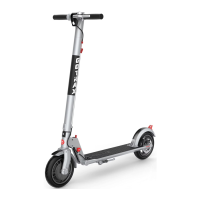
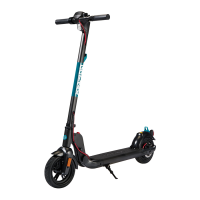
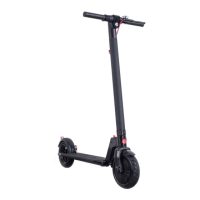
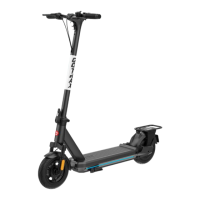
The GOTRAX Xr Elite Electric Scooter is a personal mobility device designed for urban commuting and recreational use. This user manual provides comprehensive instructions for assembling, operating, and maintaining the scooter, ensuring a safe and enjoyable riding experience.
Before riding, it is crucial to read and understand all the information provided in the manual. Riders under 18 years of age must obtain parental permission before using the electric scooter. Safety is paramount, and the manual emphasizes several key precautions. Always wear a helmet when riding the Electric Scooter. Ensure the scooter has a full battery before each ride to avoid unexpected power loss. Riders must be aware of and follow all local road laws. It is strictly prohibited to ride the scooter under the influence of drugs or alcohol. Always respect pedestrians and maintain a safe distance. The scooter should not be ridden in wet conditions, as this can cause it to slide, leading to injury, and may also damage the electronics, voiding the warranty.
The manual includes a "Warning Message" section that highlights critical safety information. The scooter is not waterproof, and water damage is not covered by the warranty. Riding in wet conditions is dangerous and can lead to injury. The warranty does not cover physical damage resulting from negligent care or extreme riding. Riding the GOTRAX electric scooter carries a risk of severe injury or even death due to loss of control, collisions, and falls; therefore, users should exercise caution and ride at their own risk. Modifying the product from its original manufacturer's design is not permitted. Always keep hands and all body parts away from moving parts while operating the scooter. Before each use, thoroughly check the scooter to ensure it is operating correctly. Verify that the braking system is functioning properly and that all safety labels are in place and understood. Ensure all axle guards, chain guards, or other covers supplied by the manufacturer are in place and in serviceable condition. Check that the tires are in good condition, properly inflated, and have sufficient tread remaining. The scooter has a maximum load rating of 220 lb (100 kg), which should never be exceeded. The electric scooter should never be used by children under the age of 13.
Upon unpacking, users should find the following items: the Electric Scooter, Console & Handlebars, Approved Power Adapter / Charging Unit, 4mm Allen Wrench, Tire Gauge Pipe, and two screws. All packaging material should be removed, and each item inspected for any accidental damage that may have occurred during shipping.
Assembly of the scooter involves a few straightforward steps. First, press down on the rear fender to separate the folding hook and fender buckle, then lift the tiller upright until it locks into position. Verify the lock by gently attempting to fold it. Next, use the provided 4mm Allen wrench to loosen the screws at the hook and detach it. Remove the cover from the top of the tiller. Place the console into the top of the tiller. Take the cord attached to the hook and bring it to the front of the tiller. Pull the handbrake towards you and insert the round metal piece into the opening. String the small silver cord through the solid piece of the handbrake, ensuring the metal piece on the red cord is fully pushed into the handbrake. Finally, grab the red cord and hook, bring it back behind the tiller, and reattach the hook to the back of the tiller using the screws and Allen wrench, making sure the red cord goes around the tiller.
Before using the scooter for the first time, it must be fully charged. To charge, open the rubber charging port cover and insert the charging plug. The charger box will display a red light when charging and a green light when fully charged. Once charging is complete, cover the charging port to protect it from dust and debris. The charging time is approximately 4 hours. It is important to charge the scooter in conditions that do not exceed 104 degrees Fahrenheit or fall below 32 degrees Fahrenheit.
The scooter console offers several functions. To power the scooter on, press and hold the red button for 1 second. To power it off, press and hold the red button for 5 seconds. To turn the headlight on or off, press the red button for 1 second while the scooter is powered on. The console displays the current speed in MPH, battery life, and the current gear.
Riding tips are provided to help users operate the scooter effectively. To start riding, place one foot on the platform and one foot on the ground. Push off with the foot on the ground while simultaneously pressing the throttle button to begin movement. The handbrake is used to slow down or stop. The scooter performs best on smooth surfaces such as carparks, smooth roads, footpaths, and bike lanes. Regular cleaning of the scooter (wheels, platform, etc.) is necessary for maintenance. Avoid pressing the throttle while walking beside the scooter. Always be aware of the terrain and watch out for curbs and obstacles. The scooter also features cruise control: to activate it, press the right-hand throttle down for 10 seconds. To deactivate cruise control, press either the right-hand throttle or the brake button.
Folding the scooter for storage or transport is a convenient feature. Before folding, ensure the electric scooter is powered off. Hold the tiller and pull out the spring pin on the right folding panel, then rotate the spring pin counterclockwise. Insert the hook on the tiller into the loop on the rear fender buckle. A click indicates successful folding and locking. To unfold, press the rear fender and pull the tiller up. The spring pin will automatically insert into place within the folding lever, locking the mechanism.
Maintenance and repair are essential for extending the life of the electric scooter. Regular cleaning with a soft damp cloth is recommended when the scooter is dirty. For brake adjustments or any service needs, contact the customer service team. Attempting to repair the scooter yourself can void the warranty and risk damaging the device. If the tire pressure is low, inflate it to the recommended PSI of 50, which is typically found on the side of the tire. Do not use alcohol, gasoline, kerosene, or other corrosive chemical solvents to clean the scooter, as these can severely damage its appearance and structure. Pressure washers should also be avoided as they can damage the electronics. When not in use, store the scooter in a dry and cool location. Avoid storing it outdoors, as sun exposure can damage its appearance and reduce the life of the battery and tires.
If the tiller feels loose or wiggles while riding, it can be tightened. Open the plastic cover and use the Allen wrench to tighten the screws as shown in the figure. For disc brake adjustments, if the brake is too tight, use the 4MM Allen wrench to loosen the screws counterclockwise, pull the brake wire to extend it, and then retighten the screws. If the disc brake is too loose, loosen the screws, pull the brake wire to extend it, and retighten the screws.
Battery information is also crucial. Only use the approved GOTRAX power adapter to charge the scooter; using other adapters may pose a risk of fire and equipment damage. Improper disposal of used batteries can seriously pollute the environment, so users must comply with local disposal regulations. Store the scooter and power adapter in conditions that do not exceed 122 degrees Fahrenheit or fall below -4 degrees Fahrenheit. A warning is issued regarding the risk of fire and the absence of user-serviceable parts. Prolonged exposure to UV rays, rain, and other elements can damage the enclosed materials, so the scooter should be stored indoors when not in use.
For troubleshooting, users are advised that user manuals are frequently updated on GOTRAX.com, and the company reserves the right to update and change manuals online. For problems or more detailed information, contact the customer service team at GOTRAX.com. Warranty information can also be found by visiting GOTRAX.com.
 General
| Top Speed | 15.5 mph |
|---|---|
| Motor | 300W |
| Max Load | 220 lbs |
| Charging Time | 4-5 hours |
| Display | LED display |
| Foldable | Yes |
| Tires | 8.5 inches |
| Brakes | Disc brake and EABS |
| Lights | LED Headlight & Taillight |
| Range | Up to 18.6 miles |
| Riding Modes | 3 modes |


 To Next Page