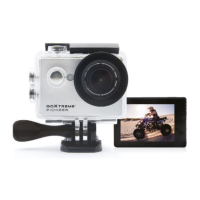
1. Installing!a!Micro!SD!Card!
Note:!Please!choose!a!branded!Micro!SD!card,!and!then!format!it!with!the !computer!befo re!us e.! !
We!suggest!a!high!quality!SD!card!for!the!perfect!result.!
Maximum!card!capacity!is!64GB!(Class!6!or!above)!
!
2. Installing!and!re moving !th e !b at te rie s!
A. Slightly!press!and!swipe!the!battery!cap!to!open!it!
B. Correctly!install!the!battery!into!the!camera!as!indicated!by!+/-!sign!and!m ake!sure!it!is!inserte d !in!
the!correct!direction,!m atch in g!th e!a rrow s!m a rked !on !the!ba ttery!b efo re!you !fit!it.!
C. Battery!Gauge:!Please!refer!to!diagram!
D. Removing!the!Battery:!Open!the!cap!and!pull!out!the!battery!
!
3. Charging!
A. You!can!recharge!the!camera!by!connecting!it!directly!to!the!compute r. !
B. It!can!be!a ls o !ch a rg ed!with!a!car!charger!(Max !ou tpu t!1.0mAh)!
C. The!camera!can!record!video!while!charging! !
D. The!camera!can!also!be!charged!with!the!power!switched!off.!
!
4. Sw itching!the!camera!on!and!off!
A. Press!and!hold!the!power!switch!for!3!to!5!seconds!to!turn!it!on/off!
B. You!can!also!switch!it!on/!off!trough!the!LCD!screen!display!menu.!
!
5. Mode!Switching!
Switch!between!video!recording/Photo!shooting/Playback!by!pressing!the!power!button!as!mode!
function.!
! Recording!mode,!while! ! is!photo!shooting!mode.!
Symbols!are!displayed!on!the!top!of!the!screen.!
!
! Refers!to!the!function!of!video!playback,!and!the!last!option!displayed!is!system!se ttin g s. !
!
!
!
!
!
!
!
!
!
!
!


 To Next Page