EasyManua.ls Logo

Grace Digital GDI-IRD4500M - User Manual

Grace Digital GDI-IRD4500M
46 pages
Print Icon
To Next Page IconTo Next Page
Loading...
1
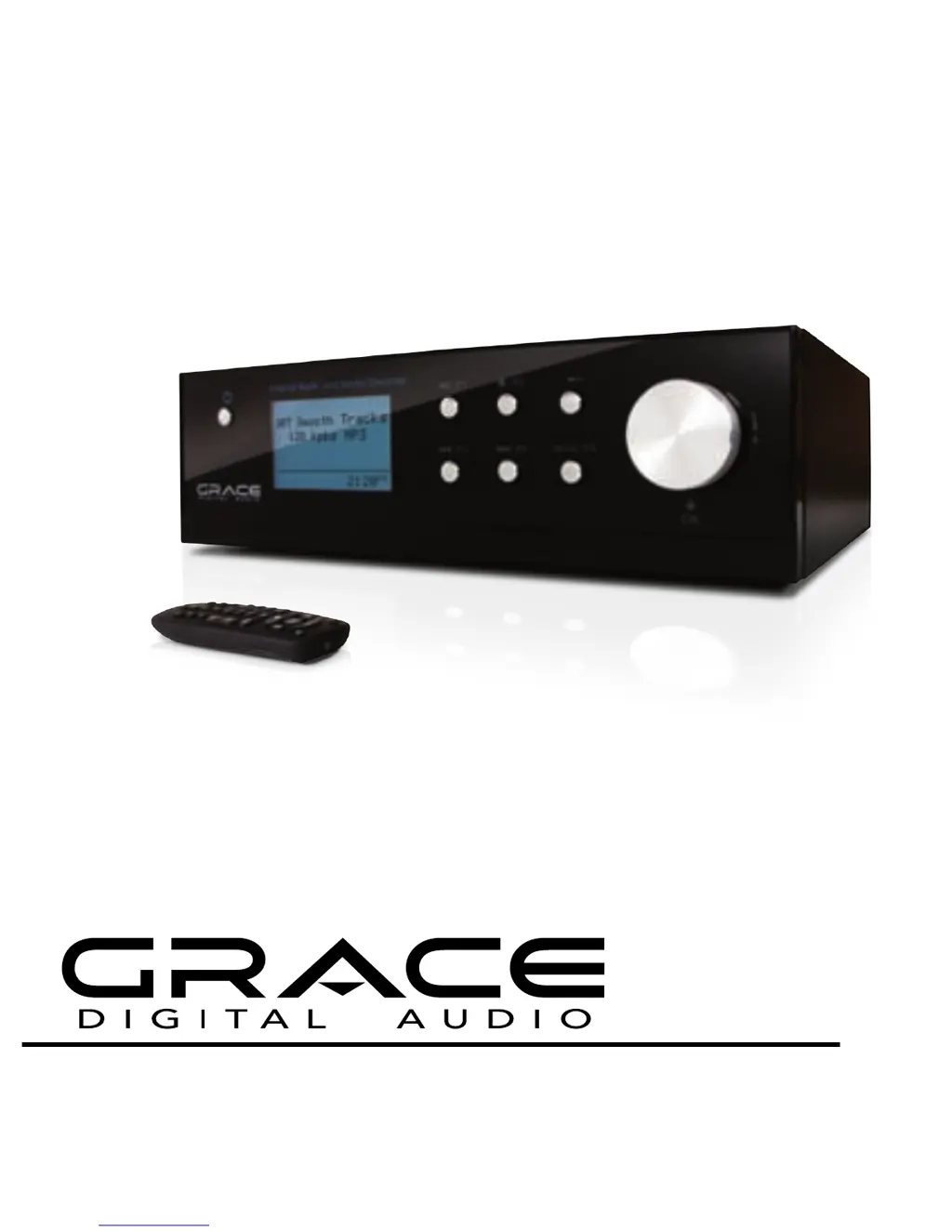
BRAVADO-X Internet Radio and Network Media Player
GDI-IRD4500M
USER GUIDE
BRAVADO-X WiFi Internet Radio by Grace Digital Audio

Table of Contents

Questions and Answers

Summary

Safety Warnings

General Operational Safety

Covers ventilation, temperature, moisture, damage, covers, weather, and usage advice.

Proposition 65 Disclosure

Details regarding potential chemical exposure listed in Proposition 65.

Internet Radio Quickstart Guide

Prerequisites for Internet Radio Use

Details required items like broadband connection and wireless access point for initial setup.

Radio Controls

Internet Radio Mode Controls

Explains operation of buttons like STANDBY/ON, P1-P5, and Volume Knob for internet radio.

Media Player Mode Controls

Details button functions like Play/Pause, Stop, Previous/Next Track, and Volume Knob for media player.

Device Jacks and Ports

Power and Audio Connections

Details power adapter, DC connection, headphone jack, and line out/speaker out ports.

USB and Auxiliary Inputs

Describes the USB port for data/ethernet and the AUX IN for audio devices.

Remote Control Functions

Remote Controls for Internet Radio

Explains how remote buttons like STANDBY, Arrow Keys, OK, MENU, and Keypad are used for internet radio.

Remote Controls for Media Player

Details remote button functions like Play/Pause, Stop, Next/Previous Track for media playback.

Wireless Network Connection Steps

Powering Up the Radio

Instructions for initial power-on and display indicators during the startup sequence.

Scanning for Wireless Networks

Guide on initiating a scan to find available wireless networks on the radio.

Connecting to a Wireless Network

Process for selecting a network and initiating connection after scanning.

Entering Network Encryption Keys

Details on how to enter WEP or WPA security codes for network connection.

Selecting Radio Stations

Browsing Stations by Location or Genre

Guide to selecting stations based on geographical location or content genre.

Sirius Internet Radio Integration

Instructions for logging in and listening to Sirius stations via the radio.

Station Availability Notes

Information on stations not broadcasting 24/7 or potential online availability issues.

Pandora Radio Station Setup

Creating Pandora Stations

Steps to create new Pandora stations by typing keywords and selecting suggestions.

Pandora Feedback and Controls

Using the 'Retrieve' button for song feedback, bookmarking, and other Pandora playback options.

Managing Stations and Volume

Adjusting Volume Levels

Instructions on how to increase or decrease the audio volume using the volume knob.

Storing Stations in Presets

Methods for saving current stations to preset buttons on the radio and remote control.

Playing Preset Stations

Guide on how to select and listen to previously saved preset radio stations.

Station Features and Options

Requesting Unavailable Stations

Process for requesting stations not currently in the online list via the Grace Digital website.

Live vs. On-Demand Listening

Explains how to select live broadcasts or on-demand programs from stations offering both.

Setting the Clock

Accessing Settings Menu

Steps to navigate to the main settings menu for configuring various device options.

Configuring Time and Date

Instructions for setting the current time, date, and daylight saving time (DST).

Setting the Alarm

Setting Up Alarms

Guide to setting specific times, choosing alarm sources (buzzer/station), and disabling alarms.

Alarm Activation and Behavior

Details on how alarms are set, triggered, and interact with the radio's display and network status.

Sleep Timer and Account Configuration

Setting the Sleep Timer

Instructions for configuring the device to automatically turn off after a set period.

Registering on Grace Digital Audio Website

Steps to create an account on the Grace Digital Audio website for enhanced features.

Managing User Profile Settings

Guide to editing personal information, address, and account details via the 'My Profile' section.

Customizing Content with My Stuff

Adding and Managing My Stations

How to add, edit, and play custom radio stations via the 'My Stations' list.

Adding Custom Internet Streams

Process for adding user-defined internet radio streams using their URLs.

Adding and Accessing Podcasts

Steps to add podcasts via RSS feeds and access them through the 'My Podcasts' menu.

Pandora Feature Setup

Activating Pandora Service

Requirements and steps to link a Pandora account for music streaming.

Accessing Pandora Stations

Guide to selecting and listening to personal Pandora radio stations via the menu.

Pandora Feedback and Controls

Using the 'Retrieve' button for song feedback, bookmarking, and other Pandora playback options.

Media Player Quickstart Guide

Setting Up Windows PC for Media Sharing (XP)

Instructions for sharing audio files on a Windows XP PC via network shares.

Setting Up Mac for Media Sharing (OSX)

Steps for configuring file sharing on Apple OSX for media access by the radio.

Accessing Shared Media Files

Locating Shared Files on the Radio

Steps to find and scan PCs on the network for shared audio files using the radio.

Listening to Single Tracks

Guide to browsing by artist and selecting individual tracks for playback from shared folders.

Listening to Shared Albums

Instructions for browsing albums by artist and playing entire albums from shared sources.

Queuing Tracks for Later Playback

How to add individual tracks to the playback queue for later listening.

Queuing Albums for Later Playback

Process for adding entire albums to the playback queue.

Media Playback Controls

Playback Control Functions

Details on using STOP, PLAY/PAUSE, SKIP TO PREVIOUS, and SKIP TO NEXT buttons.

Removing Tracks from the Queue

Steps to delete individual tracks or clear the entire playback queue.

Shuffle Playback Mode

Guide to enabling random playback for tracks in the queue.

Repeat Playback Mode

Instructions to enable repeat playback for tracks or the entire queue.

UPnP Media Server Setup

Using Windows Media Player 11 as UPnP Server

Guide to configuring WMP11 to act as a UPnP media server for the radio.

Configuring Media Sharing in WMP11

Steps to enable media sharing and allow the radio device access within WMP11.

Navigating UPnP Servers on the Radio

Steps to select UPnP servers, browse media categories, and select files on the radio.

Browsing Queued Tracks

How to view the list of tracks currently added to the playback queue.

Queuing UPnP Tracks

Process to add UPnP tracks to the playback queue for later listening.

Queuing UPnP Albums

Method to add UPnP albums to the playback queue.

Media Queue Management

Playback Controls for Queued Media

Instructions for controlling playback of queued tracks using radio buttons.

Removing Queued Tracks

Steps to delete individual tracks or clear the entire queue of media files.

Settings Menu Navigation

Accessing Settings Options

Steps to navigate the settings menu and select various configuration options.

Network Configuration Options

Details on scanning for new networks or manually configuring network parameters.

Firmware Upgrade Process

Instructions for downloading and installing new firmware for the radio.

Language Settings

How to change the display language of the radio's interface.

Factory Reset Procedure

Steps to restore the radio to its original factory default settings.

Radio Registration

Information on obtaining a registration key for the Grace Digital Audio customer portal.

Device Settings and Features

Backlight Brightness Adjustment

How to adjust the radio's display backlight brightness for different states.

UPnP Device Naming

Allows renaming the device for easier identification by other UPnP devices.

Wi-Fi Signal Strength Check

Displays the current Wi-Fi signal strength for optimal placement.

Other Cool Stuff (Software Notes)

Information on current software version, new features, and general usage tips.

Troubleshooting Common Issues

Network Connection Problems

Steps to resolve issues connecting the radio to a wireless network.

Station Playback Issues

Guidance for when the radio connects but cannot play specific stations.

Power and Speaker Troubleshooting

Checks for power, speaker selection, and connection issues if no audio is heard.

Product Specifications and Warranty

Technical Specifications

Lists power requirements, output levels, frequency response, and network capabilities.

License and Warranty Information

Details on software licensing (GNU, Microsoft) and the manufacturer's limited warranty.

Appendix: Media Sharing Setup

Setting Up Media Sharing in WMP11

Instructions for sharing media files using Windows Media Player 11 on XP.

Allowing Radio Access in WMP11

Steps to confirm device access and properties for media sharing in WMP11.

Playing Music from Network

Playing Music Wirelessly

Guide to selecting and playing music files from the network using the radio.

USB Port Functionality

USB-Ethernet Connection Guide

Instructions for using the USB port with an adapter for a wired network connection.

Contact and Compliance Information

Customer Support and User Forum

Provides contact email, website, and operating hours for customer support.

Proposition 65 and FCC Compliance

Details on potential chemical exposure and FCC rules compliance for the device.

Grace Digital GDI-IRD4500M Specifications

General IconGeneral
TypeInternet Radio
ModelGDI-IRD4500M
BrandGrace Digital
Wi-FiYes
BluetoothYes
Display Size3.5 inches
Power SourceAC Adapter
ConnectivityWi-Fi, Bluetooth
Remote ControlYes
Headphone JackYes
Line OutYes
DisplayColor LCD
Streaming ServicesPandora, Spotify, iHeartRadio
Audio OutputRCA
Supported Audio FormatsMP3, WMA, AAC
Presets10 on radio, unlimited via web

Related product manuals