To Next Page
L
Laura RodriguezAug 4, 2025
How to fix Grace Digital GDI-WHA8005 Radio when it shows 'Error loading menu'?
- KKaren ChaneyAug 4, 2025
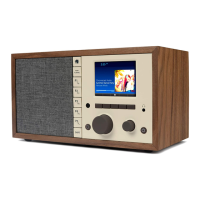
If your Grace Digital Radio shows 'Error loading menu', try turning the Mondo Elite Classic off and then on again.

How to fix Grace Digital GDI-WHA8005 Radio when it shows 'Error loading menu'?
If your Grace Digital Radio shows 'Error loading menu', try turning the Mondo Elite Classic off and then on again.
Provides essential safety precautions and care guidelines for device operation and handling.
Details critical safety warnings concerning electrical hazards, heat, water, and chemical exposure.
Guides through connecting the device to a Wi-Fi network using the wizard.
Provides steps for manually setting up network parameters like SSID and IP address.
Guides on streaming audio from Chromecast-enabled apps to the device.
Describes pairing and streaming audio via Bluetooth to the device or headphones.
Covers setting time formats, timezones, and daylight saving adjustments.
Details how to set up, modify, and manage alarm clocks.
Explains how to configure snooze intervals and the automatic sleep timer.
Describes how to adjust equalizer settings, Deep Sleep, and Master Power Off.
Guides on resetting the device to its original factory settings, erasing all configurations.
Provides solutions for common problems like connection, buffering, and update errors.
Guides on navigating and selecting channels by category or list.
Guides on entering SiriusXM streaming account details for service access.
Outlines the limited warranty period, conditions, and exclusions for product defects.
 General
| Type | Internet Radio |
|---|---|
| Wi-Fi | Yes |
| Display | LCD |
| Dimensions | 8.5 x 5 x 5 inches |
| Weight | 2.5 lbs |
| Features | Alarm Clock, Sleep Timer, Remote Control |
| Ethernet | Yes |
| Power Source | AC Adapter |
| Streaming Services | Pandora, Spotify, iHeartRadio, TuneIn |
| Connectivity | Wi-Fi, Ethernet |
| Frequency Range | 87.5 - 108 MHz |
| Audio Output | Headphone Jack |