
 Need help?
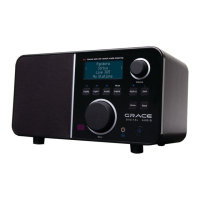
Do you have a question about the Grace Digital SOLO GDI-IRA500 and is the answer not in the manual?
Initial steps to power on the radio and prepare it for network connection.
Guide to scanning for available Wi-Fi networks in the area.
Process for selecting and connecting to a Wi-Fi network using a password.
How to set up and listen to Pandora radio stations via the device.
Steps to select time zone, set hour, and set minute.
Setting alarm times, recurrence, and sound source.
How the alarm operates and displays when the radio is in standby mode.
Link and manage Pandora music streams with your Grace Digital account.
Configure network settings, scan for networks, or change router.
Download and install the latest firmware for the radio.
Restore radio to default factory settings, clearing presets and network.
Obtain registration key to link radio to Grace Digital customer portal.
Set the clock, alarms, and DST settings.
Steps to configure Windows Media Player 11 for media sharing.
Instructions for playing music files from the configured media server.
 General
| Brand | Grace Digital |
|---|---|
| Model | SOLO GDI-IRA500 |
| Category | Radio |
| Type | Internet Radio |
| Power Source | AC Adapter |
| Connectivity | Wi-Fi, Ethernet |
| Remote Control | Yes |
| Audio Output | Headphone Jack |
| Display | LCD |
| Streaming Services | Pandora, iHeartRadio, SiriusXM |





 To Next Page