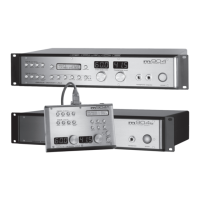
grace design m906
owner’s manual
14
grace design m906
owner’s manual
15
Okay, you’ve rack mounted your m906, attached the remote control unit, connected the power
supply and have made all of your audio connections. Now the fun begins! The following sections
will take you through the operational details of your m906 monitoring system.
Selecting an Analog Input Source The m906 provides the following analog input sources:
• 5.1 bal balanced 5.1 format input (DB25 connector wired to the Tascam standard pinout)
• 5.1 unbal unbalanced 5.1 format input via RCA connectors.
• 2ch bal 1 balanced stereo input (XLR connectors wired pin 2 hot, pin 3 cold and pin 1 ground)
• 2ch bal 2 balanced stereo input (XLR connectors wired pin 2 hot, pin 3 cold and pin 1 ground)
• cue balanced stereo input (XLR connectors wired pin 2 hot, pin 3 cold and pin 1 ground)
Pressing the cue switch activates the stereo cue input source for monitoring. The cue inputs on the
rear of the m906 will normally be fed by a stereo pair output from your digital audio workstation or
console that has been setup to provide a cue mix to talent in the studio. The cue input switch allows
you to monitor this cue mix in the control room. Also related to the cue function is the MON > CUE
and Talkback features, w hich are discussed later in the manual.
To select the desired analog source input, simply press the switch that corresponds to the source
you’d like to monitor. Each time you press a switch to select a new source to monitor, the new source
becomes active and the source switch LED illuminates. The name
of the current input will be displayed on line one of the SYSTEM
LCD (screenshot 1). Line two will display DAC status (which is still
supplying signal to the FIXED DAC OUTPUTS). DAC Input source,
sample rate and s-Lock status will be displayed.
Selecting a Digital Input Source The m906 provides the following digital input sources:
• 5.1 AES3 5.1 format input using 3 AES3 signals on a DB-25 connector wired to the Tascam standard for 8
channel digital I/O. Input channels 1-6 are monitored on this input.
• 5.1 ADAT 5.1 format input using ADAT light pipe channels 1-6
• 2ch AES3 two channel AES3 input on an XLR connector wired wired pin 2 hot, pin 3 cold and pin 1
ground
• 2ch AES3 two channel AES3 input on DB-25 channels 7-8
• 2ch S/PDIF two channel input on an RCA coaxial connector.
• 2ch ADAT/TOS two channel input derived from channels 7-8 of the ADAT optical input connector or left
and right channels from the TOSLINK optical input. (Out of the box, this switch selects the ADAT format as
the default choice. To change the current source selection, simply press this switch again. When this occurs,
the newly selected format will be displayed in the system LCD window.) NOTE: The two channel ADAT format
source is derived from channels 7 and 8 from the ADAT input on the rear panel. It cannot be sourced from any
other pair of ADAT channels.
To select a digital input, simply press the corresponding input switch (AES3 1, AES3 2, S/PDIF or
Operating the m906
screenshot 1
analog input selected, DAC status


 To Next Page