EasyManua.ls Logo

Graco Ultra Max II 650 PC Pro - User Manual

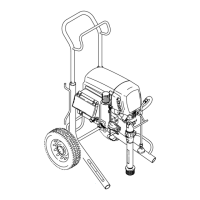
Graco Ultra Max II 650 PC Pro
64 pages
Print Icon
To Next Page IconTo Next Page
Loading...
3A6491E
EN
Operation, Parts
Electric Airless
Sprayers
For portable airless spraying of architectural paints and coatings. For
professional use only. Not approved for use in explosive atmospheres or
hazardous locations.
490/495/595/650/395EU Models:
3300 psi (228 bar, 22.8 MPa) Maximum Working Pressure
See page 3 for additional model information.
Important Safety Instructions
Read all warnings and instructions in this manual, in related manuals, and on the unit
before using the equipment. Be familiar with the controls and the proper usage of the
equipment. Save these instructions.
Related Manuals
Gun – 3A6285 (Contractor PC) Pump – 334599
Use only genuine Graco replacement parts.
The use of non-Graco replacement parts may void warranty.

Questions and Answers

  • A
    Amber GuerraAug 15, 2025
    What to do if fluid is spitting from the gun of my Graco Ultra Max II 650 PC Pro?
    • R
      Robin DavisAug 15, 2025
      If your Graco Paint Sprayer is spitting fluid from the gun, it could be due to a few reasons. There might be air in the pump or hose, so check and tighten all fluid connections, and cycle the pump slowly during priming. Another possibility is a partially clogged spray tip, which you should clear. Also, ensure that your fluid supply isn't low or empty, and refill it if necessary, then prime the pump.
  • K
    Keith HahnAug 18, 2025
    Why is my Graco Ultra Max II 650 PC Pro Paint Sprayer pump difficult to prime?
    • J
      John BrooksAug 18, 2025
      If you're finding it difficult to prime your Graco Paint Sprayer, consider these potential causes. Air in the pump or hose can be a culprit, so check and tighten all fluid connections, and cycle the pump slowly during priming. A leaking intake valve can also make priming difficult; clean the intake valve, ensuring the ball seat is in good condition. Worn pump packings may also be the cause, and in that case, you would need to replace them. Lastly, ensure the paint isn't too thick, and thin it according to the supplier's recommendations.
  • B
    Brandon ChaseAug 21, 2025
    How to fix excessive paint leakage into throat packing nut on my Graco Ultra Max II 650 PC Pro?
    • C
      carljarvisAug 22, 2025
      If you notice excessive paint leakage into the throat packing nut of your Graco Paint Sprayer, there are a few possible reasons. The throat packing nut might be loose; remove the spacer and tighten the nut just enough to stop the leakage. Alternatively, the throat packings could be worn or damaged, requiring replacement. Also, the displacement rod might be worn or damaged, and would need to be replaced.
  • A
    Alexandria BauerAug 25, 2025
    Why is the pump output low on my Graco Ultra Max II 650 PC Pro?
    • T
      Teresa MullenAug 25, 2025
      If the pump output is low on your Graco Paint Sprayer, several factors could be responsible. First, check if the spray tip is worn and replace it if necessary. A clogged spray tip can also reduce output, so relieve the pressure and clean it. Ensure that you have enough paint supply and reprime the pump. Inspect the intake strainer for clogs, and clean it if needed. Also, a clogged fluid or tip filter can cause this issue, so clean the filter. Finally, leaking from the prime valve can lead to low pump output, so repair the prime valve.
  • J
    James WebbAug 27, 2025
    What to do if motor runs but pump does not stroke on Graco Paint Sprayer?
    • W
      wagnerdesireeAug 28, 2025
      If the motor runs but the pump doesn't stroke on your Graco Paint Sprayer, it could be due to a damaged connecting rod assembly, which would need replacement. Alternatively, the gears or drive housing might be damaged, requiring inspection and possible replacement.
  • W
    wparkerAug 30, 2025
    Why Graco Ultra Max II 650 PC Pro does not run and the control board status light blinks 6 times?
    • H
      heather68Aug 30, 2025
      If your Graco Paint Sprayer doesn't run at all and the control board status light blinks 6 times repeatedly, it could be due to the motor being hot or a fault in the motor thermal device. Allow the sprayer to cool down. If it runs when cool, address the cause of overheating by ensuring the sprayer is in a cooler location with good ventilation and that the motor air intake isn't blocked. If it still doesn't run, replace the motor. Make sure to check the thermal device connector at the control board and measure the resistance of the thermal device.
  • R
    Robert WrightSep 2, 2025
    Why does my Graco Paint Sprayer stop after running for a few minutes?
    • A
      Ashley TorresSep 2, 2025
      If your Graco Paint Sprayer operates for only 5 to 10 minutes and then stops, the pump packing nut might be too tight. This restricts pump action and overloads the motor. Loosen the pump packing nut, and check for leaks around the throat. If necessary, replace the pump packings.
  • B
    Breanna FieldsSep 5, 2025
    What to do if Graco Paint Sprayer does not run and control board blinks 5 times?
    • R
      Ryan LyonsSep 5, 2025
      If your Graco Paint Sprayer doesn't run and the control board status light blinks 5 times repeatedly, the control might be commanding the motor to run, but the motor shaft isn't rotating. This could be due to a locked rotor, an open connection between the motor and control, a problem with the motor or control board, or excessive motor amp draw. Remove the pump and try to run the sprayer. If the motor runs, check for a locked or frozen pump or drive train. If it doesn't run, disconnect the motor connector(s) from the control board socket(s), ensuring the contacts are clean and secure. Then, spin the motor fan and restart the sprayer. If it runs, replace the control board.
  • D
    Dr. Matthew Avila PhDSep 8, 2025
    How to troubleshoot basic electrical problems with Graco Ultra Max II 650 PC Pro Paint Sprayer?
    • T
      tranmatthewSep 8, 2025
      For basic electrical problems with your Graco Paint Sprayer, ensure the motor leads are securely fastened and properly mated. Replace any loose terminals and crimp them to the leads, ensuring they are firmly connected. Clean the circuit board terminals and securely reconnect the leads. Also, inspect the motor armature commutator for burn spots, gouges, or extreme roughness, and have a motor shop resurface the commutator if possible.
  • D
    djonesSep 12, 2025
    What to do if Graco Ultra Max II 650 PC Pro does not shut off and control board blinks 2 times?
    • B
      Barbara CoxSep 12, 2025
      If your Graco Paint Sprayer does not shut off and the control board status light blinks 2 times repeatedly, the control board may be faulty and needs to be replaced.

Summary

Electric Airless Sprayers

Important Safety Instructions

Read all warnings and instructions in this manual, in related manuals, and on the unit before using the equipment.

Safety Warnings

Grounding and Electrical Safety

Procedures for proper grounding and electrical connections to prevent shock and fire hazards.

Fire and Explosion Hazards

Precautions against flammable fumes, static electricity, and ignition sources to prevent fires and explosions.

Injection and Misuse Hazards

Risks of skin injection from high-pressure spray and dangers of equipment misuse, including lack of attention or fatigue.

Environmental and Material Hazards

Warnings related to electric shock, pressurized aluminum parts, toxic fluids/fumes, and required personal protective equipment.

Grounding and Power

Pressure Relief Procedure

Sprayer Setup

Flushing the Sprayer

Detailed steps for flushing the sprayer, including initial storage fluid removal and cleaning flushes.

Sprayer Startup

Building Pressure and Leak Inspection

Steps for building pressure, running the sprayer, and inspecting for leaks after initial setup.

Sprayer Operation

Spray Tip Installation

Instructions for safely installing the spray tip and associated components onto the gun.

Clearing Spray Tip Clogs

Steps to follow when a spray tip becomes clogged, including tip rotation and gun triggering.

Sprayer Cleanup

Procedures for cleaning the sprayer, including removing components and flushing the system.

Digital Display Features

Digital Display Operation

How to navigate and use the sprayer's digital display for pressure, job gallons, and lifetime gallons.

BlueLink App and Connectivity

Sprayer Maintenance

Routine Maintenance Schedule

A table outlining regular maintenance activities and their recommended intervals for optimal sprayer performance.

Troubleshooting

Mechanical;Fluid Flow Issues

Identifies common mechanical and fluid flow problems and their respective checks and solutions.

Low Pump Output Troubleshooting

Specific troubleshooting steps for low pump output, including checking pump rod, packings, and intake valve.

Priming and Operation Stoppage Issues

Solutions for problems related to difficult priming and the sprayer stopping after short operation periods.

Electrical System Issues

Troubleshooting steps for common electrical problems like the sprayer not running, stopping, or not shutting off.

Error Code Messages

Explanation of error codes displayed by the control board and their corresponding actions.

Electrical Troubleshooting Flowchart

Sprayer Will Not Run Diagnosis

A flowchart guiding users through diagnosing why the sprayer will not run, checking voltage, switches, and components.

Sprayer Will Not Shut Off Troubleshooting

Troubleshooting Procedure for Shutdown Issues

A procedure to diagnose and resolve issues where the sprayer fails to shut off, checking pressure and transducer.

Battery Replacement

Wiring Diagrams

Technical Specifications

Graco Warranty Information

Graco Ultra Max II 650 PC Pro Specifications

General IconGeneral
BrandGraco
ModelUltra Max II 650 PC Pro
CategoryPaint Sprayer
LanguageEnglish

Related product manuals