BIOBASIC MANUAL
|
17
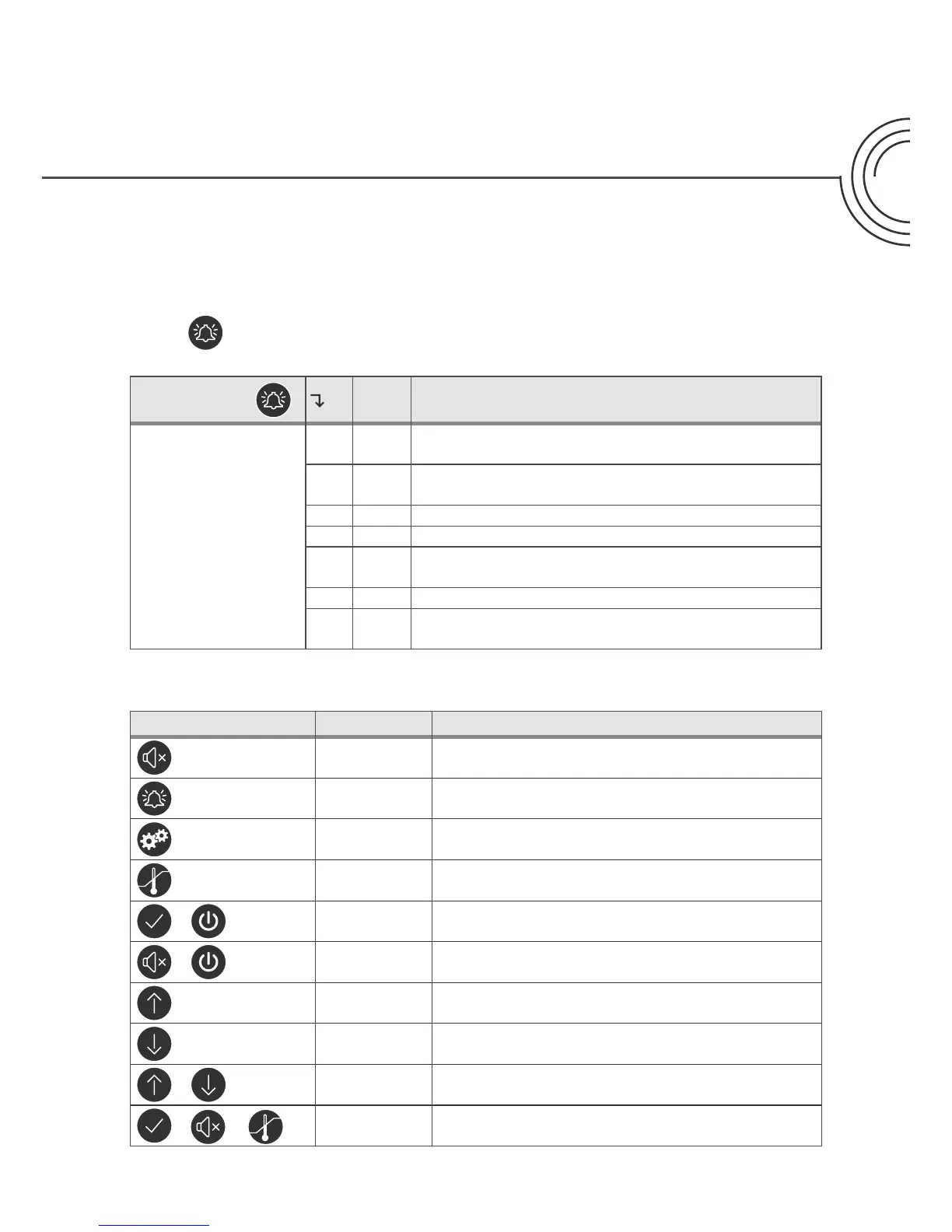
Press
for 3 seconds to enter the alarm settings
Alarm settings
Unit
HL [° C]
High temperature alarm limit.
Code for activated alarm [A2]
LL [° C]
Low temperature alarm limit.
Code for activated alarm [A3]
Hd [Min.] Delay of high temperature alarm
Ld [Min.] Delay of low temperature alarm
dA On/o
Door alarm.
Code for activated alarm [ A1]. [1=on / 0=o]
dAd [Min.] Delay of door alarm
bU On/o
Acoustic signal for alarm codes
[ A1], [ A2] and [ A3]. [1=on / 0=o]
Alarm settings
Buttons and useful shortcuts
Buttons: Press for: Function:
- Acknowledge alarm, mute for 5 minutes
> 3 seconds Access the alarm settings
> 5 seconds Access the parameter settings
> 3 seconds Adjust/show setpoint temperature value
+
> 3 seconds Manually start or stop a defrost
+
> 6 seconds Activating / deactivating the keypad lock
-
Show highest registered temperature spike (since
the last reset of alarm and temperature history)
-
Show lowest registered temperature spike (since
the last reset of alarm and temperature history)
+
> 3 seconds Clear and reset alarm and temperature history
+
+
+
> 6 seconds Restores factory settings
+



 To Next Page
 Loading...