FirstOperation
BatteryCharging
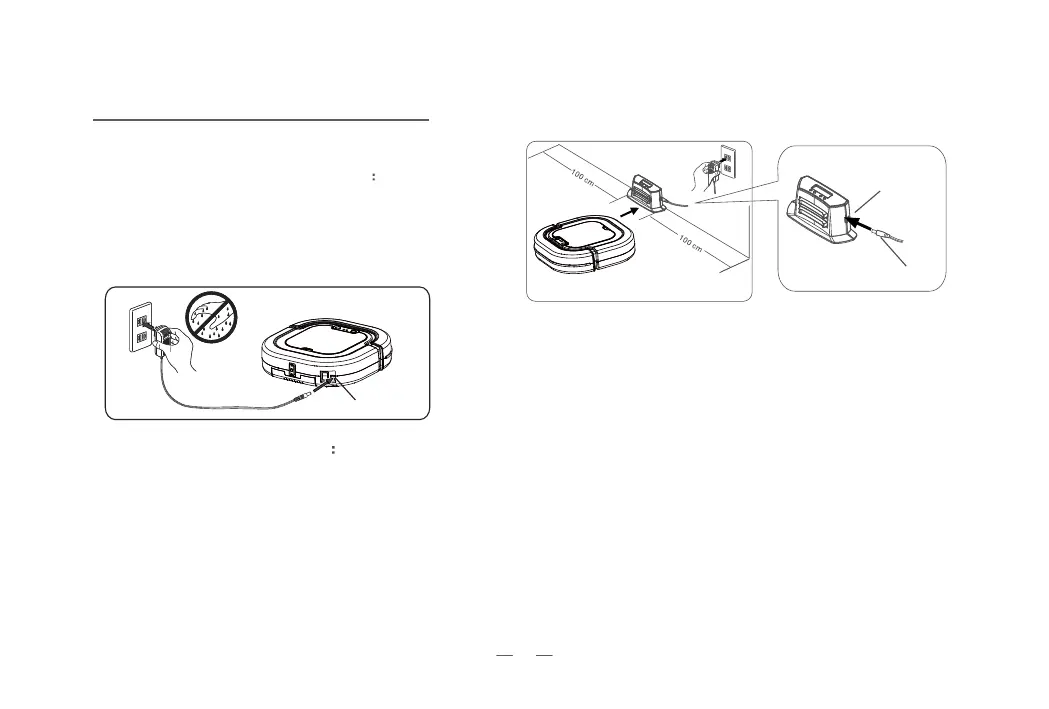
01 Direct charge with power adapter
1. Plug in the adapter. You will see a flashing green light
if it is being charged
successfully.
2. Green light on if fully charged.
3. Red light on, needs to be charged now.
02 Charge with docking station
1. Connect the adapter to docking station.
2. Make sure the electrodes of docking station and the
robot are connected.
3. You will see a flashing green light if it’s being charged
successfully.
Notice : If the robot be moved when it is at the
docking station, the power light will turn to green.
The robot will go back to docking station if it runs out
of battery.
03 Instructions of Power Light
1. Green Light Flashes : being charged
2. Green Light ON : fully charged
3. Red Light ON : needs to be charged
Power adapter plug
plughole
Plughole
Plug
4


 To Next Page