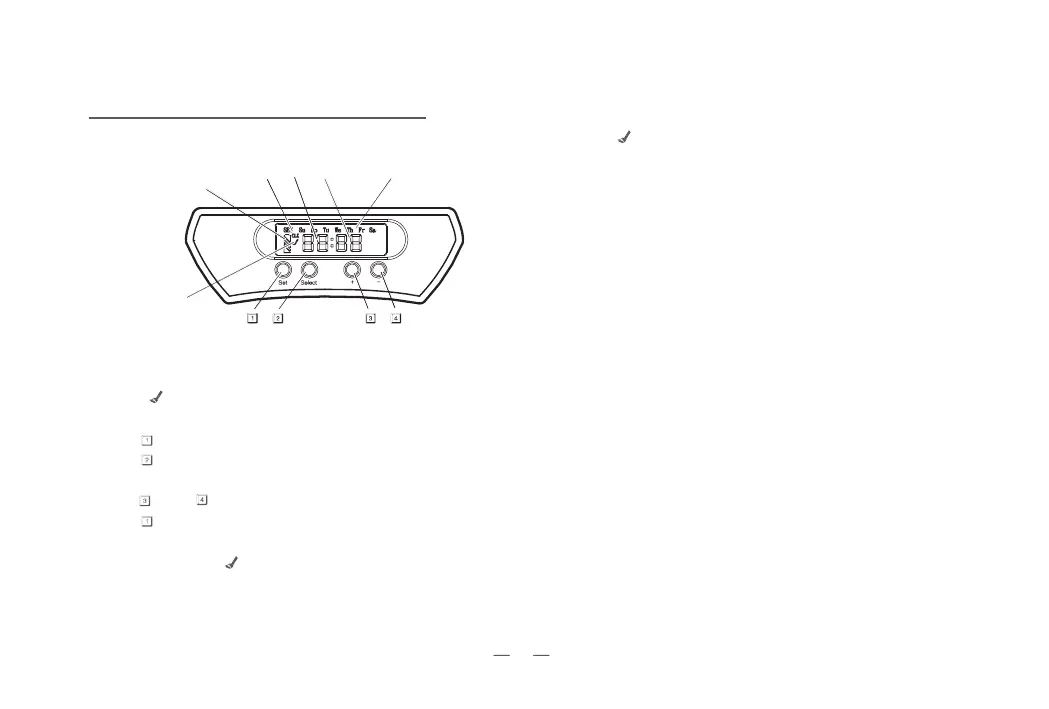
ControlPanelofDockingStation:
Formatofschedules:
Functionsofbuttons:
GeneralOperation
“Set” : Press ”Set”to switch between setting the “CLK”present
time and” ”the working schedule.
A. Set present time :
Press “Set” once, ”SET“ ,”CLK” will flash.
Press “Select” to switch aming time setting modes of Hour,
Minute,and Day of Week.
Press “+”and “-” for adjustment of the digits.
Press “Set”again when finish time setting.
B. Set working schedule :
Press “Set”twice, “ ”(on the left side of the screen)will flash.
Press ”Select” to switch among “Hour”/”Minute”/”Day of
Week” to do the setting as described in paragraph A.If no
time setting was done before,the screen will show”--:--”,
press”+” and “-” to adjust the digits.
***
With “ ”shown on the LCD display indicates the working
schedule is set completely.
“+” : Press “+”for increment adjustment purpose.
“-“ : Press “-“for decrement adjustment purpose.
a. Work everyday(Su-Sa light on).
b. Five days a week(Mo-Fr light on).
c. Six days a week(Mo-Sa light on).
d. Two days a week(Su and Sa light on ).
e. Once a week(Any one day of the week light on).
ON
Battery Indicator
Present Time Setting Hour Minute Day of Week
Completed setting for
time of cleaning
6



 To Next Page