FirstOperation
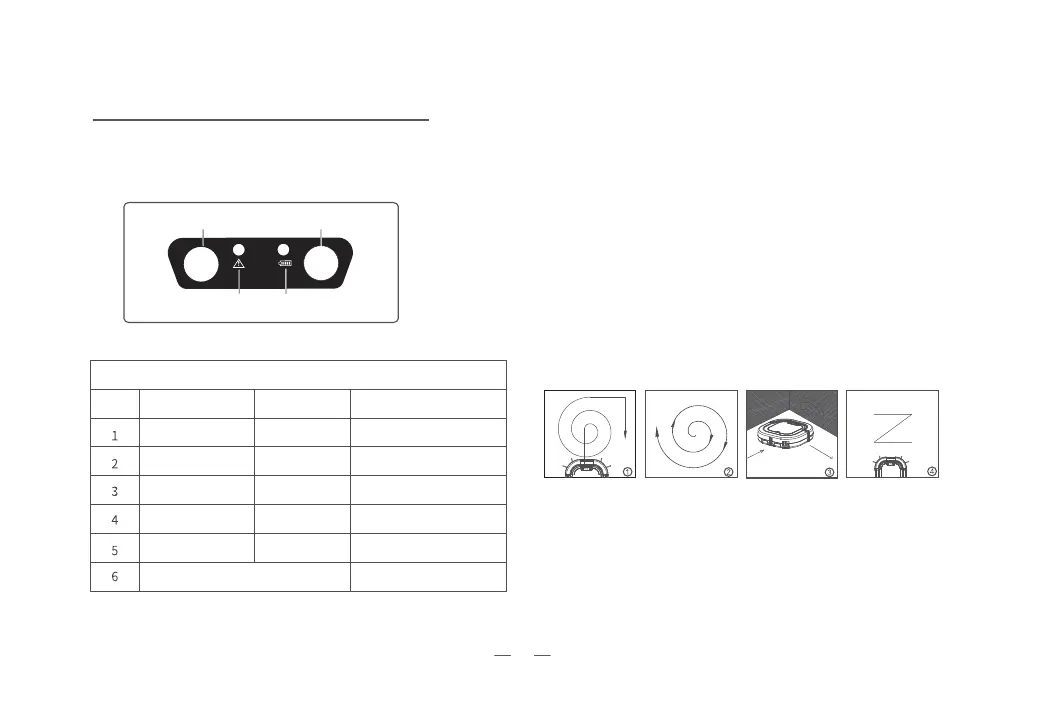
ControlPanel
Include 2 led lights,1 button,and a Remote control
signal receiver.
Malfunction Light(Red)
Battery Light(Green)
Start/Stop Button
Remote control
signal receiver
LED Light Instructions
Malfunction Light
(Red)
Battery Light(Green)
Robot Status
On
On
Flashes
On
On
On
Flashes
Off
Charging
Off
Off
Fully Charged
Low battery
Robot get hung
Side Brushes or big whell
get stuck
Abnormal Charging
Red light and green light flashes in turn
MultipleCleanModes
1. Automatic Clean Mode : The robot will clean your room and
switch to
different clean modes according to environment.
2. Spiral Clean Mode : Use this mode for main cleaning area,
and then the robot will spin
in circles to clean.
3. Edge Clean Mode : The robot will clean the room perimeter
and navigate around furniture and obstacles.
4. ”Z” Clean Mode : This “Zig-Zag” clean mode cleans fastly and
effectively in large areas if there’s not too much furnitures.
5


 To Next Page