11
Screen Operation
Welcome Screen
When first powered on, the welcome page will appear for 2 seconds, then jump to
operation mode automatically.
All system screens are divided into 5 MODES as per different functions. Scroll
through each mode by pressing the M key.
In each MODE, there may be more than one page to display. Press ↓ or ↑ buttons
to scroll through each page.
Ready Screen
MODE 1 Ready Screen is divided into 4 pages:
Page 1:
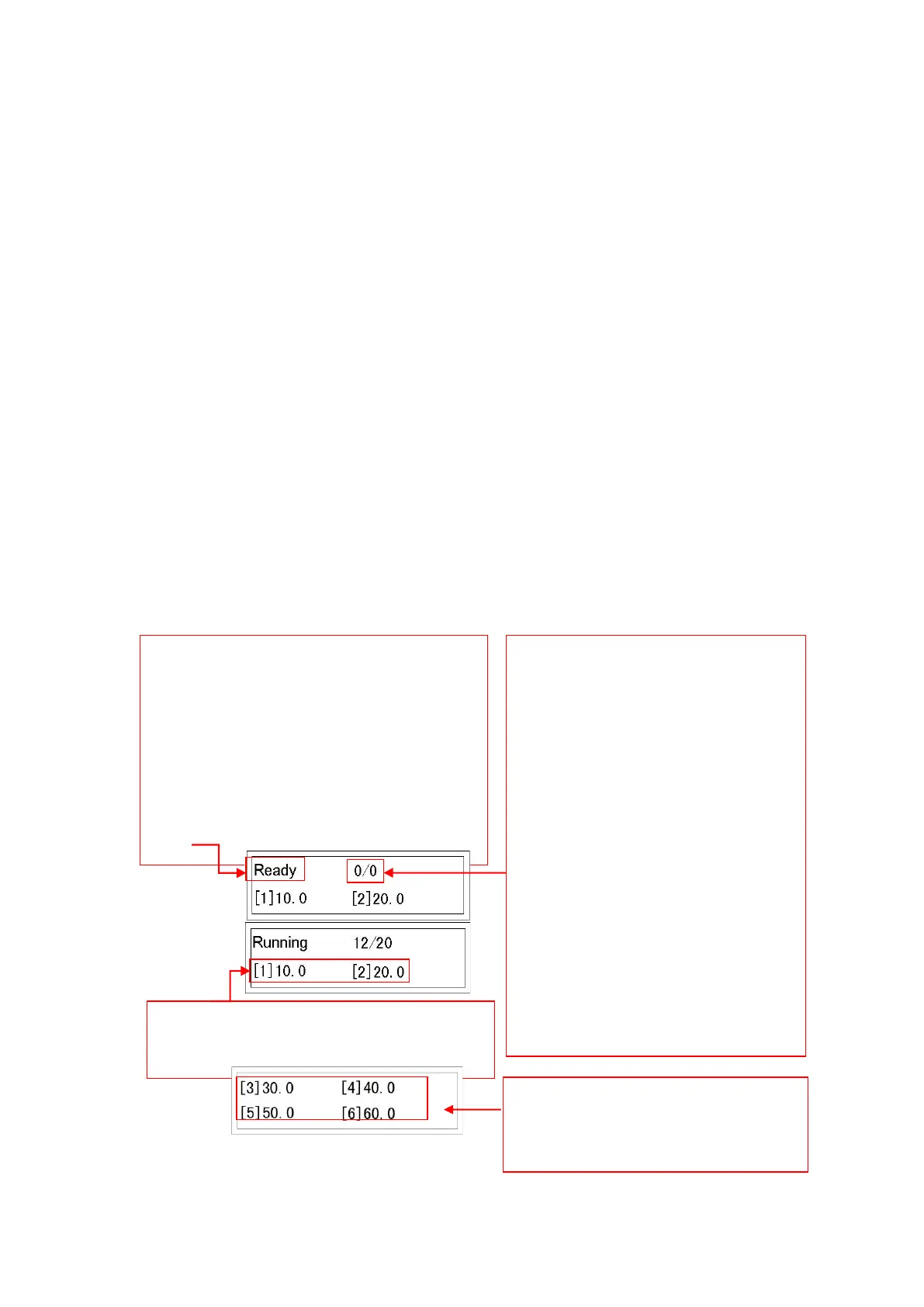
Ready: Screen editable
Running: Feed paper and crease
Note: In “Ready” state, press RUN or TEST
button to shift to “Running” state.
In “Running” state, press STOP to shift
to “Ready” state.
Displays first two creases programmed.
(Crease data can’t be input in this mode)
Press ↓ button to
shift to page 2, 3,
4…8 etc.
Fed Quantity: counts number of
sheets from 0. This is not
editable.
Pre-set Quantity: Input desired
batch of sheets. Press Enter to
confirm.
The machine will stop
automatically when Fed Quantity
matches Pre-set Quantity.
If Pre-set Quantity is 0, the
machine will not stop until STOP
is pressed or paper runs out.


 To Next Page