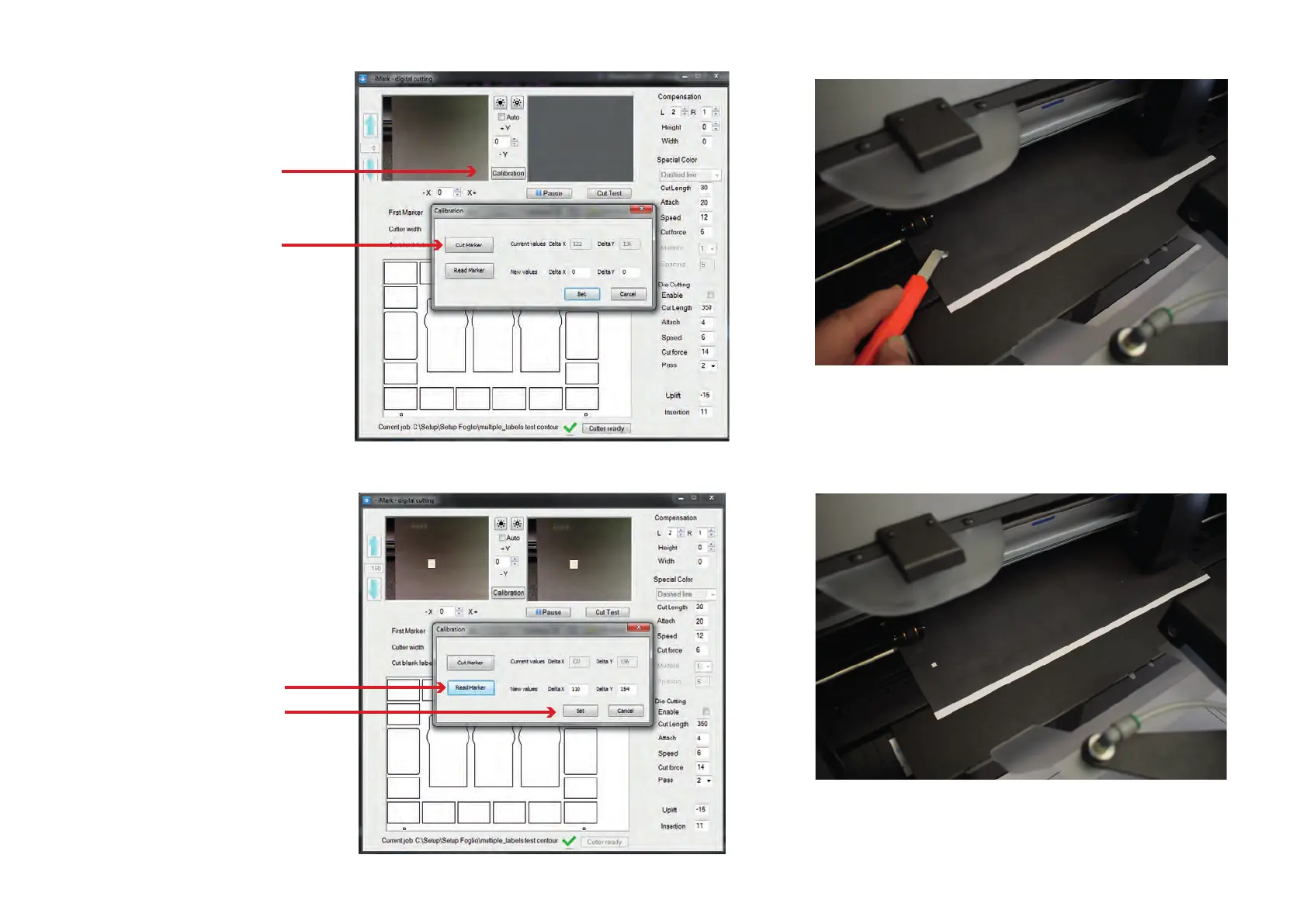
Press the ‘Calibration’ button
When you press ‘Cut Marker’
the plotter cuts a small square.
Press the ‘Read Marker’ button
to read the calibration values
When you press ‘Set’ you store
the values that are specic for
the camera installed on your
plotter.
Remove the small square adhesive to expose the white liner
When you have nished you can remove the calibration sheet
you have to rise the media lever, press the key #2 on the panel
then you can cut a sample sheet to check the alignment.
Press the ‘Calibration’ button
When you press ‘Cut Marker’
the plotter cuts a small square.
Press the ‘Read Marker’ button
to read the calibration values
When you press ‘Set’ you store
the values that are specic for
the camera installed on your
plotter.
Remove the small square adhesive to expose the white liner
When you have nished you can remove the calibration sheet
you have to rise the media lever, press the key #2 on the panel
then you can cut a sample sheet to check the alignment.



 To Next Page