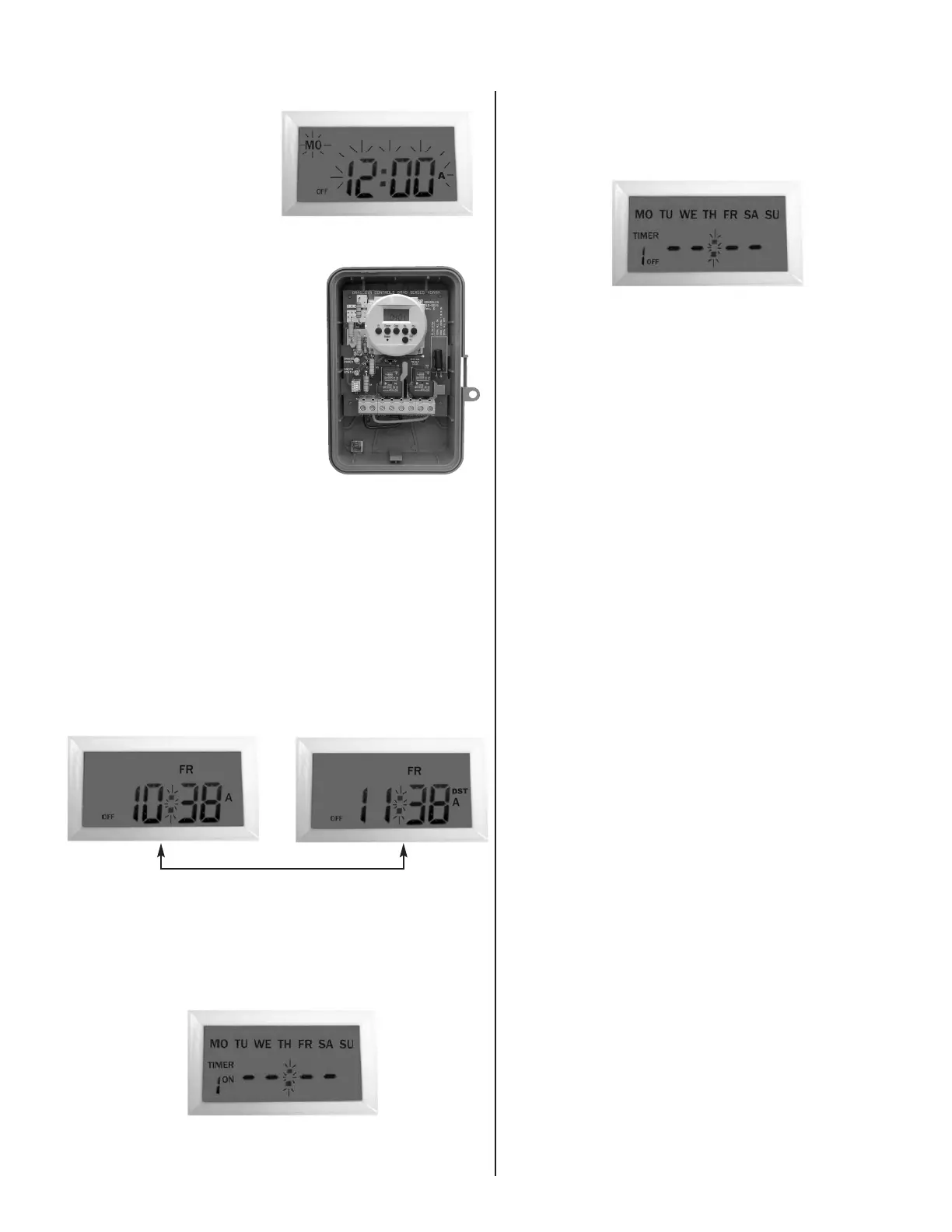
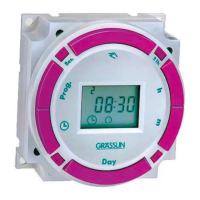
1. Using the h+ and m+ keys, enter the desired ON time. By
default, all days are indicated, thus all 7 days will be pro-
grammed. When complete, press the
Timer key once.
TIMER 1 OFF – – : – – will be displayed.
2. Using the
h+ and m+ keys, enter the desired OFF time. By
default, all days are indicated. When complete, press the
Timer key once.
3. If complete, press the
Clock key to return to current time
and day.
4. Note that a total of 7 ON and 7 OFF events can be pro-
grammed.
BLOCK PROGRAMMING
To change the day selection, simply keep pressing the Day
key and the display will change as follows:
Individual Day (MON, TUE, etc.) MON-WED-FRI
MON~FRI TUE-THU-SAT
SAT~SUN MON~WED
MON~SAT THU~SAT
MON~SUN
Follow the previous steps to complete programming.
REVIEWING PROGRAMS
1. To review the programs that have been entered, simply
press and release the
Timer key. Each time you do this,
you will be able to scroll thru the programs.
2. Any program can be edited simply by pressing the
h+, m+,
and
Day keys. Then press the Timer key in order to accept
the changes.
3. When complete, press the
Clock key to return to current
time and day.
DELETING PROGRAMS
1. To delete a particular program, simply press the Timer key
until the desired program is displayed.
2. Then press the
h+ and m+ keys until – – : – – is displayed.
Then press the
Timer key in order to delete this particular
program.
3. When complete, press the
Clock key to return to current
time and day.
MANUAL OVERRIDE
Pr
essing the manual over
ride key will alternate the unit ON or
OFF.
INITIAL
ST
AR
TUP
When you initially program the unit, it may be necessary to
pr
ess the manual over
ride key as the unit will not look back
to determine if it should be ON. For example, if the current
time is 2:00PM and you just programmed the unit to turn ON
at 1:00PM, you will need to pr
ess the manual override key to
tur
n it ON. Ther
eafter
, the unit will r
esume normal operation
(automatic).
INITIAL SETUP
Apply power to the unit as
i
llustrated in the wiring dia-
g
ram. Then push the
R
eset
key with a paper clip or
pencil tip. The display will
flash as shown.
Press and release
Clock
button to start setting the time (display will stop flashing)
SETTING CURRENT TIME
1. Press and HOLD the Clock key
d
uring this entire procedure.
2. Press the
h+ key to advance the
hours.
3. Press the
m+ key to advance the
minutes.
4. Press the
Day key to advance
the day.
5. If any keys are pressed for a pro-
longed period, the display will
advance rapidly.
6. Release the
Clock key once the
time and day have been entered.
Now the timer is in operation and ready to be programmed.
The colon “:” after the hours will continuously flash indicating
that the time is advancing.
DAYLIGHT SAVINGS TIME ADJUSTMENT
1. To enter Daylight Savings Time, simply press both the h+
and m+ keys simultaneously.
2. The display will indicate “DST” and advance the hour by
one.
3. To end Daylight Savings Time, simply press both the
h+
and m+ keys simultaneously. “DST” will disappear from the
display and the hour will be increased by one.
PROGRAMMING ON/OFF EVENTS
Press the Timer key once. The display will change as shown
to the right.
TIMER 1 ON – – : – – appears.
h+ and m+ keys
3
G
M40E
DTA40E2 PROGRAMMING INSTRUCTIONS








 To Previous Page