9
ABOUT YOUR SCANNER
Once you understand a few simple terms used in this
manual and familiarize yourself with your scanner’s fea-
tures, you can put the scanner to work for you. You sim-
ply determine the type of communications you want to
receive, then set the scanner to scan them.
A frequency is the receiving signal location (expressed in
kHz or MHz). To find active frequencies, you can use the
search function.
You can also search the One Touch Search Banks, which
are preset groups of frequencies categorized by type of
service.
When you find a frequency, you can store it into a pro-
grammable memory location called a channel, which is
grouped with other channels in a channel-storage bank.
You can then scan the channel-storage banks to see if
there is activity on the frequencies stored there. Each time
the scanner finds an active frequency, it stays on that
channel until the transmission ends.
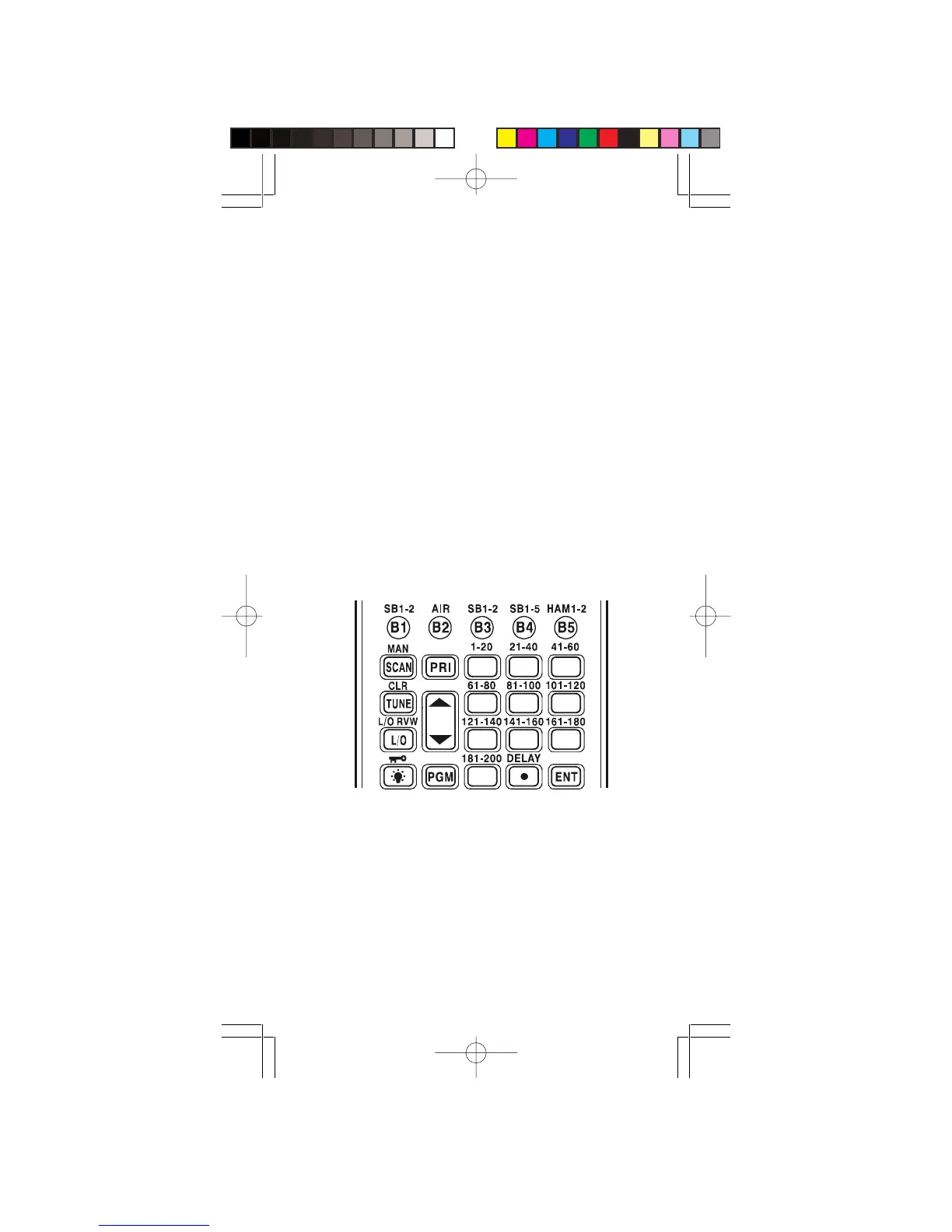
A LOOK AT THE KEYPAD
B1/SB1-2—Lets you search the scanner’s
preprogrammed search band 1.
B2—Lets you search the scanner’s preprogrammed
search band 2.
B3/SB1-2—Lets you search the scanner’s
preprogrammed search band 3.
B4/SB1-5—Lets you search the scanner’s
preprogrammed search band 4.
B5/HAM—Lets you search the scanner’s preprogrammed
amateur radio band.
1
4
7
0
2
5
8
3
6
9
Manual01.p65 2003/03/11, 15:46Page 9 AdobePageMaker6.5J/Win



 To Next Page