REMOTE CONTROL
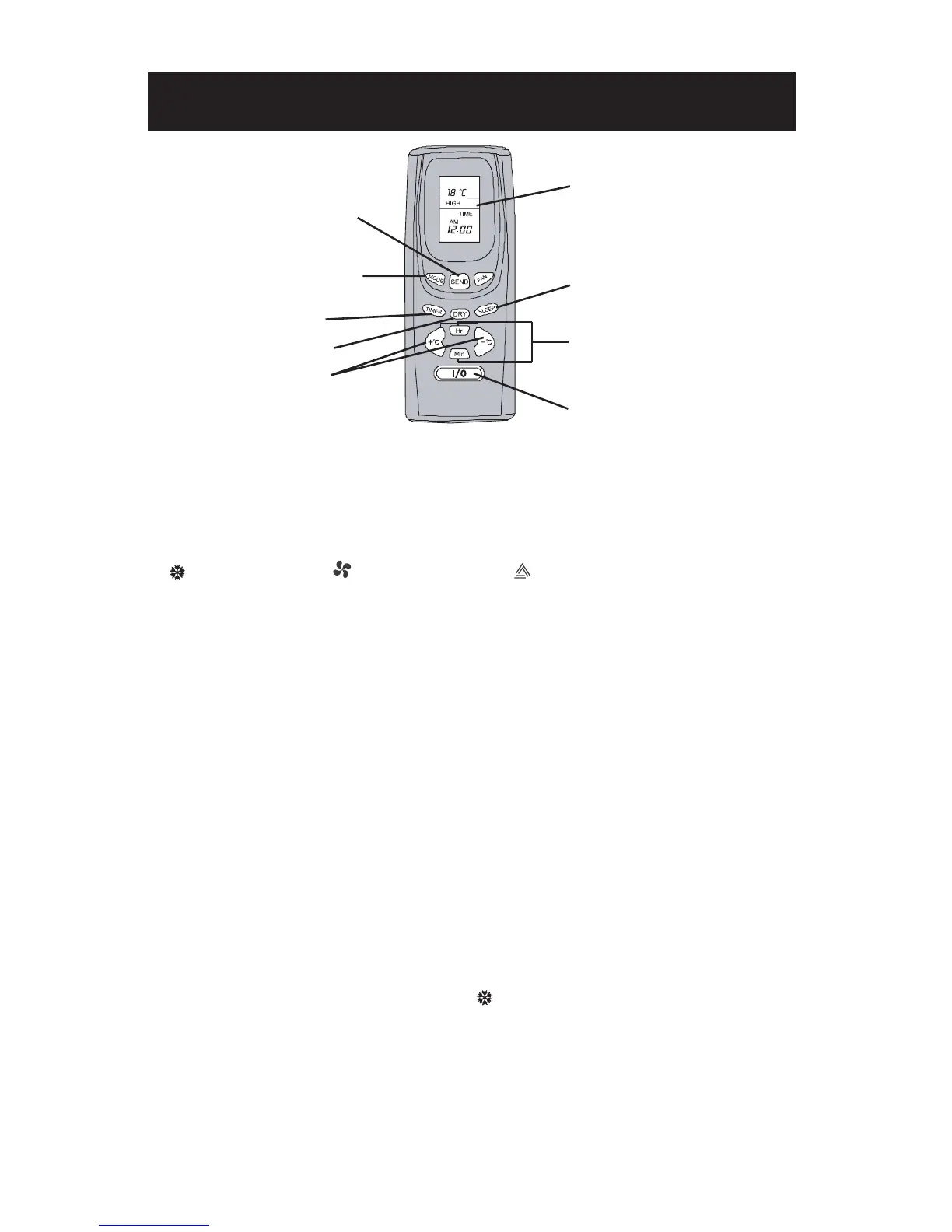
MODE : to set the air
conditioner in AUTO, COOL
or FAN mode
SLEEP : to set the air
conditioner in SLEEP
mode
I/O (ON/OFF) : to start or
close the air conditioner
TIMER : to set the timer or
the clock (time)
DRY : to set in
DEHUMIDIFYING mode
SEND : initiate all operations
of the air conditioner
+oC / -oC :
to set temperature
To set the number of hours
when the timer is on or the
time (clock)
LCD DISPLAY
FAN : to set fan speeds
*Product may differ from illustratiion.
TO START OR STOP THE AIR CONDITIONER :
Press on the I/O (ON/OFF) button.
TO SET THE MODE :
• Press on MODE until the matching icon flashes on the remote LCD display :
for COOLING mode, for FAN ONLY mode ou for the AUTO mode.
• Press on SEND to initiate the operation on the air conditioner ; a “beep” will confirm
transmission and the icon will stop flashing.
*
IMPORTANT: some screen may display a “sun” icon for HEATING mode; this mode is available only
on some models.
TO SET FAN SPEED :
• Press on FAN and choose the speed : HIGH, M (Medium) or LOW - each speed icon will flash.
• Press on SEND ; a “beep” will confirm transmission and the speed icon will stop flashing.
TO SET TEMPERATURE :
• Press on +
°
C or -
°
C to set the desired température - the temperature icon will flash. The
temperature is increased or decreased by 1
°
each time you press on these buttons.
The temperature settings range from 16
°
C to 30
°
C (61
°
F to 86
°
F).
• Press on SEND ; a “beep” will confirm transmission and the temperature icon will stop flashing.
NOTE : all the above operations can be keyed in on the remote control before pressing on SEND
to initiate the operations on the air conditioner.
EX. : to set your air conditioner in COOLING mode, at HIGH fan speed and at
22
°
C :
• press on MODE until the COOLING flashing icon shows on the LCD display ;
• then, press on FAN until the HIGH flashing icon shows on the display - when pressing on FAN,
the cooling icon will stop flashing;
• then, press on +
°
C
or -
°
C
until you reach 22
°
C - the temperature icon will flash and the FAN
icon will stop flashing ;
• to complete, press on SEND - a “beep” will confirm transmission and the temperature icon will
stop flashing.
12


 To Next Page