8
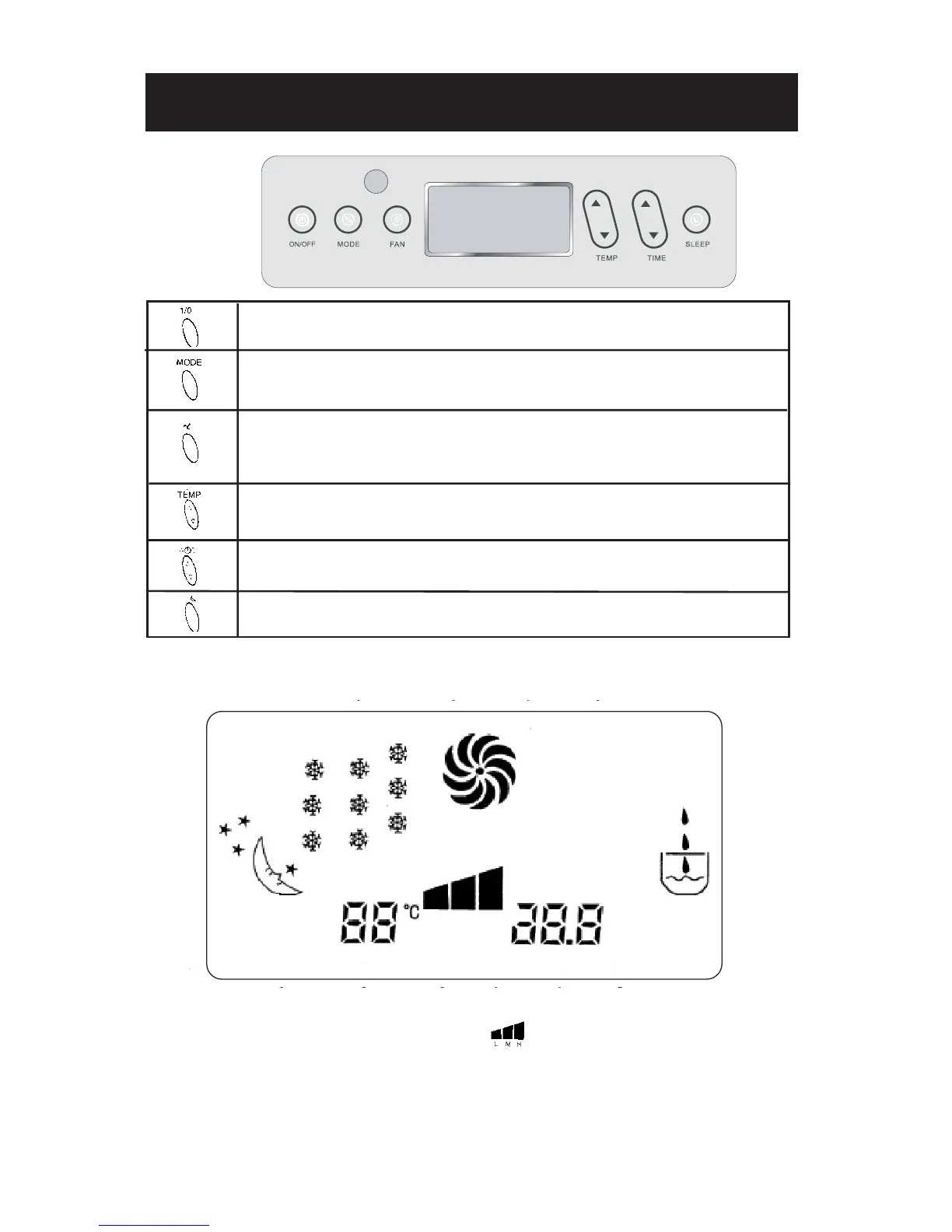
CONTROL PANEL AND LCD DISPLAY
Press this button to turn the unit on or off.
Press this button to select one of the following modes : COOL, FAN, DRY or
AUTO.
In COOL, FAN or AUTO mode, press this button to select the fan speeds (LOW
- MEDIUM - HIGH). In DRY mode, the fan speed cannot be adjusted.
To set temperature in cooling or auto mode.
To set the time (# of hours) when the timer is on.
Sets the air conditioner in SLEEP mode (automatic shut off).
SLEEP : In sleep mode (automatic shut off)
COOL : In cooling mode
FAN : In fan only mode
DRY : In dehumidifying mode
SET TEMP : Displays the set temperature
AUTO : Auto mode
: Fan speeds -
LOW/MEDIUM/HIGH
SET TIME : Displays the hours set when
timer is on
ON : Timer is on
OFF : Timer is off
LCD DISPLAY
CONTROL
PANEL
*HEATING mode is optional on some models.
FAN


 To Next Page