Wall Mounted Type
Fan Coil Unit Service Manual
23
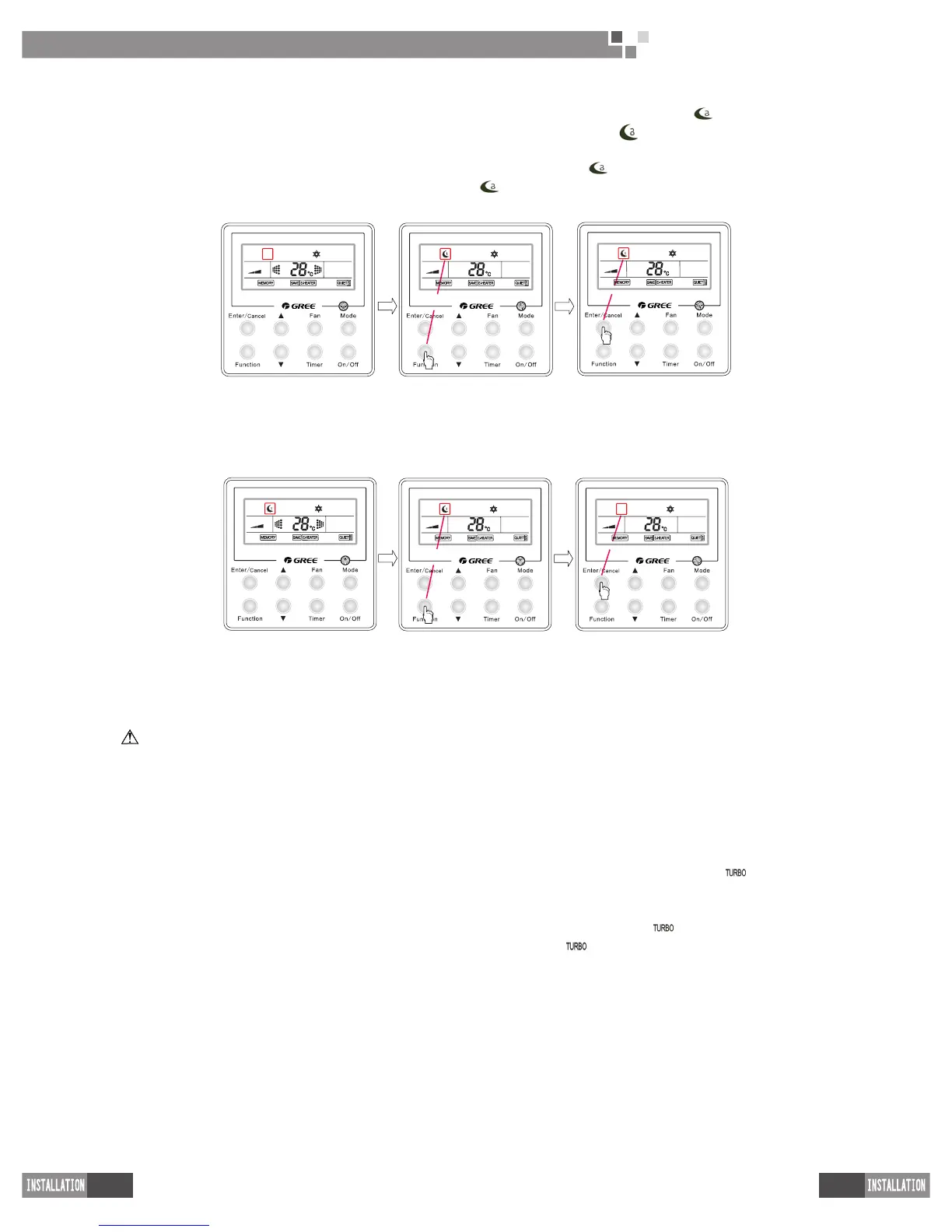
(2) How to activate the “
Sleep
” function:When the unit is “
On
” and the “
Sleep
” function is deactivated, press
the “
Function
” key to go to the setting state of the “
Sleep
” function with the symbol“ ”ashing, after that,
press the “
Enter/Cancel
” key to make a conformation and then the symbol “ ” will stop ashing.
(3) How to deactivate the “
Sleep
” function
:
When the unit is “
On
” and the “
Sleep
” function is activated, press “
Function
” to go to the setting state of the sleep function with the symbol“ ”ashing, after that, and then press “
Enter/Cancel
” to make a conrmation and the symbol “ ” will disappear.
See Fig.14 for how to activate the “
Sleep
” function.
When the “Sleep” function
is not activated
Press “Function” to go to
the setting status
Press “Enter/cancel” to
activate the “Sleep” function
Fig.14 How to Activate the “
Sleep
” Function
See Fig.15 for how to deactivate the“
Sleep
”function.
When the “Sleep” function
is activated
Press “Function” to go to
the setting status
Press “Enter/cancel” to
deactivate the “Sleep”
function
Fig.15 How to Deactivate the “
Sleep
” Function
NOTE
①
The default setting for the “
Sleep
” function is “
Off
” when the unit is powered on again after power failure.
②
This function is unavailable under the “Fan” mode.
4�8 Turbo
“
Turbo
” function: It is a function to make the temperature of the conditioned air approach the set value
rapidly through high-speed running of the fan under either “
Cool
” or “
Heat
” mode.
How to active the “
Turbo
” function: under the “
Cool
” or “
Heat
” mode, when the “
Turbo
” function is “
Off
”,
press the “
Function
” key to go to the setting status of the “
Turbo
” function with the symbol“ ” ashing, after
that , press the “
Enter/Cancel
” key to make a conrmation and then the symbol stops ashing.
How to deactivate the “
Turbo
” function:When the unit “
On
” and the “
Turbo
” function is activated, press the
“
Function
” key to go to the setting state of the “
Turbo
” function with the symbol“ ”ashing, after that, press
the “
Enter/Cancel
” key to make a conrmation and then the symbol“ ”disappear .



 To Next Page