Wall Mounted Type
Fan Coil Unit Service Manual
26
4�10 E-Heater
“
E-heater
” Function: Under the “
Heat
” mode, the heating efciency can be improved greatly by activating
the auxiliary electric heater.
How to active the “
E-heater
” function: Under the “
Heat
” mode, press the “
Function
” key to go to the setting
state with the symbol“ ” ashing, after that, press “
Enter/Cancel
” to make a conrmation and then the
symbol will stop ashing.
How to deactivate the “
E-heater
” function: When the “
E-heater
” function is activated, press the“
Function
”
key to go to the setting state of the “
E-heater
” function with the symbol“ ”ashing, after that, press the “
Enter/Cancel
” key to deactivate this function and then the symbol“ ”will disappear.
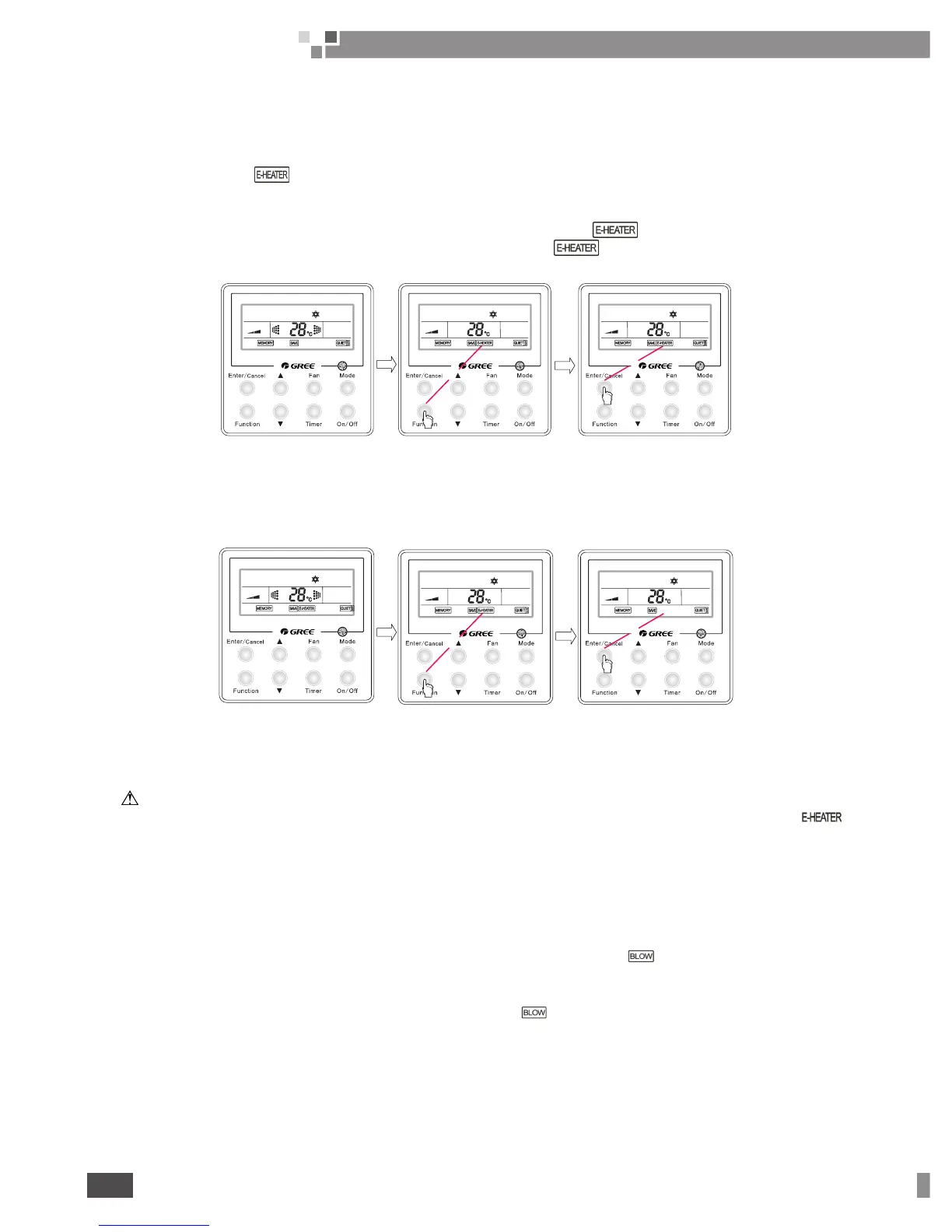
See Fig. 20 for how to activate the “
E-heater
” function.
Press “Function” to go
to the setting status
When the “E-heater”
function is not activated
Press “Enter/cancel” to
activate the “E-Heater”
function
Fig. 20 How to Activate the “
E-heater
” function
See Fig.21 for how to deactivate the “
E-heater
” function.
When the “E-heater”
function is activated
Press “Function” to go to
the setting status
Press “Enter/cancel” to
dectivate the “E-Heater”
function
Fig.21 How to Deactivate the “
E-heater
” Function
NOTE:
①
The “
E-heater
” function is unavailable under the “
Cool
”, “
Dry
” or “
Fan
” mode and the symbol “ ”
will not be displayed on the LCD under those modes.
②
When the unit is switched to the “
Heat
” mode, the default status of the “
E-heater
” function is “
On
”.
4.11 Blow
“
Blow
” Function:It is intended to dry the moisture inside the evaporator after the unit is turned on to prevent
mould growing there.
How to activate the “
Blow
” function:Under the “
Cool
” and “
Dry
” mode, when the “
Blow
” function is not
activated, press the “
Function
” key to go to the setting state with the symbol“ ”ashing, and then press the
key “
Enter/Cancel
” to make a conrmation.
How to deactivate the “
Blow
” function:When the unit is “
On
” and the “
Blow
” function is activated, press “
Function
” function to go to the setting state with the symbol “
”
ashing, and then press the “
Enter/Cancel
”
key to deactivate this function.



 To Next Page