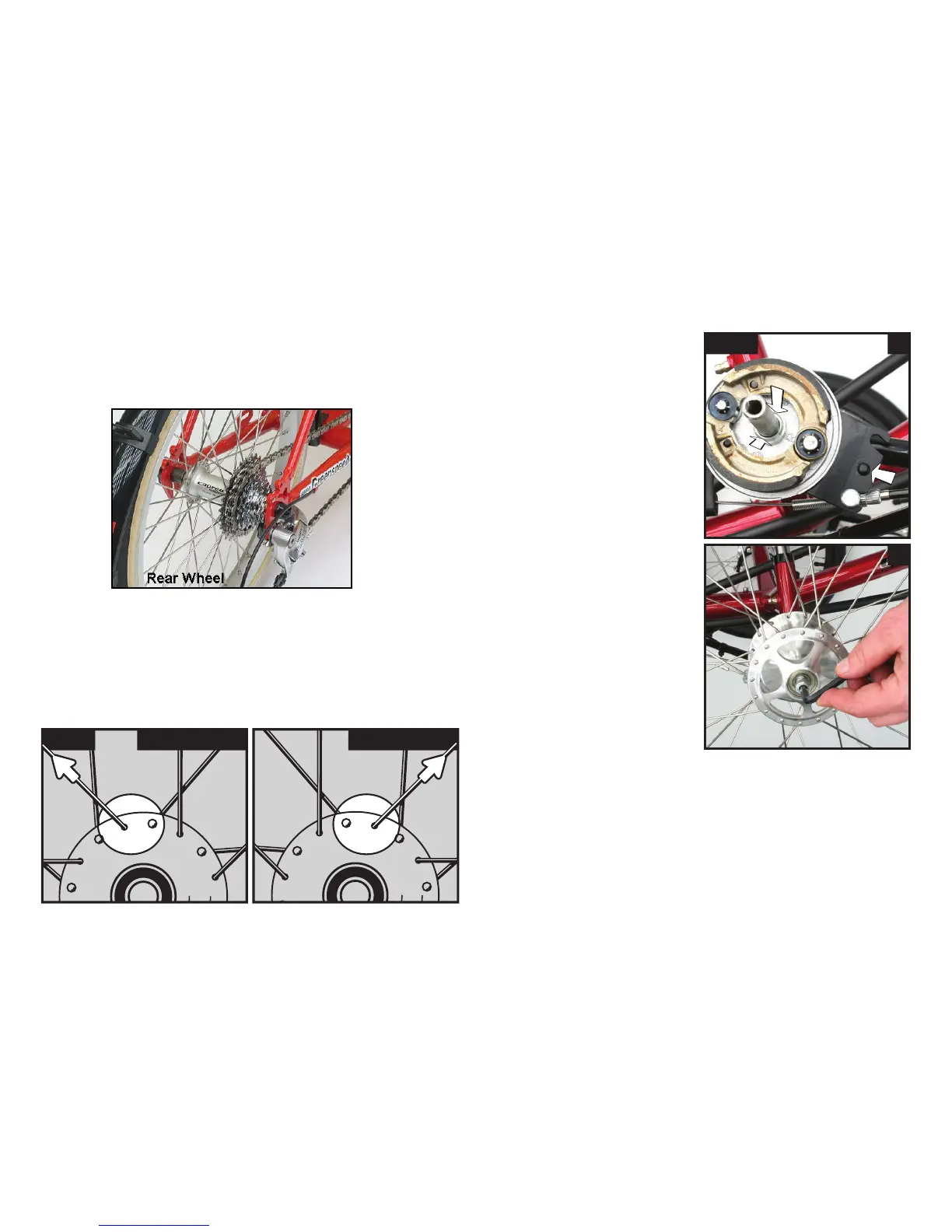
Next you install your wheels. Put the rear wheel in first and
tighten up the quick release. The cogs go on the right hand side of
the trike. That is, as if you are seated in the trike ;-)
fig 3 left wheel right wheel
Outside spoke points to the left Outside spoke points to the right
fitting your wheels
Now install the front wheels. Fig 3a and 3b, shows that there are
left and right wheels. They can be identified by looking at the top
of the hub and following the top outside spoke (that is the spoke
with its head on the inside). When this spoke goes to the right,
it is the right wheel, and vice versa! Be sure to try and install
them this way in the future, as this will prolong spoke life.
fig 4 a
b
~ drum brakes
The brake assembly backing
plate should be checked that
it is sitting hard against the
axle and that the retaining pin
is engaged (fig.4a).
Now is also a good time to
hook up brake cable (fig 16).
~ disc brakes
Disc brake wheels slide straight onto the axle the same way drum
brake hubs do and the screw at the end holds them in place.
The exception however is our hollow alloy axle disc brake set up.
Hollow alloy axles use a different method where by the alloy axle
goes through the hub and then into the kingpin assembly.
Use the provided short cap
screw to hold the wheel on
(fig.4b). Some models are
also provided with a shaped
hub cap washer.
Do the same on the other side.
5


 To Next Page