18
FEATURES AND CONTROLS
■CONSOLE
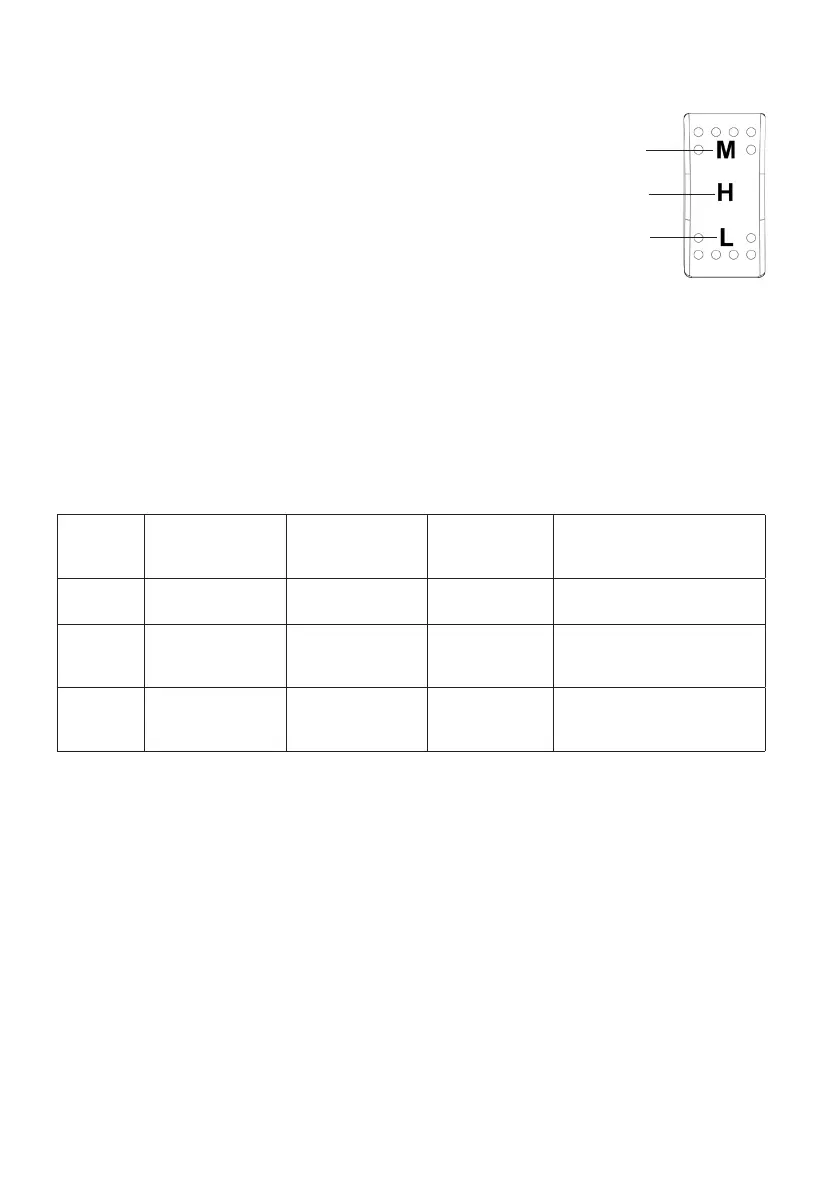
Drive Mode Switch
CAUTION! Changing the drive mode switch position
while driving could result in an automatic increase
or decrease in speed without a change to accelera-
tor pedal pressure. Press the top of the switch to se-
lect high mode. Use high mode for most trail-riding
conditions. The vehicle will operate at speeds up to
30 MPH (48 km/h).
Maximum Range
High
Low
Press the bottom of the switch to select low mode. Low mode is recommended for short-term
operation in extreme load conditions. Use low mode when towing, hauling loads or maneuvering
over obstacles. Speed will be limited to a maximum of 10 MPH (16 km/h) and regenerative braking
increases to improve control in aggressive terrain. Return the mode switch to high mode for normal
operation.
Move the switch to the center position to select the maximum range mode. Use this mode to
operate the vehicle a greater distance or for a longer time period. This mode limits both speed and
torque to obtain the maximum driving range.
Mode Maximum
Speed
Torque (percent
of Maximum
torque)
Deceleration
(regenerative
braking)
Application
High 30 MPH (48.3
km/h)
70% Minimum Trail riding
Max
Range
20 MPH (32.2
km/h)
50% Minimum Whenever possible, to
maximum driving range of
battery pack
Low 10 MPH (16.1
km/h)
100% Maximum Towing, hauling loads,
driving on steep hills or
aggressive terrain



 To Next Page