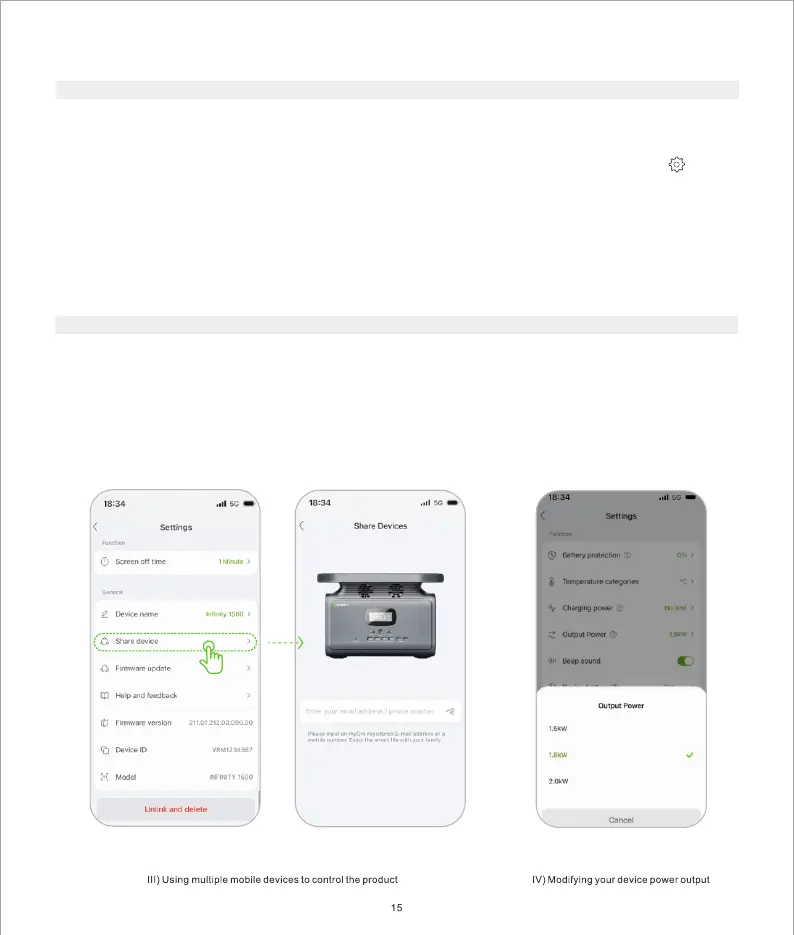
III) Using Multiple Mobile Devices to Control the Product
If multiple users need to remotely control the product, the master account needs to authorize other MyGro
accounts to allow other mobile devices to control the product.
1. Go to Device, select the product from the device list to enter the product details, and then click the
to enter the setting page.
2. Select Share device, enter the account ID of the device to be shared, and send a pairing invitation.
3. After the invited account accepts the invitation, the device is shared successfully.
* If the master account unpairs from the device, the associated shared account will be un-paired simultaneously
and the device cannot be controlled remotely.
The default power output is set to be 1800W, and it's allowed to be modified to a maximum of 2000W in the
app as illustrated below. Maximizing your power output will cause extra heat which requires a faster fan speed
for better cooling.
IV) Modifying Your Device Power Output
The WIFI RF working frequency is 2400-2483.5 Mhz. Maximum output power 18±2 dBm.


 To Next Page