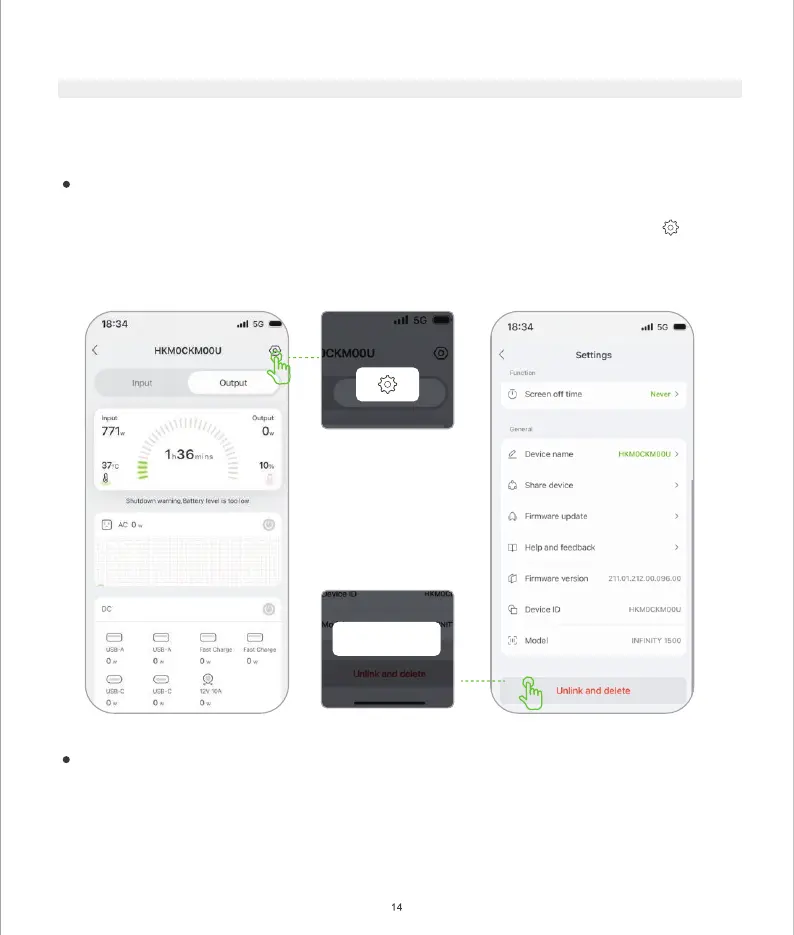
Unlink and delete
II) Re-pairing the Product with New Mobile Devices
If the device is already bound to a mobile device, you need to un-pair the product from the current device before
re-pairing it to the new mobile device. After re-pairing, you can use the new mobile device to remotely control
the product.
Un-pair from the existing device.
Method 1: Un-pair using APP
a) Go to Device select the product from the device list to enter the product details, and then click to enter
the setting page.
b) Click Remove Device and confirm.
Method 2: Reset Bluetooth/Wi-Fi to un-pair
a) Press and h
old the Wi-Fi Reset button on the device for 3 seconds until you hear a beep. The device
pairing record is cleared successfully.
After successfully un-pairing the device, please login to the APP on the new mobile device to pair the device.
(Please refer to the steps in
I.Pairing the Product with Your Device).


 To Next Page