GROWATT NEW ENERGY TECHNOLOGY CO.,LTD - Powering Tomorrow
16
WiFi mode
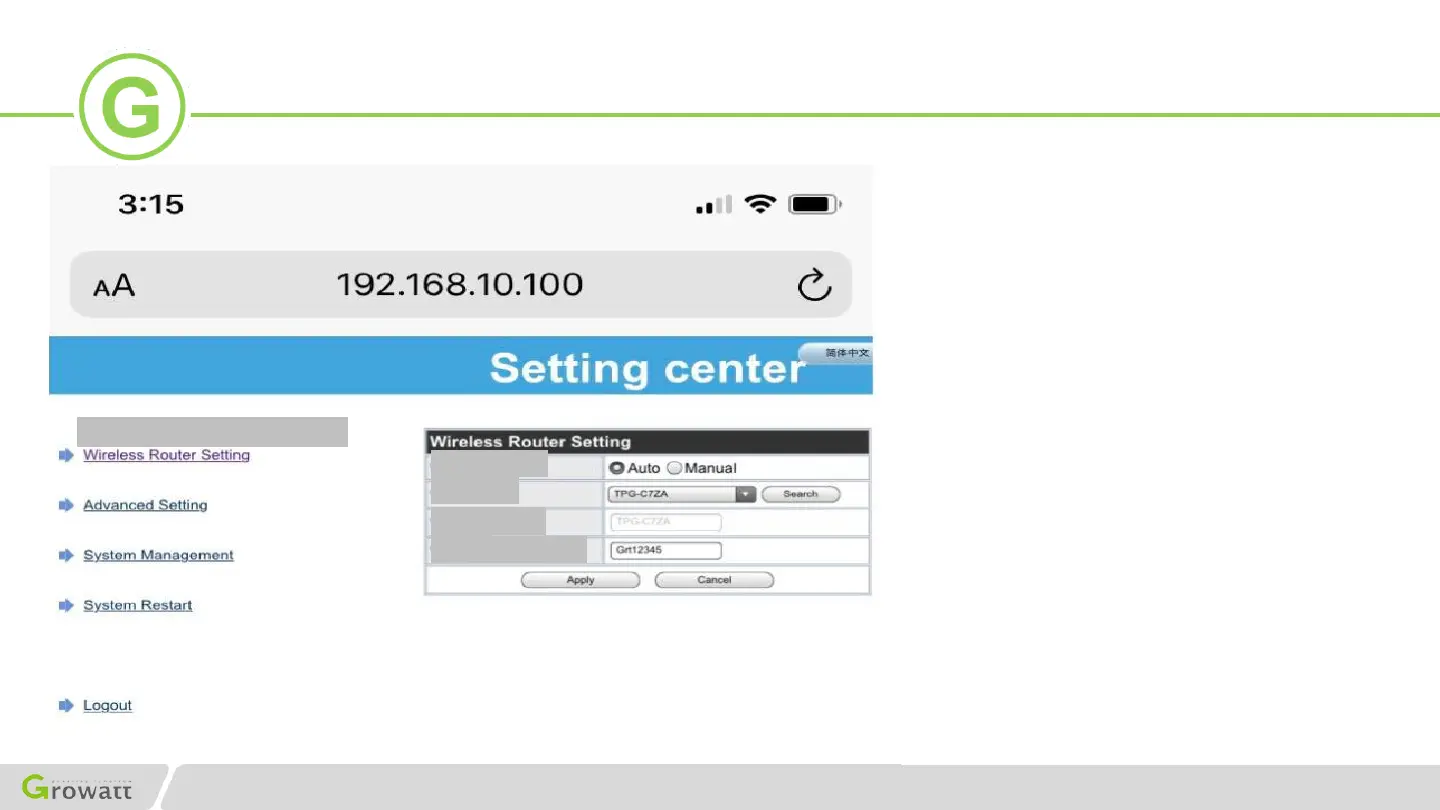
WiFi list
WiFi name
input
WiFi password
Wireless Router Setting
Auto Manual
1.Please choose‘Auto’mode.
1.1 Please choose‘Auto’. Click Search,
when the search is complete, select the
your home Wifi name, and then fill in the
password.
1.2 Please double check you enter the
correct password as these parts are
capital sensitive.
1.3 Please click on‘Apply’if you are
sure the name and password are right.
Shinephone App configuration(Method 2 / AP MODE)
2.Please choose‘Manual’mode.
2.1 Manually input 2.4GHz + 5GHz dual
band or 2.4Ghz Wifi name and password
in‘Wifi’.
2.2 Please double check you enter the
correct Wifi name and password as these
parts are capital sensitive.
2.3 Please click on ‘Apply’ if you are
sure the name and password are right.


 To Next Page
 Loading...