EasyManua.ls Logo

Grundig Sonoclock 690 - User Manual

Grundig Sonoclock 690
7 pages
Print Icon
To Next Page IconTo Next Page
Loading...
ELECTRONIC CLOCK RADIO
Sonoclock 690
NL
DE
NO
EN
DA
FR
SV
IT
TR
ES
FI
RU
Question and Answer IconNeed help?

Do you have a question about the Grundig Sonoclock 690 and is the answer not in the manual?

Summary

Safety and Information

General Safety Precautions

Guidelines for device placement, usage in moderate climates, and protection from moisture.

Technical Data

Details on noise suppression, compliance directives, power supply, output, frequency range, and dimensions.

Environmental Note

Information on recycling, proper disposal of electrical equipment, and environmental protection.

Overview of Controls

Power and Channel Controls

Functions of ON/OFF, channel selection (1-5, 6-10) buttons.

Display Information

Understanding the display content including station frequency, volume, and time.

Alarm and Timer Functions

Operation of MODE and TIMER buttons for alarm and timer settings.

Volume and Device Components

Adjusting volume with VOL. controls and identifying back/bottom device parts.

Time and Station Setting

Using UP/DOWN for manual tuning and MEMO SET for saving stations/time.

Current Supply and Battery

Connecting the Mains Cable

Procedure for connecting the power cord and ensuring correct voltage.

Inserting Back-up Battery

How to install a backup battery for saving clock and alarm times during power failure.

Battery Environmental Disposal

Guidance on environmentally sound disposal of used batteries.

Installation and Settings

Device Setup and Mounting

Steps for setting up the device and mounting it using the provided holder.

Setting the Time

Instructions for setting the current time using the ON/OFF and MEMO SET buttons.

Setting Radio Stations

Procedure for searching and saving radio stations to channel positions.

Radio Mode Operation

Radio Reception

How to switch on the device and select channel positions for radio reception.

Adjusting Volume

Using the + VOL. and - VOL. buttons to adjust the audio volume.

Switching Display Content

Changing the display between current time and radio station frequency using the MODE button.

Alarm Mode

Setting Alarm Time and Type

Procedure to set alarm time and select between radio station or signal tone alarms.

Checking and Cancelling Alarms

How to check the set alarm time and cancel the alarm for the day.

Switching Off Alarm Function

Instructions for permanently disabling the alarm function while retaining saved times.

Timer Mode

Setting the Alarm Timer

Programming a reminder with a signal tone for a specified duration.

Summary

Safety and Information

General Safety Precautions

Guidelines for device placement, usage in moderate climates, and protection from moisture.

Technical Data

Details on noise suppression, compliance directives, power supply, output, frequency range, and dimensions.

Environmental Note

Information on recycling, proper disposal of electrical equipment, and environmental protection.

Overview of Controls

Power and Channel Controls

Functions of ON/OFF, channel selection (1-5, 6-10) buttons.

Display Information

Understanding the display content including station frequency, volume, and time.

Alarm and Timer Functions

Operation of MODE and TIMER buttons for alarm and timer settings.

Volume and Device Components

Adjusting volume with VOL. controls and identifying back/bottom device parts.

Time and Station Setting

Using UP/DOWN for manual tuning and MEMO SET for saving stations/time.

Current Supply and Battery

Connecting the Mains Cable

Procedure for connecting the power cord and ensuring correct voltage.

Inserting Back-up Battery

How to install a backup battery for saving clock and alarm times during power failure.

Battery Environmental Disposal

Guidance on environmentally sound disposal of used batteries.

Installation and Settings

Device Setup and Mounting

Steps for setting up the device and mounting it using the provided holder.

Setting the Time

Instructions for setting the current time using the ON/OFF and MEMO SET buttons.

Setting Radio Stations

Procedure for searching and saving radio stations to channel positions.

Radio Mode Operation

Radio Reception

How to switch on the device and select channel positions for radio reception.

Adjusting Volume

Using the + VOL. and - VOL. buttons to adjust the audio volume.

Switching Display Content

Changing the display between current time and radio station frequency using the MODE button.

Alarm Mode

Setting Alarm Time and Type

Procedure to set alarm time and select between radio station or signal tone alarms.

Checking and Cancelling Alarms

How to check the set alarm time and cancel the alarm for the day.

Switching Off Alarm Function

Instructions for permanently disabling the alarm function while retaining saved times.

Timer Mode

Setting the Alarm Timer

Programming a reminder with a signal tone for a specified duration.

Overview

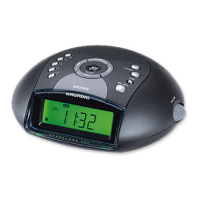
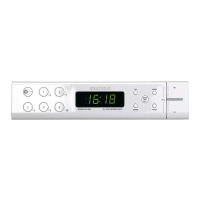
The Grundig Sonoclock 690 is an electronic clock radio designed for the playback of audio signals, specifically radio. It features a clear digital display that shows various information such as station frequency, volume, current time, alarm time, and alarm timer. The device is designed for both tabletop use and under-counter mounting, offering flexibility in placement.

Function Description:

The core function of the Sonoclock 690 is to provide radio reception and alarm capabilities. It operates on FM frequencies from 87.5 to 108.0 MHz. The radio can be switched on and off using the "ON/OFF" button, which also serves to terminate the alarm for the day or the alarm timer.

The device offers 10 channel positions for saving radio stations. These can be selected using buttons "1...5" for the first five channels (pressed once) and "6...10" for the latter five (pressed twice). When the device is switched on, it automatically selects the previously used channel position.

The Sonoclock 690 includes a clock function, allowing users to set the current time. When the device is switched off, the current time is displayed. The display can be toggled between showing the radio station frequency and the current time using the "MODE" button.

Alarm functionality is a key feature, offering two types: alarm with radio station and alarm with signal tone. Both alarm types are equipped with a dynamic signal tone, meaning the volume gradually increases as the alarm sounds. The alarm time can be set, and the alarm type can be selected using the "MODE" button when the device is switched off. The alarm function can be cancelled for the day or completely switched off, though alarm times are saved even when the function is inactive.

An alarm timer is also available, allowing users to program the device to remind them with a signal tone after a set duration (from 0 to 300 minutes). This function can be used whether the device is on or off.

Usage Features:

  • On/Off and Alarm Termination: The "ON/OFF" button serves multiple purposes: switching the device on/off, terminating the daily alarm, and stopping the alarm timer.
  • Channel Selection: Dedicated buttons "1...5" and "6...10" allow for quick selection of saved radio stations.
  • Manual Tuning: The "UP" and "DOWN" buttons are used for manually setting the radio station frequency, as well as for adjusting the time, alarm time, and alarm timer.
  • Volume Control: A "+ VOL." and "- VOL." control allows for easy adjustment of the listening volume.
  • Display Information: The display provides essential information, including station frequency, volume level, current time, alarm time, and alarm timer status. Illuminated icons indicate when an alarm with radio station or signal tone is activated, when the device is active, and when the alarm timer is active.
  • Setting the Time: When the device is off, the time can be set by holding down "MEMO SET" and using the "UP" or "DOWN" buttons. Holding these buttons down allows for faster time adjustment.
  • Saving Radio Stations: While the device is on, radio stations can be saved to a channel position by pressing "MEMO SET," selecting the desired channel (1-10) within 10 seconds, and confirming with "MEMO SET."
  • Station Search: Pressing and holding "UP" or "DOWN" initiates an automatic station search, stopping when a strong signal is found. Brief presses allow for step-by-step frequency adjustment.
  • Setting Alarm Time and Type: With the device off, the alarm time is set by pressing and holding "MODE" and then using "UP" or "DOWN." The alarm type (radio or signal tone) is selected by pressing "MODE" until the desired icon appears.
  • Checking Alarm Time: The alarm time and type can be checked without activating the alarm by pressing "MODE" when the device is off.
  • Cancelling Alarm: The daily alarm can be cancelled by pressing "ON/OFF" when the alarm sounds. The alarm will still sound the following day.
  • Switching Off Alarm Function: To completely disable the alarm function, press "MODE" when the device is off until no alarm icons are illuminated. The set alarm times are retained for future re-activation.
  • Setting Alarm Timer: The alarm timer is set by pressing and holding "TIMER," then using "UP" or "DOWN" to select the desired duration. The timer can be prematurely ended by holding "TIMER" for 3 seconds.

Maintenance Features:

  • Casing Care: The device casing should be cleaned with a clean, dry cloth. No cleaning agents should be used, as they may damage the casing.
  • Back-up Battery: The Sonoclock 690 includes a compartment for a 9V block battery (type 6F22). This battery serves as a back-up, saving the clock time and alarm time in case of a power failure. It is recommended to replace this battery approximately once a year.
  • Battery Handling: Batteries should not be exposed to extreme heat. If the device is to be disconnected from the mains for an extended period or if the battery is used up, it should be removed to prevent damage.
  • Resetting the Device: In case of malfunctions due to static electricity or fast transients, the device can be reset by unplugging the power cord and reconnecting it after a few seconds.
  • Ventilation: Adequate ventilation is crucial for the device. A minimum free space of 10 cm behind the device should be maintained. Ventilation slots should not be covered by objects, newspapers, table cloths, or curtains.
  • Moisture Protection: The device should be protected from moisture, water drops, and splashes. No vessels containing liquids should be placed on the device.
  • Internal Access: The device casing should never be opened, as warranty claims are excluded for damage resulting from improper handling.
  • Placement Considerations: When placing the device, be aware that certain furniture surfaces may contain chemical additives that can corrode the device supports, leaving residues.

Grundig Sonoclock 690 Specifications

General IconGeneral
EqualizerNo
Radio typeClock
Tuner typeDigital
FM band range64 - 108 MHz
Supported radio bandsFM, PLL
Preset stations quantity10
Driver unit90 mm
Number of built-in speakers1
Display typeLED
Input voltage230 V
Apple docking compatibilityNot supported
Battery type9V
Product colorWhite
Power sourceAC
AC input frequency50 - 60 Hz
Weight and Dimensions IconWeight and Dimensions
Depth150 mm
Width276 mm
Height60 mm
Weight1100 g

Related product manuals