ENGLISH
12
Connecting the mains cable
Note:
7
Check if the mains voltage on the type plate (on
the back of the device) corresponds to the local
mains voltage.
7
If this is not the case, contact your dealer.
1 Insert the mains cable in the socket (230 V
~
, 50/60
Hz).
Caution:
7
The device is connected to the mains with the
power cord. Pull out the power cord when you
want to completely disconnect the device from
the mains.
7
Unplug the mains plug to disconnect the device
from the mains. Make sure the power plug is eas-
ily accessible during operation and not hindered
by other objects.
Insert back-up battery
If there is a power failure, the clock time and alarm
time of the device are saved by the back-up battery.
Radio mode and alarm mode cannot be used, howe-
ver, the display is not illuminated.
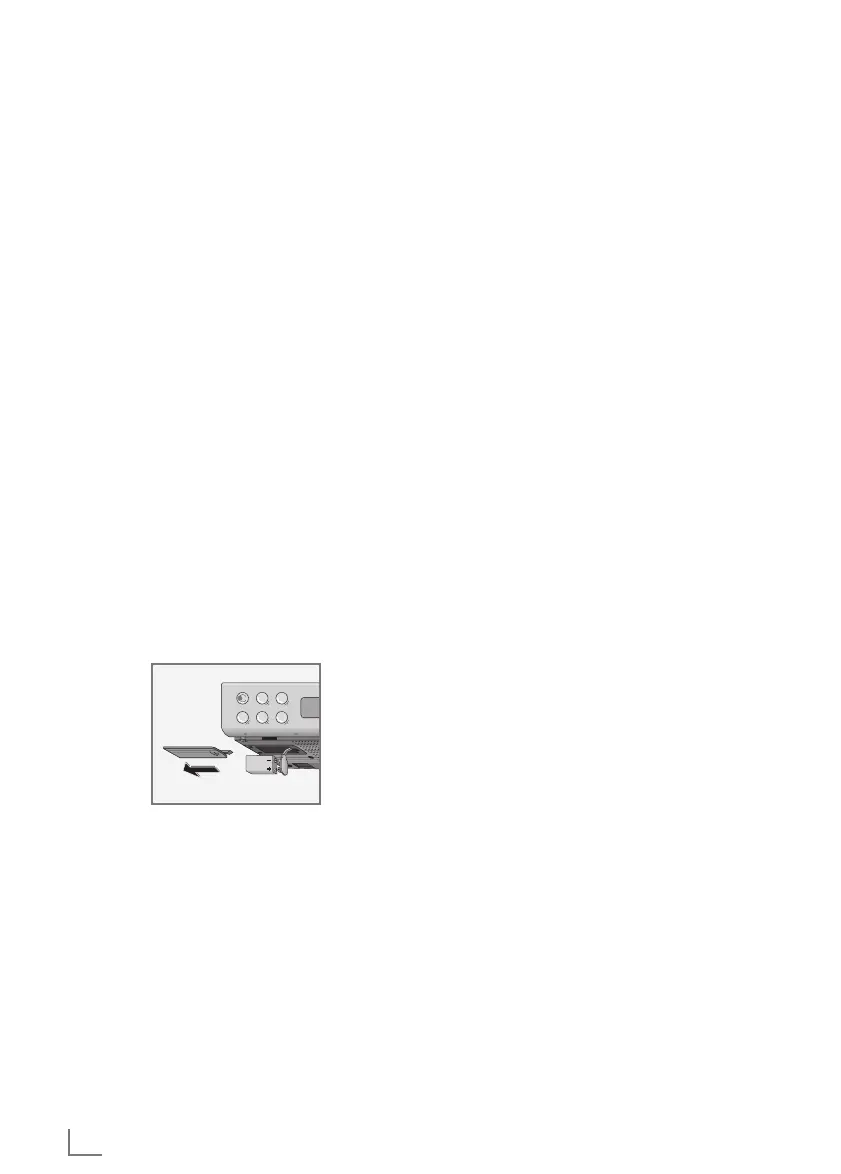
1 Open the battery compartment by pressing the mar-
ked surface and pushing the cover to the side.
2 Insert a battery (9 V block, type 6F22).
3 Close the battery compartment.
CURRENT SUPPLY
__________________________________________________
Note:
7
We recommend that you replace the back-up bat-
tery after approximately 1 year.
7
Do not expose the batteries to extreme heat,
caused for example by direct sunlight, heaters or
fire.
7
Remove the battery when it is used up, or when
the device is disconnected from the mains for an
extended period of time.
7
There is no liability for damage resulting from flat
batteries.
Environmental note
7
Batteries, including those which are heavy
metal-free, may not be disposed of along with
household waste. Please ensure the environmen-
tally sound disposal of the used batteries, e.g. via
public collection locations. Find out about the le-
gal regulations which apply to you.
ON OFF
1 2
543
6 7
8 9 10




 To Next Page