EasyManua.ls Logo

Gsmart G1342 - Page 39

Gsmart G1342
57 pages
Print Icon
To Next Page IconTo Next Page
To Previous Page IconTo Previous Page
Loading...
G1342 5-5
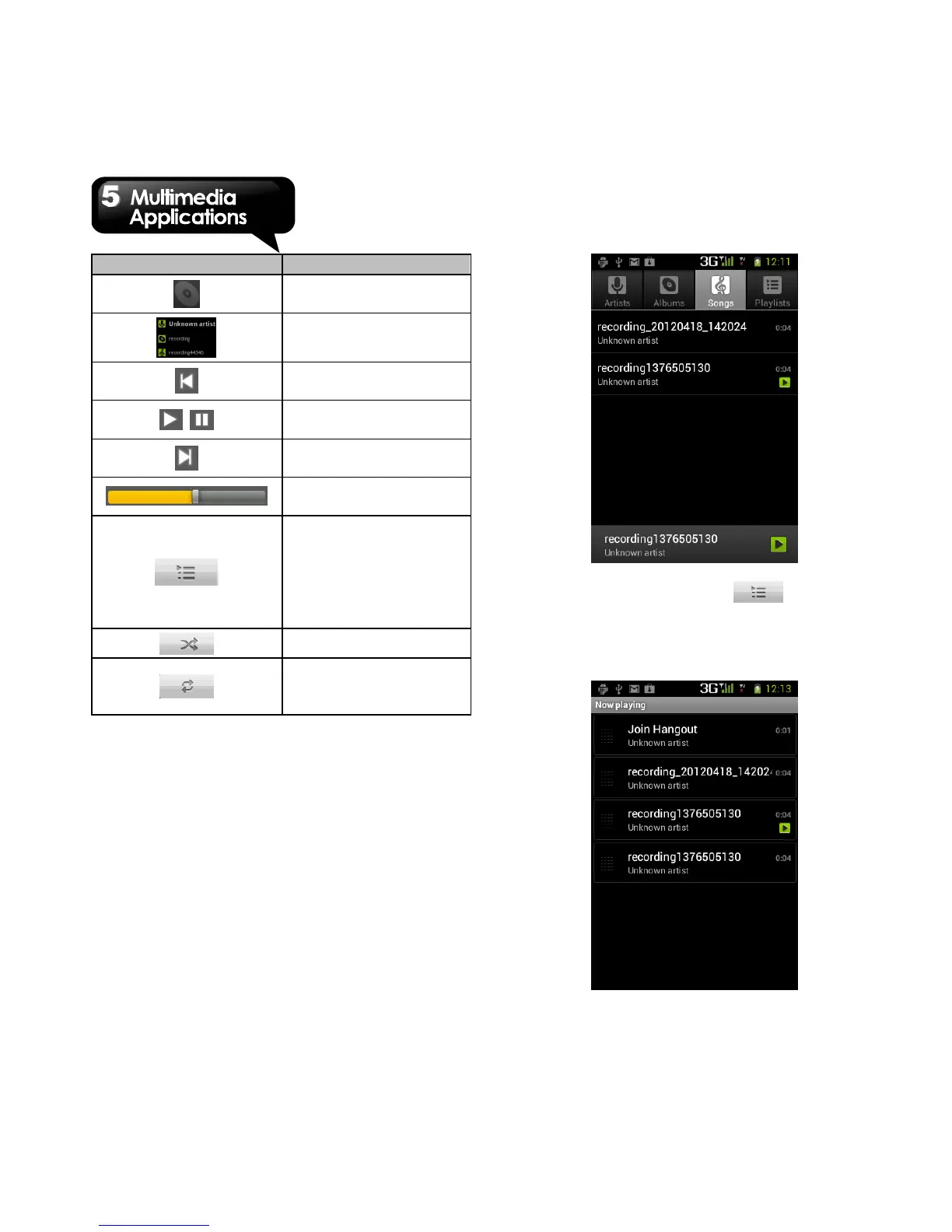
Icon
Function
Album art picture or
animation
The display area of
audio information.
Tap to go to the
previous song.
Tap to play or pause
the song.
Tap to go to the next
song.
Slide to go forward or
backward.
Tap to go to Now
playing list. Displays
the list of currently
playing songs and
those on queue for
playback.
Tap to shuffle.
Tap to enable or
disable the repeat
function.
Library screen: Displays folder categories
which make searching for media files quickly
and easily.
Now playing screen: Tap to go to now
playing list. Tap and hold the icons on the left of
each media file to arrange the sequence of play
list.

Related product manuals