174
PART 3
STEP 7. Installing Brake Disc to Wheel Hub
138692 Rev 0 (04/22)
Assembling Your Bike
GT Bicycle Owner’s Manual
STEP 7. Installing Brake Disc to Wheel Hub
If your bike already has the disc brake rotor installed on the front wheel, skip down to step 8.
Six bolt type:
Find the disc brake rotor, mounting bolts and remove all packaging materials. Look at the front wheel
and note that one side of the hub has six threaded holes.
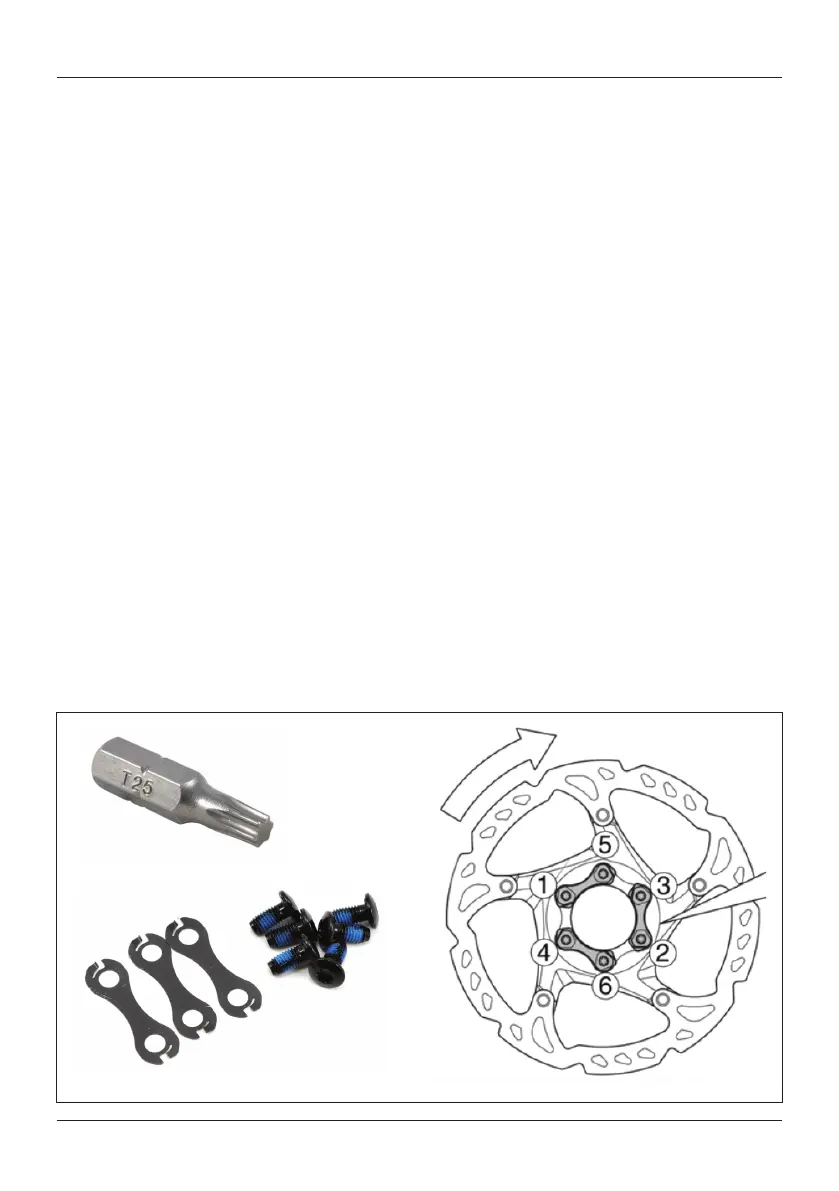
Set the disc brake rotor over these holes. Carefully note and follow directional markings on the disc
brake rotor. Markings will face out. Find the six Torx T25 bolts and place them though the dog bone
shaped locking washers, positioned with the sharp tabs up. Place bolts through the holes in the disc
brake rotor and thread each one into the threaded holes in the hub. Each bolt will have some thread
retaining compound on the threads, often blue color. This compound makes it more difficult to turn the
bolt. So, once you have started all six bolts by hand you will need a T25 Torx wrench to turn the bolts.
Tighten all six bolt snugly.
After all six bolts are snug, fit the Torx T25 bit to a torque wrench and tighten each bolt to the torque
specification marked on the rotor. Be sure the tool is properly engaged as this tool interface is rather
shallow. It is important to torque these bolts in a crisscross or star pattern. With the wheel stationary in
front of you torque the (1) 12 o’clock bolt, then (2) the six o’clock bolt, then (3) the 10 o’clock bolt, then (4)
the 4 o’clock bolt, then (5) the 8 o’clock bolt and finally (6) the 2 o’clock bolt.



 To Next Page