7
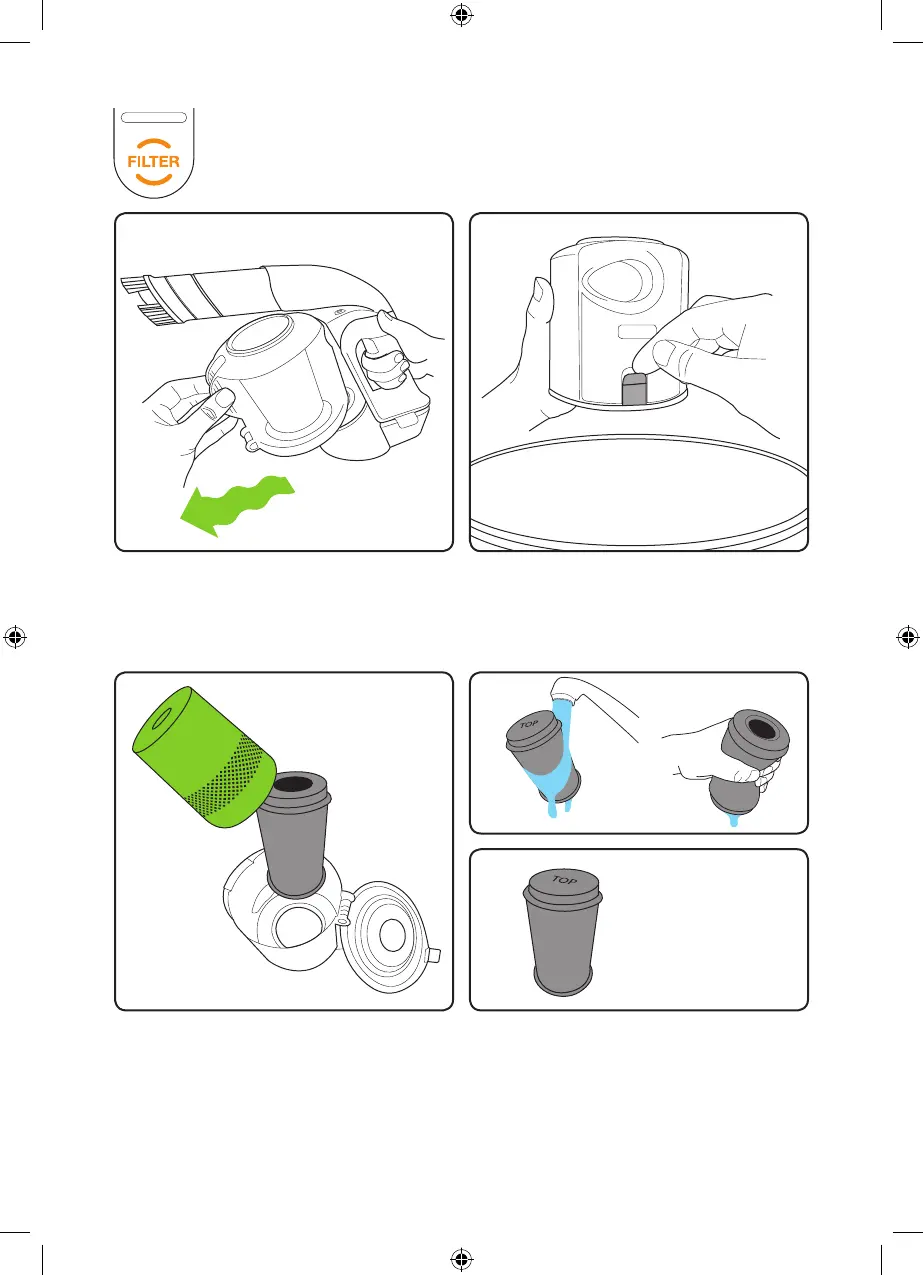
There’snolatch,thebinjustpullsoff.
It’seasierifyouwiggleitasyoupullit.
If the lter light comes on when the bin is
not full, wash the lter. The lter is inside
the green lter case which just pulls out
oftheMulti’sbin.
HoldtheMulti’sbinoveryourrubbishbinand
release the latch to empty the dirt. Check the
holesonthegreenltercasearen’tblocked
and remove any dirt stuck to it.
Washthelterunderatap,squeezeitout
then let it dry completely before using it.
(You can get a spare lter at
www.gtechonline.co.uk)
Tip: Never put the bin back without
the lter inside. You could damage
the motor.
When placing the
lter back into the bin,
make sure the word
TOP is at the top of the
bin, and the hole is at
the bottom.
Empty the bin regularly, especially
if the lter light comes on.
Cleaning the lter
Multi Manual v6.indd 7 03/09/2013 10:15



 To Next Page