6
1 2 3 4
ON DIP
STAT US
LEARN RMT
LEARN
MAST LIMIT
LEARN
SLV LIMIT
S3
S4
S2
OFF
SOFT START OFF
WARNING OFF
OPEN PULL
SLV OPEN DLY.
MODE1 OFF
MODE2 OFF
ON
ON
PUSH
SIMULT.
ON
ON
120 MIN MAX
AUTO CLOSE TIME STALL FORCE
1 2 3 4
ON DIP
SOFT START OFF
WARNING OFF
OPEN PULL
SLV OPEN DLY.
MODE1 OFF
MODE2 OFF
ON
ON
PUSH
SIMULT.
ON
ON
120 MIN
ON
OFF
1
ON DIP
2 3 4
Main DIP Switch Settings (MODES)
DIP Switch #1 - Soft Start/Stop
ON - Soft start enabled (factory preset).
OFF - Soft start disabled.
The Soft Start/Stop feature slowly starts the
gate as it begins to open and slows the gate as
it comes to the closed position. This saves wear
and tear on the gate and gate opener system.
DIP Switch #2 - Warning Buzzer
ON - Buzzer warning enabled (factory preset).
OFF - Buzzer warning disabled.
The Warning Buzzer alerts you when the gate
opener is beginning to either open or close the
gate. It sounds for the first 2 seconds in each
direction. It also sounds a warning when the gate
obstructs two times in one cycle. Switching this
to OFF only disables the open and close warning
not the obstruction warning.
DIP Switch #3 - Push/Pull-to-Open
ON - Pushtoopen.
OFF - Pushtoopen(factorypreset).
IfyourgateopensintothepropertytheDIP
Switch is set to the OFF position (factory
setting). If your gate opens out from the property
theDIPSwitchmustbesettotheONposition.
NOTE:ifyouhaveaPush-to-Opengate
applicationyouwillneedaPush-to-Openbracket
(seePush-to-OpenInstructionsonpage30).
DIP Switch #4 - Dual Operation
ON - Slave opens simultaneously with master.
OFF - Slave opens after master.
Note: Not applicable for single gate operator.
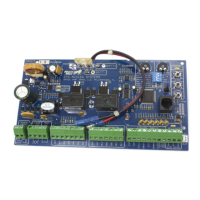
DIP Switches
CONTROL BOARD SETTINGS
Auto Close Time
Potentiometer
1 2 3 4
ON DIP
STATUS
LEARN RMT
LEARN
MAST LIMIT
LEARN
S3
S2
OFF
SOFT START OFF
WARNING OFF
OPEN PULL
SLV OPEN DLY.
MODE1 OFF
MODE2 OFF
ON
ON
PUSH
SIMULT.
ON
ON
120 MINMAX
AUTO CLOSE TIME STALL FORCE
Auto Close
The 'AUTO CLOSE TIME' pot controls
auto close feature.
Turning the pot all the way counter-clockwise
will turn auto close feature off. The minimum
auto close time is 3 seconds. The maximum
(turn the pot all the way clockwise) auto close
timeis120seconds.


 To Next Page
 Loading...