The GUSTARD U18 is a high-performance USB audio interface designed to enhance the sound quality of your audio system. This device acts as a bridge between your computer and your audio equipment, converting digital audio signals from your computer into high-quality analog or digital signals for your DAC or other audio components. It is particularly well-suited for audiophiles and professionals seeking pristine audio reproduction and flexible connectivity.
Function Description
The primary function of the GUSTARD U18 is to process digital audio signals from a USB source (typically a computer) and output them in various high-fidelity formats. It utilizes GUSTARD's second-generation audio frequency synthesizer (K2-Bustard) to achieve ultra-low noise and jitter, ensuring a clean and accurate audio signal.
Key functions include:
- USB Audio Interface: Connects to a computer via a USB Type-B port, supporting USB 2.0. This allows the U18 to receive digital audio data from your PC.
- Clock Management: The U18 features a sophisticated clock system. It can operate using an internal clock (INT) or an external 10MHz clock (EXT). The internal clock uses AS338 Hi-End oscillators from Accusilicon, known for their ultra-low noise and jitter at the femtosecond (fs) level. The ability to switch to an external 10MHz clock allows users to further enhance sound quality by synchronizing with a high-precision external clock source.
- Multiple Digital Outputs: The device offers a variety of digital output options to connect to different DACs and audio processors:
- Coaxial (S/PDIF): A standard digital audio output.
- AES (XLR): A professional-grade digital audio output.
- Optical (Toslink): Another common digital audio output.
- IIS over HDMI: A specialized high-performance digital audio interface that transmits I²S signals over an HDMI cable. This is a non-standard HDMI connection, specifically designed for audio, and offers multiple pinout modes (GUSTARD, MODE2, MODE3, MODE4) to ensure compatibility with various DACs, particularly those from GUSTARD. It also supports programmable DSD FLAG pins (F14/F15/F16) for DSD signal identification.
- Word Clock Output: Provides a word clock signal, allowing other audio devices in your setup to synchronize with the U18's precise clock, further reducing jitter across the entire audio chain.
- Display and Status Indication: An OLED screen displays crucial information such as the sampling frequency, current clock source (internal or external), and the selected IIS output mode. This provides immediate feedback on the device's operational status.
Usage Features
The GUSTARD U18 is designed for ease of use while offering advanced configuration options for optimal performance.
-
Simple Connectivity:
- USB Input: Connect your PC to the U18's USB Type-B input. For tower PCs, it is recommended to use the original USB 2.0 port on the back panel to minimize signal loss and potential bugs.
- Power: The device connects to AC power (115V/230V, 50/60Hz) via a standard IEC power outlet. An international voltage switch allows adaptation to different power grids.
- Outputs: Connect the U18's digital outputs (Coaxial, AES, Optical, IIS over HDMI) to your DAC or other digital audio equipment.
- External Clock (Optional): If using an external 10MHz clock, connect it to the dedicated BNC input.
-
User Interface and Control:
- Display: The high-resolution OLED screen on the front panel provides clear information about the current sampling frequency, clock source (INT/EXT), and IIS pinout mode.
- Function Buttons:
- REF Button: A short press switches between the internal clock (INT) and the external 10MHz clock (EXT).
- IIS Button: A short press cycles through the different IIS pinout modes (GUSTARD, MODE2, MODE3, MODE4). A long press allows changing the DSD Flag for specific IIS modes (F14/F15/F16), though this is not necessary under GUSTARD mode.
-
Driver Installation (Windows):
- The U18 requires a specific USB driver for Windows operating systems (Windows 7 SP1, Windows 8, Windows 10).
- The driver is typically provided on an included CD or can be downloaded.
- Installation involves running an executable file (e.g.,
Gustard_UsbAudio_vX.XX.X_setup.exe) and following the on-screen prompts.
- If the device is not recognized after connecting, try a different USB port or power cycle the U18.
- During installation, if prompted, reboot the U18 or reconnect the USB cable.
-
DSD Playback Configuration (foobar2000):
- For DSD hardware decoding, specific components need to be installed and configured in foobar2000.
- ASIO Proxy Installation: Install
ASIOProxyInstall-0.7.2.exe (or a similar version) from the foobar2000_DSD_0.7.X folder.
- foobar2000 Component Installation:
- Open foobar2000's Preferences -> Components.
- Click 'Install' and select
foo_input_sacd.fb2k-component and foo_out_asio.fb2k-component from the foobar2000_DSD_0.7.X folder.
- Apply changes and restart foobar2000.
- ASIO Driver Selection:
- In foobar2000's Preferences -> Playback -> Output -> ASIO, double-click
foo_dsd_asio.
- In the
foo_dsd_asio window, select "Gustard USB Audio" as the ASIO Driver and "ASIO Native" as the DSD Playback Method.
- SACD Output Mode:
- In foobar2000's Preferences -> Tools -> SACD, set the Output Mode to "DSD".
- Troubleshooting DSD Playback: If DSD playback issues occur (e.g., "The process receiving or sending data has terminated"), it might be due to version conflicts between ASIOProxy and SACD components. Ensure both are version 0.7.x. If components are locked, reinstalling foobar2000 or using an older ASIOProxy version (e.g.,
ASIOProxyInstall-0.6.5.exe) might resolve the issue.
-
IIS Pinout Modes: The U18 offers four IIS pinout modes (GUSTARD, MODE2, MODE3, MODE4) to ensure compatibility with a wide range of DACs. The "GUSTARD" mode is specifically designed for all GUSTARD DACs. Users should refer to the provided pinout diagrams to select the correct mode for their specific DAC.
Maintenance Features
The GUSTARD U18 is designed for reliable long-term operation with minimal user maintenance.
- Clock Source Protection: To protect connected devices, the U18 does not automatically switch clock sources. If you plug or unplug an external 10MHz clock, you must manually select the desired clock source using the REF button.
- Error Indication: If the external 10MHz clock is not working properly, the display will show "EXT ERR" and the sampling frequency will blink, alerting the user to a potential issue.
- Warranty Service:
- Free Warranty: The U18 comes with a 2-year free warranty and lifetime maintenance from the date of purchase. This covers failures due to component quality or manufacturing problems under normal usage. The manufacturer covers freight costs within mainland China; international freight and taxes are the user's responsibility.
- Beyond Warranty Service: Warranty service is not provided for:
- Products exceeding the warranty period.
- Mismatched model, barcodes, or purchase date with the warranty card.
- Unauthorized modifications to the circuit, components, or self-repairs without GUSTARD technician permission.
- Damage caused by natural forces.
- Damage from use outside permitted environmental conditions.
- Damage due to incorrect use or improper storage (e.g., high voltage, physical impact, water/oil/liquid exposure, excessive dust, oxidation, corrosion).
- Individual component damage, cosmetic damage, or firmware modifications leading to non-functionality by unauthorized users after the warranty period.
- For out-of-warranty repairs, GUSTARD commits to reasonable maintenance fees (excluding major component or circuit board replacements beyond repair). The user is responsible for freight, maintenance, and material costs.
The GUSTARD U18 is a robust and versatile USB audio interface that provides exceptional audio performance and flexible connectivity, making it an excellent choice for demanding audio setups.

 Need help?
 General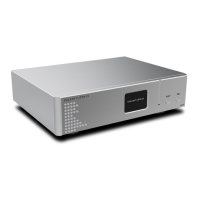

 To Next Page